Open WebUI API keys let scripts, monitoring jobs, and internal tools call the same backend that powers the web interface without borrowing a browser session. Each key belongs to the account that creates it, so API requests inherit that user's role, groups, model access, and feature permissions.
The administrator setting is the master switch for key creation. Admin accounts can generate keys after the switch is enabled, while non-admin users also need the API Keys feature permission through default permissions or a group grant. Endpoint restrictions can narrow which backend routes API keys may call when automation should only reach specific API paths.
Copy a new key only when it is created and store it like a password. A simple /api/models request confirms bearer authentication without sending chat content or changing server data, so it is a low-impact check before using the key in a script.
Steps to enable Open WebUI API keys:
- Sign in to Open WebUI as an administrator.
- Open Admin Panel → Settings → Authentication, turn on Enable API Keys, and click Save.
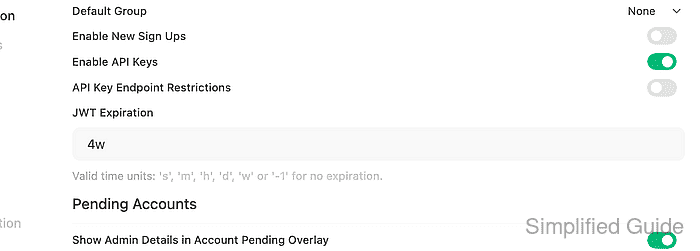
For non-admin users, also grant the API Keys feature permission from Admin Panel → Users → Groups through Default Permissions or a dedicated group. If endpoint restrictions are enabled, allow /api/models for the verification check and any routes the integration must call.
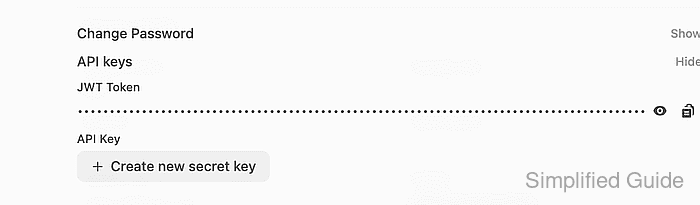
- Open the user menu, select Settings, select Account, and expand API keys.
- Click Create new secret key and enter a descriptive name for the integration.
Copy the generated value immediately. Treat it like a password, and do not paste it into tickets, screenshots, shell history, repositories, or shared chat logs.
- Store the copied key in a protected shell variable for the current terminal session.
$ read -r -s OPEN_WEBUI_API_KEY
- Set the Open WebUI base URL for the API check.
$ export OPEN_WEBUI_URL="https://openwebui.example.com"
- Verify that the key can authenticate a model-list request.
$ curl --fail-with-body --silent --show-error "$OPEN_WEBUI_URL/api/models" \
  -H "Authorization: Bearer $OPEN_WEBUI_API_KEY"
{"data":[{"id":"company-chat","name":"company-chat","object":"model"}]}
A 401 or 403 response usually points to the global API key setting, the user's API Keys permission, endpoint restrictions, a revoked key, or a reverse proxy that does not forward the Authorization header.

Mohd Shakir Zakaria is a cloud architect with deep roots in software development and open-source advocacy. Certified in AWS, Red Hat, VMware, ITIL, and Linux, he specializes in designing and managing robust cloud and on-premises infrastructures.


