How to refresh the Open WebUI model list
Open WebUI builds the chat model picker from the model providers connected to the server. When a provider adds, removes, or renames a model, the picker can lag behind the provider until Open WebUI asks for a fresh model list.
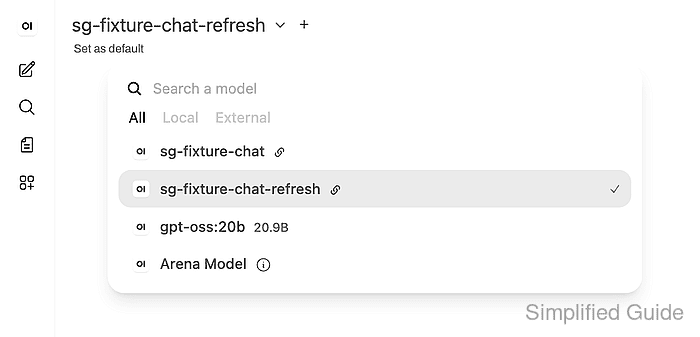
The refresh check starts at the provider endpoint and ends in the Open WebUI model picker. Checking both sides prevents a provider outage or wrong base URL from looking like a browser cache problem.
Use an account that can call the Open WebUI API or an admin account that can manage provider settings. The model must appear in the provider model endpoint first; if it does not, fix the provider before refreshing Open WebUI.
Steps to refresh the Open WebUI model list:
- Confirm that the provider exposes the model that should appear in Open WebUI.
$ curl --fail-with-body --silent --show-error "https://llm.example.com/v1/models"
{
  "object": "list",
  "data": [
    {
      "id": "sg-fixture-chat",
      "object": "model",
      "owned_by": "openai-compatible"
    },
    {
      "id": "sg-fixture-chat-refresh",
      "object": "model",
      "owned_by": "openai-compatible"
    }
  ]
}
Use the same provider base URL that is saved in Admin Panel → Settings → Connections. The example uses an OpenAI-compatible provider endpoint; use the equivalent model-list endpoint for another provider type.
- Ask Open WebUI to refresh the visible model list and check the returned model IDs.
$ curl --fail-with-body --silent --show-error "https://openwebui.example.com/api/models?refresh=true" \
  -H "Authorization: Bearer <open-webui-token>"
{
  "data": [
    {
      "id": "sg-fixture-chat",
      "name": "sg-fixture-chat",
      "object": "model"
    },
    {
      "id": "sg-fixture-chat-refresh",
      "name": "sg-fixture-chat-refresh",
      "object": "model"
    }
  ]
}
The request requires an authenticated Open WebUI token. If Cache Base Model List is enabled or the provider changed a moment ago, wait a few seconds or re-save the connection before repeating the refresh.
Related: How to enable API keys in Open WebUI - Reload the chat page and select the refreshed model from the model picker.
If the API response includes the model but the browser picker does not, reload the tab or sign in again so the frontend reads the refreshed model list.