How to restrict access by IP in Nginx
Restricting a URL or administrative endpoint to known client addresses in Nginx reduces exposure for dashboards, staging areas, status pages, and other paths that should not answer the public internet. A small allowlist is often enough to keep scanners and casual browsing away from sensitive routes without changing the application.
Host-based access control in Nginx uses the ngx_http_access_module with allow and deny directives. Rules are checked in order and the first matching rule wins, so the common pattern is one or more allow lines followed by deny all inside the specific location that needs protection.
The access rules only work against the client address that Nginx sees for the request. When traffic arrives through a reverse proxy, load balancer, or CDN, restore the real client address from a trusted source before relying on the allowlist. Keep a second login path, console session, or tested rollback ready until both an allowed and blocked request behave as expected, because a single wrong CIDR can lock out the path immediately.
Related: How to improve Nginx security
Related: How to enable basic authentication in Nginx
Steps to restrict access by IP in Nginx:
- Decide the exact URL path to protect and the IP addresses or CIDR ranges that should keep access.
Common targets include /admin/, /status, /metrics, and /nginx_status. Prefer the narrowest useful matcher so the rule does not spill over onto unrelated URLs.
- Open the server block that serves the protected host.
$ sudoedit /etc/nginx/conf.d/admin.example.net.conf
Debian and Ubuntu systems often keep site files under /etc/nginx/sites-available/ with symlinks in /etc/nginx/sites-enabled/. Other packaged layouts often load files directly from /etc/nginx/conf.d/.
- Add the IP allowlist to the specific location block, then end it with deny all.
location /admin/ {
    allow 198.51.100.0/24;
    allow 203.0.113.10;
    deny all;
}
Keep the rules in order. Because Nginx stops at the first match, moving deny all above the allowlist blocks every client.
A broad matcher such as location / can block the whole site once deny all is active.
- Restore the real client IP before the allowlist when the request first hits a reverse proxy, load balancer, or CDN.
# Place in the http {} context, or in a file included from http {}.
set_real_ip_from 192.0.2.0/24;
set_real_ip_from 198.51.100.15;
real_ip_header X-Forwarded-For;
real_ip_recursive on;
Only trust X-Forwarded-For (or a vendor header) from known proxy IPs via set_real_ip_from, otherwise client IP spoofing can bypass allowlists.
If nginx -t reports an unknown set_real_ip_from or real_ip_header directive, the running build does not include ngx_http_realip_module. Use a package or build that includes that module before relying on forwarded client addresses.
- Test the updated configuration before a reload.
$ sudo nginx -t
nginx: the configuration file /etc/nginx/nginx.conf syntax is ok
nginx: configuration file /etc/nginx/nginx.conf test is successful
Related: How to test Nginx configuration
- Reload Nginx so the new access rules take effect.
$ sudo systemctl reload nginx
Use sudo nginx -s reload when systemd is not managing the service.
Related: How to manage the Nginx service
- Request the protected URL from a client address that is inside the allowlist.
$ curl -I -sS http://admin.example.net/admin/
HTTP/1.1 200 OK
Server: nginx/1.28.3 (Ubuntu)
Date: Sat, 06 Jun 2026 11:43:10 GMT
Content-Type: text/html
Content-Length: 9
Last-Modified: Sat, 06 Jun 2026 11:43:10 GMT
Connection: keep-alive
ETag: "6a2407ce-9"
Accept-Ranges: bytes
A successful test can return 200, 301, 302, 401, or another application-level response. The important result is that the request reaches the protected location instead of failing with 403 Forbidden.
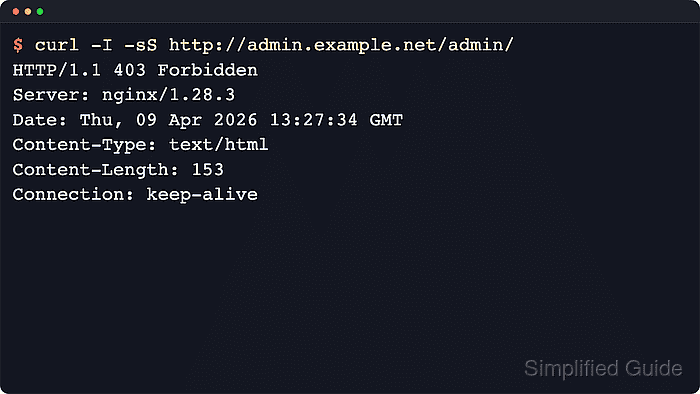
- Request the same URL from a client address that is outside the allowlist.
$ curl -I -sS http://admin.example.net/admin/
HTTP/1.1 403 Forbidden
Server: nginx/1.28.3 (Ubuntu)
Date: Sat, 06 Jun 2026 11:43:10 GMT
Content-Type: text/html
Content-Length: 162
Connection: keep-alive
Run this check from a network that is truly outside the allowlist, such as a mobile hotspot, a different VPN policy, or another host on a separate subnet.
- Inspect the effective client address when an allowed user is still blocked.
When Nginx is behind another proxy, compare the address in the access log with the expected source IP. If the log still shows the proxy address, correct the set_real_ip_from and real_ip_header configuration before changing the allowlist again.