How to configure Nginx as a reverse proxy
Configuring Nginx as a reverse proxy lets one public hostname send traffic to an application that listens on a private address or port. The backend stays off the public interface while Nginx handles the request boundary, access logs, TLS termination, and routing rules at the edge.
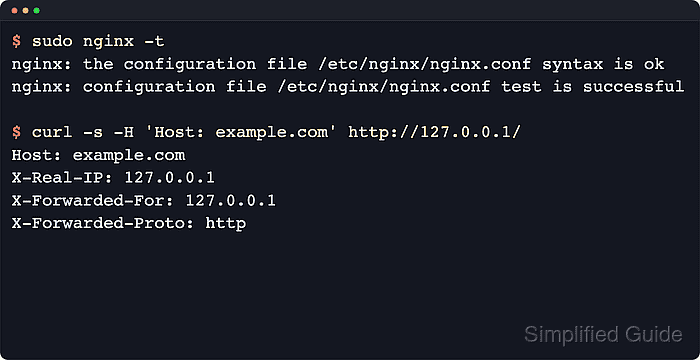
Nginx matches the incoming host and URI to a server and location block, forwards the request with proxy_pass, and sets the request headers that most applications need to build public URLs and record client origin. The baseline below passes the public Host plus X-Forwarded-Host, X-Real-IP, X-Forwarded-For, and X-Forwarded-Proto.
Packaged Linux installs often load multiple server blocks from /etc/nginx/conf.d/ or /etc/nginx/sites-enabled/, so local validation should target the same hostname defined in server_name instead of assuming a bare 127.0.0.1 request will hit the new proxy block. Current upstream Nginx uses HTTP/1.1 for proxying by default starting with version 1.29.7, but the explicit keepalive directives below keep older distro packages and newer builds on the same behavior.
Related: How to improve Nginx performance
Related: How to enable caching in Nginx
Tool: NGINX Proxy Headers Checker
Steps to configure Nginx as a reverse proxy:
- Confirm the upstream application responds directly on its backend address before routing traffic through Nginx.
$ curl -sS http://127.0.0.1:8080/health
app backend ok
Use the upstream's real scheme and port. If the backend already fails here, fix it before changing the proxy layer.
- Create a reverse proxy file such as app-reverse-proxy.conf under /etc/nginx/conf.d/ with an upstream block and a matching public server block.
upstream app_backend {
    server 127.0.0.1:8080;
    keepalive 32;
}

server {
    listen 80;
    server_name example.com;

    location / {
        proxy_pass http://app_backend;

        proxy_http_version 1.1;
        proxy_set_header Connection "";

        proxy_set_header Host $host;
        proxy_set_header X-Forwarded-Host $host;
        proxy_set_header X-Real-IP $remote_addr;
        proxy_set_header X-Forwarded-For
            $proxy_add_x_forwarded_for;
        proxy_set_header X-Forwarded-Proto $scheme;

        proxy_connect_timeout 5s;
        proxy_send_timeout 60s;
        proxy_read_timeout 60s;
    }
}
proxy_set_header Host $host keeps the public hostname for the upstream, while proxy_http_version 1.1 plus proxy_set_header Connection "" keeps upstream keepalive behavior consistent on Nginx releases before 1.29.7.
The proxy_pass target above has no URI suffix, so Nginx forwards the original request URI. If you add a URI to proxy_pass or proxy only a subpath such as /app/, Nginx rewrites the location-matched prefix differently.
- Test the updated Nginx configuration before reloading the daemon.
$ sudo nginx -t
nginx: the configuration file /etc/nginx/nginx.conf syntax is ok
nginx: configuration file /etc/nginx/nginx.conf test is successful
Related: How to test Nginx configuration
- Reload Nginx so the reverse proxy block starts serving requests for the public hostname.
$ sudo systemctl reload nginx
Use sudo nginx -s reload when the daemon is running without systemd, such as in some containers or hand-started test environments.
Related: How to manage the Nginx service
- Request the public host through Nginx and confirm that the upstream receives the forwarded request metadata.
$ curl -sS \
  -H 'Host: example.com' \
  http://127.0.0.1/
upstream request received
Host: example.com
X-Forwarded-Host: example.com
X-Real-IP: 127.0.0.1
X-Forwarded-For: 127.0.0.1
X-Forwarded-Proto: http
From another workstation, use curl --resolve example.com:80:127.0.0.1 http://example.com/ or test the real DNS name directly so the request matches server_name.
If the packaged Nginx welcome page still answers instead, the request did not match this server block. Check server_name, disable the conflicting default site if necessary, or retest with an explicit Host header.