How to monitor a Linux host with NCPA in Nagios Core
NCPA lets Nagios Core collect Linux host metrics through an HTTPS agent API instead of running NRPE commands on the remote host. It fits servers where CPU, memory, process, or agent-version checks need to be pulled from the monitoring server and displayed as normal host and service states.
The active-check path uses check_ncpa.py on the Nagios server and the NCPA service on the monitored Linux host. The token in /usr/local/ncpa/etc/ncpa.cfg authenticates the API request, while the Nagios object file decides which endpoint, thresholds, and service description appear in Nagios Core.
Keep the NCPA listener restricted to the monitoring server and replace the default token before adding checks. After reload, Nagios Core should load the host and service objects, run check_ncpa.py, and show an OK service result for the selected metric.
Steps to monitor a Linux host with NCPA active checks:
- Install Python 3 and curl on the Nagios server.
$ sudo apt-get update && sudo apt-get install --assume-yes python3 curl
check_ncpa.py runs with Python 3. Debian and Ubuntu package installs may not include /usr/bin/python3 until it is installed explicitly.
- Download the NCPA active-check plugin into the Nagios plugin directory.
$ sudo curl --fail --location --silent --show-error \
  --output /usr/lib/nagios/plugins/check_ncpa.py \
  https://raw.githubusercontent.com/NagiosEnterprises/ncpa/master/client/check_ncpa.py
- Make the plugin executable.
$ sudo chmod 755 /usr/lib/nagios/plugins/check_ncpa.py
- Run a CPU check from the Nagios server as the nagios user.
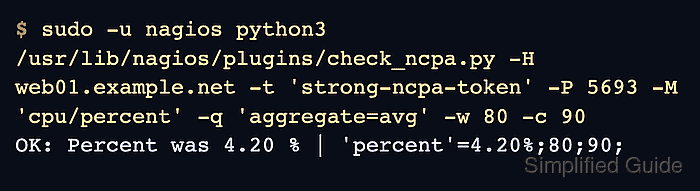
$ sudo -u nagios python3 /usr/lib/nagios/plugins/check_ncpa.py -H web01.example.net -t 'strong-ncpa-token' -P 5693 -M 'cpu/percent' -q 'aggregate=avg' -w 80 -c 90
OK: Percent was 4.20 % | 'percent'=4.20%;80;90;
Replace web01.example.net and strong-ncpa-token with the monitored host address and the token from the NCPA host. Add -s only when the NCPA certificate chains to a CA trusted by the Nagios server.
Related: How to run a Nagios plugin manually - Create a command definition for NCPA active checks.
$ sudoedit /etc/nagios4/conf.d/ncpa-command.cfg
- Add the check_ncpa command object.
define command{
    command_name            check_ncpa
    command_line            /usr/bin/python3 $USER1$/check_ncpa.py -H $HOSTADDRESS$ $ARG1$
}
The explicit /usr/bin/python3 interpreter avoids failures on current distributions where /usr/bin/python is not installed.
- Create an object file for the Linux host and CPU service.
$ sudoedit /etc/nagios4/conf.d/web01-ncpa.cfg
Use an existing host object when web01.example.net is already defined elsewhere. Do not define the same host_name in two object files.
Related: How to add a host in Nagios Core - Add the host and service objects.
define host{
    use                     linux-server
    host_name               web01.example.net
    alias                   Web 01 Linux host
    address                 web01.example.net
    check_command           check_ncpa!-t 'strong-ncpa-token' -P 5693 -M system/agent_version
}

define service{
    use                     generic-service
    host_name               web01.example.net
    service_description     CPU Usage
    check_command           check_ncpa!-t 'strong-ncpa-token' -P 5693 -M cpu/percent -q 'aggregate=avg' -w 80 -c 90
}
Use the endpoint name without a /api/ prefix in -M. The system/agent_version host check confirms that the token and listener respond before metric services are evaluated.
- Validate the Nagios configuration before applying it.
$ sudo nagios4 -v /etc/nagios4/nagios.cfg
Nagios Core 4.4.6
Reading configuration data...
   Read main config file okay...
   Read object config files okay...

Running pre-flight check on configuration data...

Checking objects...
	Checked 9 services.
	Checked 2 hosts.
	Checked 1 host groups.
	Checked 0 service groups.
	Checked 1 contacts.
	Checked 1 contact groups.
	Checked 181 commands.
	Checked 5 time periods.
##### snipped #####
Total Warnings: 0
Total Errors:   0

Things look okay - No serious problems were detected during the pre-flight check
Fix every reported object, command, or template error before reloading Nagios Core.
Related: How to validate the Nagios Core configuration - Reload the nagios4 service.
$ sudo systemctl reload nagios4
Use the service name and control method from the local installation when Nagios Core was installed from source.
Related: How to manage the Nagios Core system service - Check the service result in the Nagios Core web UI.
http://monitor.example.net/nagios4/
Open Services and confirm the CPU Usage row for web01.example.net shows OK with plugin output that starts with OK: Percent.