How to enable external commands in Nagios Core
External commands let Nagios Core accept runtime instructions through a local command file while the monitoring daemon is already running. Web CGI actions such as forced checks, acknowledgements, and downtime scheduling use this path, and local integrations can submit supported commands to the same interface.
The main nagios.cfg file controls whether the daemon reads external commands, where the command FIFO is created, and whether received commands are logged. On Debian and Ubuntu package installs, the command file is normally /var/lib/nagios4/rw/nagios.cmd; source installs often use /usr/local/nagios/var/rw/nagios.cmd instead.
Nagios Core creates nagios.cmd as a FIFO when the daemon starts, not as a regular file that should be created by hand. Write access belongs only to trusted command senders, such as the web server user for cmd.cgi or a local automation account that submits passive results.
Steps to enable Nagios Core external commands:
- Open the main Nagios Core configuration file.
$ sudoedit /etc/nagios4/nagios.cfg
Use the active main configuration file for that install. Source installs commonly use /usr/local/nagios/etc/nagios.cfg.
- Enable external command checking, set the command file path, and log received commands.
check_external_commands=1
command_file=/var/lib/nagios4/rw/nagios.cmd
log_external_commands=1
Nagios Core 4 processes external commands as soon as they are received. Older command_check_interval settings do not control processing on current Nagios Core 4 systems.
- Add the web server user to the trusted command group when cmd.cgi must submit commands.
$ sudo usermod --append --groups nagios www-data
Debian and Ubuntu packages commonly use the nagios group for the command FIFO. Source-install quickstarts may use a dedicated group such as nagcmd instead; add only trusted command-submit users to that group.
- Validate the Nagios Core configuration before restarting the daemon.
$ sudo nagios4 -v /etc/nagios4/nagios.cfg
Nagios Core 4.4.6
##### snipped #####
Reading configuration data...
   Read main config file okay...
   Read object config files okay...
##### snipped #####
Total Warnings: 0
Total Errors:   0

Things look okay - No serious problems were detected during the pre-flight check
Use sudo /usr/local/nagios/bin/nagios -v /usr/local/nagios/etc/nagios.cfg on source installs that follow the upstream default layout.
Related: How to validate the Nagios Core configuration - Restart Nagios Core so it creates the command FIFO from the configured path.
$ sudo systemctl restart nagios4
Use the service name for the installed package or source-install service. Debian and Ubuntu packages use nagios4.
Related: How to manage the Nagios Core system service - Restart Apache when the web server user was added to the command group.
$ sudo systemctl restart apache2
Existing web server worker processes keep their old group list until they restart. Use the local web server unit name when the monitoring UI does not run under apache2.
Related: How to manage the Apache web server service - Check that the command directory and FIFO exist with group write access.
$ sudo ls -ld /var/lib/nagios4/rw /var/lib/nagios4/rw/nagios.cmd
drwxrwsr-x 1 nagios nagios 4096 Jun 22 01:19 /var/lib/nagios4/rw
prw-rw---- 1 nagios nagios    0 Jun 22 01:19 /var/lib/nagios4/rw/nagios.cmd
The leading p on nagios.cmd means it is a FIFO. Keep the group limited to the web server or automation accounts that should be allowed to submit commands.
- Store the current Unix timestamp for a test command.
$ now=$(date +%s)
- Submit a forced host check through the command file.
$ printf '[%s] SCHEDULE_FORCED_HOST_CHECK;localhost;%s\n' "$now" "$now" | sudo tee /var/lib/nagios4/rw/nagios.cmd
[1782091273] SCHEDULE_FORCED_HOST_CHECK;localhost;1782091273
Replace localhost with a real host from the monitoring server. A forced host check is a low-impact test because it asks Nagios Core to run an existing active check.
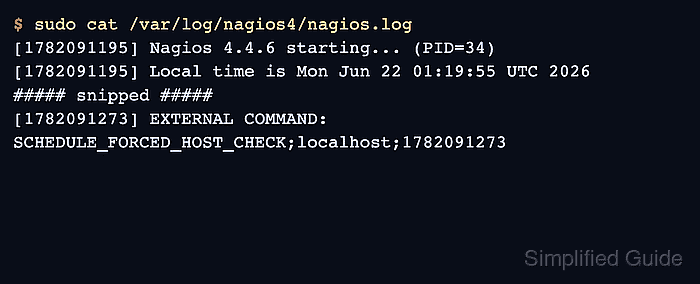
Related: How to reschedule an active check in Nagios Core - Confirm that Nagios Core processed the external command.
$ sudo cat /var/log/nagios4/nagios.log
[1782091195] Nagios 4.4.6 starting... (PID=34)
[1782091195] Local time is Mon Jun 22 01:19:55 UTC 2026
##### snipped #####
[1782091273] EXTERNAL COMMAND: SCHEDULE_FORCED_HOST_CHECK;localhost;1782091273
If log_external_commands is disabled, verify the same action from the web interface or through the affected host state.
Related: How to check Nagios Core logs