How to optimize MySQL or MariaDB query performance
Poorly tuned queries turn modest traffic into CPU spikes, lock waits, and avoidable disk work in MySQL or MariaDB. Query-level tuning usually produces the fastest performance gains because it reduces how many rows the server must read, sort, and lock for each request.
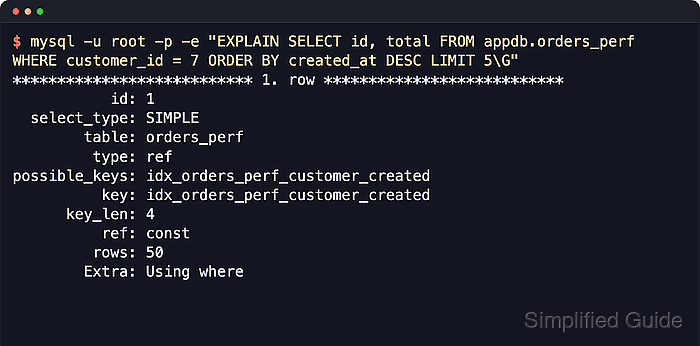
The optimizer chooses an execution plan from the query shape, available indexes, and current table statistics. The slow query log helps identify the statements that matter most, and EXPLAIN shows whether the server is using targeted index lookups or falling back to scans, temporary tables, and filesorts.
Most improvements are trade-offs rather than free speed. Extra indexes raise write cost and consume more disk, stale statistics can push the optimizer toward the wrong plan, and maintenance statements such as OPTIMIZE TABLE can rebuild large tables. Safe tuning starts with a baseline, changes one thing at a time, and validates the same workload window after each change.
Related: How to optimize MySQL or MariaDB performance
Related: How to configure slow query log in MySQL or MariaDB
Related: How to analyze MySQL or MariaDB slow query log
Related: How to use EXPLAIN to view query plans in MySQL or MariaDB
Related: How to create an index in MySQL or MariaDB
Related: How to optimize table structures in MySQL or MariaDB
Related: How to monitor performance metrics in MySQL or MariaDB
Steps to optimize MySQL or MariaDB query performance:
- Verify the slow-query capture settings before collecting tuning candidates.
$ mysql --table -u root -p -e "SHOW VARIABLES WHERE Variable_name IN ('slow_query_log','slow_query_log_file','long_query_time','log_queries_not_using_indexes');"
+-------------------------------+-----------------------------------------------+
| Variable_name                 | Value                                         |
+-------------------------------+-----------------------------------------------+
| log_queries_not_using_indexes | ON                                            |
| long_query_time               | 1.000000                                      |
| slow_query_log                | ON                                            |
| slow_query_log_file           | /var/lib/mysql/query-optimize-performance.log |
+-------------------------------+-----------------------------------------------+
slow_query_log must be ON or no tuning candidates will be captured.
long_query_time is measured in seconds. Lower thresholds surface more statements but increase log volume.
On MariaDB 10.11 and later, use the mariadb client when the mysql alias is not installed, and check log_slow_query plus log_slow_query_time when changing the slow-log state or threshold.
- Summarize the slow query log and choose the digest with the highest total cost or the most wasteful row count.
$ mysqldumpslow -s t -t 10 /var/lib/mysql/query-optimize-performance.log
Count: 3  Time=0.00s (0s)  Lock=0.00s (0s)  Rows_sent=5.0 (15), Rows_examined=1005.0 (3015), Rows_affected=0.0 (0), root[root]@localhost
  SELECT id, total FROM appdb.orders_perf WHERE customer_id = N ORDER BY created_at DESC LIMIT N
Use s t to rank by total time or s c to rank by call count. High-frequency statements with large Rows_examined often produce the biggest wins.
Use mariadb-dumpslow on MariaDB packages that no longer ship the mysqldumpslow client name. The summary format is the same for this workflow.
Always use the active path from slow_query_log_file rather than assuming a distro-specific default.
- Run EXPLAIN for the chosen statement with representative constants to expose the current access path.
$ mysql -u root -p -e "EXPLAIN SELECT id, total FROM appdb.orders_perf WHERE customer_id = 7 ORDER BY created_at DESC LIMIT 5\G"
*************************** 1. row ***************************
           id: 1
  select_type: SIMPLE
        table: orders_perf
         type: ALL
possible_keys: NULL
          key: NULL
      key_len: NULL
          ref: NULL
         rows: 1001
        Extra: Using where; Using filesort
Red flags include type: ALL, key: NULL, Using filesort, Using temporary, or a large rows estimate for a query that should be selective.
Predicates that wrap indexed columns in functions, leading-wildcard LIKE patterns, or implicit type conversions can prevent index use even when an index exists.
- Add or adjust an index so the lookup and sort pattern match the statement being tuned.
$ mysql -vvv -u root -p -e "CREATE INDEX idx_orders_perf_customer_created ON appdb.orders_perf (customer_id, created_at);"
--------------
CREATE INDEX idx_orders_perf_customer_created ON appdb.orders_perf (customer_id, created_at)
--------------

Query OK, 0 rows affected (0.41 sec)
Records: 0  Duplicates: 0  Warnings: 0

Bye
Composite indexes usually follow the equality filters first, then range or ordering columns. In this example, customer_id filters the rows and created_at supports the ORDER BY clause.
Each additional index increases write amplification, buffer-pool pressure, and disk usage. Remove dead or redundant indexes instead of stacking every possible combination.
- Refresh optimizer statistics after large inserts, deletes, index changes, or noticeable plan drift.
$ mysql --table -u root -p -e "ANALYZE TABLE appdb.orders_perf;"
+-------------------+---------+----------+----------+
| Table             | Op      | Msg_type | Msg_text |
+-------------------+---------+----------+----------+
| appdb.orders_perf | analyze | status   | OK       |
+-------------------+---------+----------+----------+
ANALYZE TABLE updates index statistics so the optimizer can re-estimate row counts and join order.
MariaDB also supports ANALYZE TABLE … PERSISTENT for deeper column statistics, but the plain statement is the safest first pass for a shared MySQL or MariaDB workflow.
- Re-run EXPLAIN and confirm that the tuned statement now uses the intended index.
$ mysql -u root -p -e "EXPLAIN SELECT id, total FROM appdb.orders_perf WHERE customer_id = 7 ORDER BY created_at DESC LIMIT 5\G"
*************************** 1. row ***************************
           id: 1
  select_type: SIMPLE
        table: orders_perf
         type: ref
possible_keys: idx_orders_perf_customer_created
          key: idx_orders_perf_customer_created
      key_len: 4
          ref: const
         rows: 50
        Extra: Using where
Success usually looks like a non-NULL key, a more selective type such as ref or range, and a sharply lower rows estimate than the pre-change plan.
When the estimated plan still disagrees with observed latency, move to the deeper plan-analysis workflow in How to use EXPLAIN to view query plans in MySQL or MariaDB before adding more indexes blindly.
- Use OPTIMIZE TABLE only when reclaiming space or rebuilding a fragmented table is actually part of the fix.
$ mysql --table -u root -p -e "OPTIMIZE TABLE appdb.orders_perf;"
+-------------------+----------+----------+-------------------------------------------------------------------+
| Table             | Op       | Msg_type | Msg_text                                                          |
+-------------------+----------+----------+-------------------------------------------------------------------+
| appdb.orders_perf | optimize | note     | Table does not support optimize, doing recreate + analyze instead |
| appdb.orders_perf | optimize | status   | OK                                                                |
+-------------------+----------+----------+-------------------------------------------------------------------+
OPTIMIZE TABLE is not routine query tuning. On modern InnoDB workloads it often means a table rebuild or a recreate-plus-analyze operation, which can be long-running and disruptive on large tables.
- Validate the same workload window after the change and compare the digest again instead of trusting one improved EXPLAIN alone.
$ mysqldumpslow -s c -t 10 /var/lib/mysql/query-optimize-performance.log
Count: 2  Time=0.00s (0s)  Lock=0.00s (0s)  Rows_sent=5.0 (10), Rows_examined=5.0 (10), Rows_affected=0.0 (0), root[root]@localhost
  SELECT id, total FROM appdb.orders_perf WHERE customer_id = N ORDER BY created_at DESC LIMIT N
Compare the same traffic window before and after the change. Fewer rows examined for the same digest is often a stronger success signal than raw query count alone.
Track latency percentiles, CPU, lock waits, and buffer-pool reads alongside the slow-log digest so regressions show up quickly.