Query plans show whether MySQL or MariaDB will reach rows through an index lookup, a full scan, a temporary table, or a filesort before the statement ever becomes a production incident. Reading that plan first turns SQL tuning from guesswork into a controlled check of how much data the optimizer expects to touch.
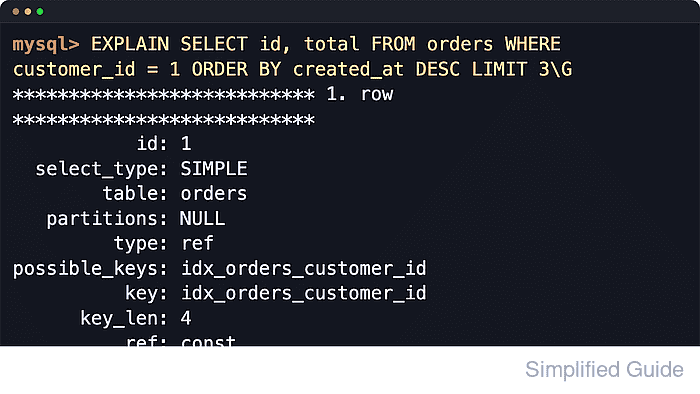
Base EXPLAIN describes the optimizer's chosen access path for a statement, usually one row per table in the tabular plan. Shared fields such as type, possible_keys, key, rows, and Extra show how the server will reach data, which indexes it considered, which index it chose, and whether extra work such as sorting or temporary tables is still required. On MySQL, request FORMAT=TRADITIONAL when that stable column set matters, because current servers can choose another default from @@explain_format.
Current MySQL and MariaDB releases still overlap on tabular EXPLAIN, but the deeper inspection commands differ. MySQL supports FORMAT=TRADITIONAL, FORMAT=JSON, FORMAT=TREE, SHOW WARNINGS, and EXPLAIN ANALYZE; current 9.x servers can default to tree output and can return JSON analysis when the JSON EXPLAIN format version supports it. MariaDB uses EXPLAIN EXTENDED for the rewritten query text plus filtered and uses ANALYZE or ANALYZE FORMAT=JSON for execution-time statistics. Any execution-time variant runs the statement, so keep it on representative but safe workloads.
Steps to use EXPLAIN to view query plans in MySQL or MariaDB:
- Capture the exact statement that needs inspection together with representative literal values.
Plans are cost estimates built from current statistics plus the specific constants in the predicate, so customer_id = 1 and customer_id = 9001 can choose different paths on the same table.
- Run tabular EXPLAIN first to get the baseline access path.
mysql> EXPLAIN FORMAT=TRADITIONAL SELECT id, total FROM orders WHERE customer_id = 1 ORDER BY created_at DESC LIMIT 3;
+----+-------------+--------+------------+------+------------------------+------------------------+---------+-------+------+----------+----------------+
| id | select_type | TABLE  | partitions | TYPE | possible_keys          | KEY                    | key_len | REF   | ROWS | filtered | Extra          |
+----+-------------+--------+------------+------+------------------------+------------------------+---------+-------+------+----------+----------------+
|  1 | SIMPLE      | orders | NULL       | REF  | idx_orders_customer_id | idx_orders_customer_id | 4       | const |    6 |   100.00 | USING filesort |
+----+-------------+--------+------------+------+------------------------+------------------------+---------+-------+------+----------+----------------+
1 ROW IN SET, 1 warning (0.00 sec)
The example above shows MySQL's traditional tabular output. Current MySQL can make plain EXPLAIN follow @@explain_format, so FORMAT=TRADITIONAL keeps the columns predictable. MariaDB's plain EXPLAIN uses a shorter tabular output and omits partitions and filtered until EXPLAIN EXTENDED or ANALYZE is used.
- Read each EXPLAIN row as one access step in the optimizer's chosen order.
Single-table statements usually return one row. Join plans usually return one row per table, and row order reflects the join order chosen by the optimizer rather than the order used in the SQL text.
- Compare possible_keys with key before changing indexes.
possible_keys lists indexes that might work for that step. key shows the index actually chosen. A NULL key means the optimizer did not select an index for that access path.
- Use type, rows, and Extra together instead of judging any single field in isolation.
Common type values range from ALL for a full scan to range, ref, and eq_ref for progressively tighter lookups. rows is an estimate of work, and Extra flags side operations such as Using filesort, Using temporary, Using index condition, or Using join buffer.
- On MySQL, inspect rewritten SQL or hidden function references with SHOW WARNINGS immediately after EXPLAIN.
mysql> SHOW WARNINGS;
+-------+------+--------------------------------------------------------------------------------------------------------------------------------------------------------------------------------------------------------------+
| Level | Code | Message                                                                                                                                                                                                      |
+-------+------+--------------------------------------------------------------------------------------------------------------------------------------------------------------------------------------------------------------+
| Note  | 1003 | /* select#1 */ SELECT `appdb`.`orders`.`id` AS `id`,`appdb`.`orders`.`total` AS `total` FROM `appdb`.`orders` WHERE (`appdb`.`orders`.`customer_id` = 1) ORDER BY `appdb`.`orders`.`created_at` DESC LIMIT 3 |
+-------+------+--------------------------------------------------------------------------------------------------------------------------------------------------------------------------------------------------------------+
1 ROW IN SET (0.00 sec)
MySQL uses SHOW WARNINGS after EXPLAIN to expose the extended form of the statement. This is especially useful when ref shows func and the chosen expression is not obvious from the tabular plan alone.
- On MariaDB, run EXPLAIN EXTENDED when the extra filtered estimate or rewritten query text matters.
MariaDB [appdb]> EXPLAIN EXTENDED SELECT id, total FROM orders WHERE customer_id = 1 ORDER BY created_at DESC LIMIT 3;
+------+-------------+--------+------+------------------------+------------------------+---------+-------+------+----------+-----------------------------+
| id   | select_type | TABLE  | TYPE | possible_keys          | KEY                    | key_len | REF   | ROWS | filtered | Extra                       |
+------+-------------+--------+------+------------------------+------------------------+---------+-------+------+----------+-----------------------------+
|    1 | SIMPLE      | orders | REF  | idx_orders_customer_id | idx_orders_customer_id | 4       | const | 6    |   100.00 | USING WHERE; USING filesort |
+------+-------------+--------+------+------------------------+------------------------+---------+-------+------+----------+-----------------------------+
1 ROW IN SET, 1 warning (0.00 sec)

MariaDB [appdb]> SHOW WARNINGS;
+-------+------+---------------------------------------------------------------------------------------------------------------------------------------------------------------------------------------------+
| Level | Code | Message                                                                                                                                                                                     |
+-------+------+---------------------------------------------------------------------------------------------------------------------------------------------------------------------------------------------+
| Note  | 1003 | SELECT `appdb`.`orders`.`id` AS `id`,`appdb`.`orders`.`total` AS `total` FROM `appdb`.`orders` WHERE `appdb`.`orders`.`customer_id` = 1 ORDER BY `appdb`.`orders`.`created_at` DESC LIMIT 3 |
+-------+------+---------------------------------------------------------------------------------------------------------------------------------------------------------------------------------------------+
1 ROW IN SET (0.00 sec)
MariaDB documents EXPLAIN ANALYZE as outdated syntax. Current MariaDB releases use EXPLAIN EXTENDED for the extra plan column and SHOW WARNINGS note, then use ANALYZE for runtime statistics.
- Switch to EXPLAIN FORMAT=JSON when the flat table hides nested operations or sort details.
mysql> EXPLAIN FORMAT=JSON SELECT id, total FROM orders WHERE customer_id = 1 ORDER BY created_at DESC LIMIT 3\G
*************************** 1. ROW ***************************
EXPLAIN: {
  "query": "/* select#1 */ select `appdb`.`orders`.`id` AS `id`,`appdb`.`orders`.`total` AS `total` from `appdb`.`orders` where (`appdb`.`orders`.`customer_id` = 1) order by `appdb`.`orders`.`created_at` desc limit 3",
  "query_plan": {
    "limit": 3,
    "inputs": [
      {
        "operation": "Sort: orders.created_at DESC, limit input to 3 row(s) per chunk",
        "inputs": [
          {
            "operation": "Index lookup on orders using idx_orders_customer_id (customer_id = 1)",
            "index_name": "idx_orders_customer_id",
            "estimated_rows": 6.0
          }
        ]
      }
    ],
    "operation": "Limit: 3 row(s)"
  },
  "query_type": "select",
  "json_schema_version": "2.0"
}
##### snipped #####
Both servers support FORMAT=JSON, but the field names, nesting, and MySQL JSON schema version can differ. Use it to confirm which node is sorting, scanning, or applying predicates when the tabular plan feels too compressed. On MySQL, FORMAT=TREE is a shorter human-readable alternative when JSON is more detail than needed.
- On MariaDB, compare the same query with EXPLAIN FORMAT=JSON when MariaDB-specific plan nesting matters.
MariaDB [appdb]> EXPLAIN FORMAT=JSON SELECT id, total FROM orders WHERE customer_id = 1 ORDER BY created_at DESC LIMIT 3\G
*************************** 1. ROW ***************************
EXPLAIN: {
  "query_block": {
    "select_id": 1,
    "nested_loop": [
      {
        "read_sorted_file": {
          "filesort": {
            "sort_key": "orders.created_at desc",
            "table": {
              "table_name": "orders",
              "access_type": "ref",
              "possible_keys": ["idx_orders_customer_id"],
              "key": "idx_orders_customer_id",
              "rows": 6
            }
          }
        }
      }
    ]
  }
}
##### snipped #####
- On MySQL, use EXPLAIN ANALYZE to compare estimated work with actual rows and timing.
mysql> EXPLAIN ANALYZE SELECT id, total FROM orders WHERE customer_id = 1 ORDER BY created_at DESC LIMIT 3;
+------------------------------------------------------------------------------------------------------------------------------------------------------------------------------------------------------------------------------------------------------------------------------------------------------------------------------------------------------------------------+
| EXPLAIN                                                                                                                                                                                                                                                                                                                                                                |
+------------------------------------------------------------------------------------------------------------------------------------------------------------------------------------------------------------------------------------------------------------------------------------------------------------------------------------------------------------------------+
| -> LIMIT: 3 ROW(s)  (cost=1.1 ROWS=3) (actual TIME=0.0968..0.0976 ROWS=3 loops=1)
    -> Sort: orders.created_at DESC, LIMIT INPUT TO 3 ROW(s) per chunk  (cost=1.1 ROWS=6) (actual TIME=0.0962..0.0967 ROWS=3 loops=1)
        -> INDEX lookup ON orders USING idx_orders_customer_id (customer_id=1)  (cost=1.1 ROWS=6) (actual TIME=0.0165..0.0231 ROWS=6 loops=1)
 |
+------------------------------------------------------------------------------------------------------------------------------------------------------------------------------------------------------------------------------------------------------------------------------------------------------------------------------------------------------------------------+
1 ROW IN SET (0.01 sec)
EXPLAIN ANALYZE executes the query and returns tree output by default. Current MySQL can also return JSON analysis when @@explain_json_format_version is 2. Run any execution-time plan during a quiet window or against a replica when the statement is expensive.
- On MariaDB, use ANALYZE or ANALYZE FORMAT=JSON for execution-time statistics.
MariaDB [appdb]> ANALYZE SELECT id, total FROM orders WHERE customer_id = 1 ORDER BY created_at DESC LIMIT 3;
+------+-------------+--------+------+------------------------+------------------------+---------+-------+------+--------+----------+------------+-----------------------------+
| id   | select_type | TABLE  | TYPE | possible_keys          | KEY                    | key_len | REF   | ROWS | r_rows | filtered | r_filtered | Extra                       |
+------+-------------+--------+------+------------------------+------------------------+---------+-------+------+--------+----------+------------+-----------------------------+
|    1 | SIMPLE      | orders | REF  | idx_orders_customer_id | idx_orders_customer_id | 4       | const | 6    | 3.00   |   100.00 |     100.00 | USING WHERE; USING filesort |
+------+-------------+--------+------+------------------------+------------------------+---------+-------+------+--------+----------+------------+-----------------------------+
1 ROW IN SET (0.00 sec)
ANALYZE executes the statement. ANALYZE SELECT discards the result set after collecting statistics, but ANALYZE UPDATE or ANALYZE DELETE still performs the change.
ANALYZE FORMAT=JSON adds runtime fields such as r_loops and r_total_time_ms on top of the JSON plan.
- Refresh table statistics when the plan looks inconsistent with current data size or distribution.
mysql> ANALYZE TABLE orders;
+--------------+---------+----------+----------+
| TABLE        | Op      | Msg_type | Msg_text |
+--------------+---------+----------+----------+
| appdb.orders | analyze | STATUS   | OK       |
+--------------+---------+----------+----------+
1 ROW IN SET (0.00 sec)
Bulk loads, large deletes, or skewed data can make row estimates drift. Fresh statistics can change possible_keys, key, rows, and join order.
- Re-run EXPLAIN after each query or index change and compare the same constants, not a different test case.
mysql> EXPLAIN FORMAT=TRADITIONAL SELECT id, total FROM orders WHERE customer_id = 1 ORDER BY created_at DESC LIMIT 3;
+----+-------------+--------+------------+------+-------------------------------------------------------+--------------------------------+---------+-------+------+----------+---------------------+
| id | select_type | TABLE  | partitions | TYPE | possible_keys                                         | KEY                            | key_len | REF   | ROWS | filtered | Extra               |
+----+-------------+--------+------------+------+-------------------------------------------------------+--------------------------------+---------+-------+------+----------+---------------------+
|  1 | SIMPLE      | orders | NULL       | REF  | idx_orders_customer_id,idx_orders_customer_created_at | idx_orders_customer_created_at | 4       | const |    6 |   100.00 | Backward INDEX scan |
+----+-------------+--------+------------+------+-------------------------------------------------------+--------------------------------+---------+-------+------+----------+---------------------+
1 ROW IN SET, 1 warning (0.00 sec)
The comparison above is the same query after adding a composite index on orders (customer_id, created_at). The plan stops reporting Using filesort because the index can satisfy the lookup and sort order together.
- Validate the chosen change outside the plan output.
EXPLAIN is an optimizer view, not a latency guarantee. Confirm the improvement with application timings, a slow-log comparison, or the execution-time plan variants on a safe target.

Mohd Shakir Zakaria is a cloud architect with deep roots in software development and open-source advocacy. Certified in AWS, Red Hat, VMware, ITIL, and Linux, he specializes in designing and managing robust cloud and on-premises infrastructures.


