The slow query log shows which MySQL or MariaDB statements actually consume time and row reads under a real workload, so it is the fastest way to separate one expensive query from a broader server problem.
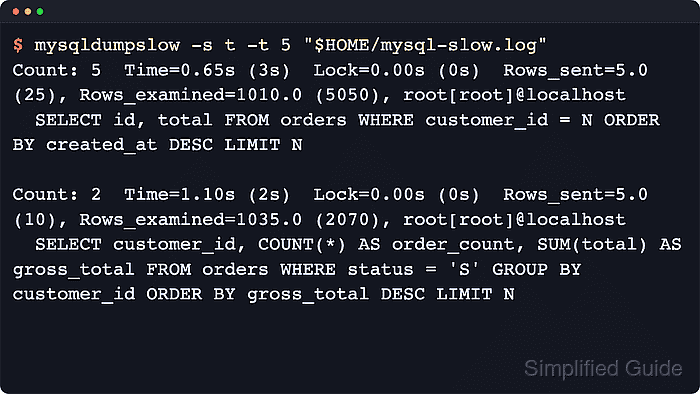
When slow logging is enabled, the server records statements that cross the active threshold together with timing and execution context such as Query_time, Lock_time, Rows_sent, Rows_examined, and the SQL text. Current MySQL builds still expose the familiar slow_query_log and slow_query_log_file variables, while current MariaDB releases can also expose renamed log_slow_* variables such as log_slow_query and log_slow_query_time for the same feature.
Analysis quality depends on the capture settings and destination. If log_output is TABLE, inspect mysql.slow_log directly or switch the server to FILE before using parsers such as mysqldumpslow or mariadb-dumpslow. Slow logs also contain literal query text, so copy only the window you need into a working file before sharing or pasting the results.
Steps to analyze a MySQL or MariaDB slow query log:
- Print the active slow-log destination and thresholds before reading anything else.
$ mysql --table -e "SELECT VARIABLE_NAME, VARIABLE_VALUE FROM information_schema.GLOBAL_VARIABLES WHERE VARIABLE_NAME IN ('LOG_OUTPUT','LOG_QUERIES_NOT_USING_INDEXES','LOG_SLOW_MIN_EXAMINED_ROW_LIMIT','LOG_SLOW_QUERY','LOG_SLOW_QUERY_FILE','LOG_SLOW_QUERY_TIME','LONG_QUERY_TIME','MIN_EXAMINED_ROW_LIMIT','SLOW_QUERY_LOG','SLOW_QUERY_LOG_FILE') ORDER BY VARIABLE_NAME;"
+---------------------------------+--------------------------+
| VARIABLE_NAME                   | VARIABLE_VALUE           |
+---------------------------------+--------------------------+
| LOG_OUTPUT                      | FILE                     |
| LOG_QUERIES_NOT_USING_INDEXES   | OFF                      |
| LOG_SLOW_MIN_EXAMINED_ROW_LIMIT | 0                        |
| LOG_SLOW_QUERY                  | ON                       |
| LOG_SLOW_QUERY_FILE             | /var/log/mysql/mysql-slow.log |
| LOG_SLOW_QUERY_TIME             | 0.500000                 |
| LONG_QUERY_TIME                 | 0.500000                 |
| MIN_EXAMINED_ROW_LIMIT          | 0                        |
| SLOW_QUERY_LOG                  | ON                       |
| SLOW_QUERY_LOG_FILE             | /var/log/mysql/mysql-slow.log |
+---------------------------------+--------------------------+
If the result only shows SLOW_QUERY_LOG, SLOW_QUERY_LOG_FILE, and LONG_QUERY_TIME, that is normal on MySQL. Current MariaDB builds can also expose the renamed LOG_SLOW_* variables alongside the legacy names.
If LOG_OUTPUT does not include FILE, skip to the next step and inspect mysql.slow_log directly first.
- Read the log table directly when the server is writing slow entries to TABLE.
$ mysql -e "SELECT start_time, query_time, lock_time, rows_sent, rows_examined, db, sql_text FROM mysql.slow_log ORDER BY start_time DESC LIMIT 1\G"
*************************** 1. row ***************************
   start_time: 2026-04-10 05:55:15.363616
   query_time: 00:00:00.700827
    lock_time: 00:00:00.000130
    rows_sent: 1
rows_examined: 1000
           db: appdb
     sql_text: SELECT COUNT(*) AS processing_rows FROM orders WHERE status = 'processing'
The built-in parsers summarize file logs, not mysql.slow_log rows, so keep FILE enabled for mysqldumpslow or mariadb-dumpslow workflows.
- Save the active file path from step 1 and copy it into a working file.
$ SLOW_LOG='/var/log/mysql/mysql-slow.log'
$ sudo cp --preserve=mode,timestamps "$SLOW_LOG" "$HOME/mysql-slow.log"
$ sudo chown "$USER":"$USER" "$HOME/mysql-slow.log"
Use the exact path reported by SLOW_QUERY_LOG_FILE instead of assuming a distro default. Copying the file avoids rotation or live-write churn while you parse it.
- Open the working file and inspect a representative entry to confirm the format, schema, and decisive metrics.
$ less "$HOME/mysql-slow.log"
##### snipped
# Time: 260410  5:55:12
# User@Host: root[root] @ localhost []
# Thread_id: 11  Schema: appdb  QC_hit: No
# Query_time: 0.656090  Lock_time: 0.000069  Rows_sent: 5  Rows_examined: 1010
SET timestamp=1775771712;
SELECT id, total FROM orders WHERE customer_id = 7 ORDER BY created_at DESC LIMIT 5;
# Time: 260410  5:55:13
# User@Host: root[root] @ localhost []
# Thread_id: 13  Schema: appdb  QC_hit: No
# Query_time: 1.101063  Lock_time: 0.000121  Rows_sent: 5  Rows_examined: 1035
SET timestamp=1775771713;
SELECT customer_id, COUNT(*) AS order_count, SUM(total) AS gross_total FROM orders WHERE status = 'processing' GROUP BY customer_id ORDER BY gross_total DESC LIMIT 5;
MySQL and MariaDB slow-log headers are similar but not identical. Focus on the Query_time, Lock_time, Rows_sent, and Rows_examined lines first, then the schema and SQL text.
- Rank the copied log by total time to find the digests consuming the most wall-clock time.
$ mysqldumpslow -s t "$HOME/mysql-slow.log"
Count: 5  Time=0.65s (3s)  Lock=0.00s (0s)  Rows_sent=5.0 (25), Rows_examined=1010.0 (5050), root[root]@localhost
  SELECT id, total FROM orders WHERE customer_id = N ORDER BY created_at DESC LIMIT N

Count: 2  Time=1.10s (2s)  Lock=0.00s (0s)  Rows_sent=5.0 (10), Rows_examined=1035.0 (2070), root[root]@localhost
  SELECT customer_id, COUNT(*) AS order_count, SUM(total) AS gross_total FROM orders WHERE status = 'S' GROUP BY customer_id ORDER BY gross_total DESC LIMIT N
MySQL documents mysqldumpslow. Current MariaDB documentation uses mariadb-dumpslow for the same workflow, so on those systems you can swap only the binary name and keep the same flags.
- Re-rank the same file by call count to catch digests that are only “moderately” slow but happen constantly.
$ mysqldumpslow -s c "$HOME/mysql-slow.log"
Count: 5  Time=0.65s (3s)  Lock=0.00s (0s)  Rows_sent=5.0 (25), Rows_examined=1010.0 (5050), root[root]@localhost
  SELECT id, total FROM orders WHERE customer_id = N ORDER BY created_at DESC LIMIT N
The query with the highest Count is often the best first optimization target when the total time is already non-trivial.
- Filter the digest list to a table name, clause, or keyword when you already know the workload area you are chasing.
$ mysqldumpslow -s at -g 'ORDER BY created_at' "$HOME/mysql-slow.log"
Count: 5  Time=0.65s (3s)  Lock=0.00s (0s)  Rows_sent=5.0 (25), Rows_examined=1010.0 (5050), root[root]@localhost
  SELECT id, total FROM orders WHERE customer_id = N ORDER BY created_at DESC LIMIT N
The -g pattern is a regular expression matched against the abstracted query text, so target a distinctive clause or table name rather than a whole statement.
- Re-run the filtered digest with -a when you need the real literals for a copy/paste investigation.
$ mysqldumpslow -a -s at -t 1 -g 'ORDER BY created_at' "$HOME/mysql-slow.log"
Count: 5  Time=0.65s (3s)  Lock=0.00s (0s)  Rows_sent=5.0 (25), Rows_examined=1010.0 (5050), root[root]@localhost
  SELECT id, total FROM orders WHERE customer_id = 7 ORDER BY created_at DESC LIMIT 5
The -a flag stops abstracting numbers and strings, so emails, tokens, account IDs, or customer-specific literals can reappear in your terminal scrollback and saved notes.
- Run EXPLAIN on the chosen statement before changing indexes or rewriting SQL.
$ mysql --database=appdb -e "EXPLAIN SELECT id, total FROM orders WHERE customer_id = 7 ORDER BY created_at DESC LIMIT 5\G"
*************************** 1. row ***************************
           id: 1
  select_type: SIMPLE
        table: orders
         type: ALL
possible_keys: NULL
          key: NULL
      key_len: NULL
          ref: NULL
         rows: 1000
        Extra: Using where; Using filesort
Red flags include type: ALL, key: NULL, large rows estimates, and extras such as Using filesort or Using temporary.
- Generate a deeper fingerprint report with pt-query-digest when you need totals, percentiles, and stable query IDs across a workload window.
$ pt-query-digest --limit=20 "$HOME/mysql-slow.log"
# Overall: 8 total, 2 unique, 1.60 QPS, 1.23x concurrency ________________
# Time range: 2026-04-10 05:55:08 to 05:55:13
# Attribute          total     min     max     avg     95%  stddev  median
# ============     ======= ======= ======= ======= ======= ======= =======
# Exec time             6s   651ms      1s   767ms      1s   197ms   640ms
# Lock time          841us    69us   146us   105us   144us    27us   108us
# Rows sent             40       5       5       5       5       0       5
# Rows examine       7.94k    1010   1.01k 1016.25 1012.63   12.50  964.41

# Profile
# Rank Query ID                           Response time Calls R/Call V/M
# ==== ================================== ============= ===== ====== =====
#    1 0xAF16A2F32FD794BFB00D13E0D144B596  3.9316 64.1%     6 0.6553  0.00 SELECT orders
#    2 0x2706A3A0B5EE1B72B7C87E3908179DD9  2.2045 35.9%     2 1.1023  0.00 SELECT orders
##### snipped
pt-query-digest is part of Percona Toolkit and groups slow-log events by fingerprint so you can compare total response time, percentiles, and per-query IDs instead of scanning one entry at a time. Redirect the same command to a report file only after checking that the output does not expose sensitive literals.

Mohd Shakir Zakaria is a cloud architect with deep roots in software development and open-source advocacy. Certified in AWS, Red Hat, VMware, ITIL, and Linux, he specializes in designing and managing robust cloud and on-premises infrastructures.


