How to post a video to Mastodon automatically
Video posts in Mastodon automation need one extra handoff that text-only posts do not have. The video file is uploaded first, Mastodon processes it in the background, and the status creation request attaches the processed media ID. Waiting for that processing step prevents an automation job from publishing a post that points at media that is not ready yet.
The API flow uses POST /api/v2/media for the upload, GET /api/v1/media/:id for the processing check, and POST /api/v1/statuses for the final post. The token needs write:media for the upload and processing check, and write:statuses for the post creation request.
Use a private test account or unlisted visibility while proving the automation path. The returned status URL and the media_attachments entry are the success signal; the video attachment should have type set to video and a non-empty url.
Steps to post a Mastodon video automatically through the API:
- Confirm that the token has the scopes needed for video upload and posting.
Required scopes:
write:media
write:statuses
Use profile or read:accounts as well when the job verifies the token owner before posting.
Related: How to verify account credentials with the Mastodon API - Set the Mastodon server URL.
$ export MASTODON_URL="https://social.example.com"
- Read the bearer token into a silent shell variable.
$ read -r -s MASTODON_ACCESS_TOKEN
The token can upload media and publish as the account that granted it. Do not paste a real bearer token into shared scripts, screenshots, logs, or tickets.
- Set the video file path.
$ export VIDEO_FILE="./launch-demo.mp4"
Use a real video file that the target instance accepts. Instance owners can set media size and format limits, so keep large production videos within the limits advertised by that server.
- Upload the video attachment.
$ curl --silent --show-error --request POST "$MASTODON_URL/api/v2/media" \
  --header "Authorization: Bearer $MASTODON_ACCESS_TOKEN" \
  --form "file=@$VIDEO_FILE;type=video/mp4" \
  --form "description=Product launch demo video"
{
  "id": "22348641",
  "type": "video",
  "url": null,
  "preview_url": "https://social.example.com/system/media_attachments/files/022/348/641/small/launch-demo.jpg",
  "description": "Product launch demo video"
}
A large video upload can return before the full-size media URL is ready. The id is usable for polling, but the status should wait until url is no longer null.
- Save the returned media ID.
$ export MEDIA_ID="22348641"
- Poll the media attachment until processing finishes.
$ curl --silent --show-error --request GET "$MASTODON_URL/api/v1/media/$MEDIA_ID" \
  --header "Authorization: Bearer $MASTODON_ACCESS_TOKEN"
{
  "id": "22348641",
  "type": "video",
  "url": "https://social.example.com/system/media_attachments/files/022/348/641/original/launch-demo.mp4",
  "preview_url": "https://social.example.com/system/media_attachments/files/022/348/641/small/launch-demo.jpg",
  "description": "Product launch demo video"
}
If the response is still processing or url is null, wait a few seconds and repeat the same request. Do not attach the media ID to a status until the processed media URL is available.
- Create the status with the processed media ID.
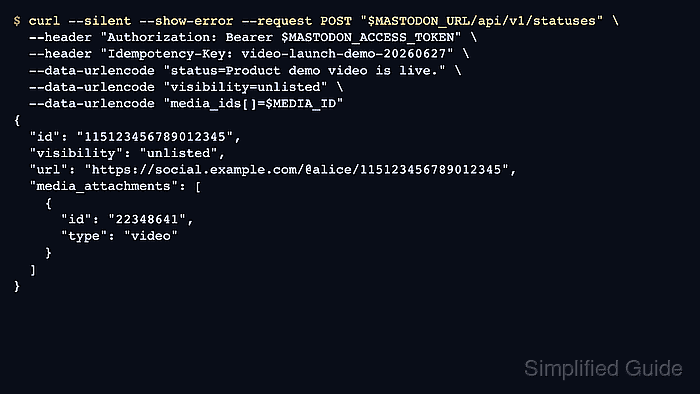
$ curl --silent --show-error --request POST "$MASTODON_URL/api/v1/statuses" \
  --header "Authorization: Bearer $MASTODON_ACCESS_TOKEN" \
  --header "Idempotency-Key: video-launch-demo-20260627" \
  --data-urlencode "status=Product demo video is live." \
  --data-urlencode "visibility=unlisted" \
  --data-urlencode "media_ids[]=$MEDIA_ID"
{
  "id": "115123456789012345",
  "visibility": "unlisted",
  "content": "<p>Product demo video is live.</p>",
  "url": "https://social.example.com/@alice/115123456789012345",
  "media_attachments": [
    {
      "id": "22348641",
      "type": "video",
      "url": "https://social.example.com/system/media_attachments/files/022/348/641/original/launch-demo.mp4",
      "description": "Product launch demo video"
    }
  ]
}
Use a new Idempotency-Key for each intended video post. Reusing a key inside Mastodon's retry window can return the earlier submission instead of creating a separate post.
- Save the returned status ID.
$ export STATUS_ID="115123456789012345"
- Verify the posted status and attached video.
$ curl --silent --show-error --request GET "$MASTODON_URL/api/v1/statuses/$STATUS_ID" \
  --header "Authorization: Bearer $MASTODON_ACCESS_TOKEN"
{
  "id": "115123456789012345",
  "visibility": "unlisted",
  "url": "https://social.example.com/@alice/115123456789012345",
  "media_attachments": [
    {
      "id": "22348641",
      "type": "video",
      "url": "https://social.example.com/system/media_attachments/files/022/348/641/original/launch-demo.mp4",
      "description": "Product launch demo video"
    }
  ]
}
The media_attachments array should contain the uploaded media ID, type should be video, and the status url should open as the posting account. Add read:statuses to the token when the verification fetch targets private or direct posts.
- Remove the temporary shell variables.
$ unset MASTODON_ACCESS_TOKEN MASTODON_URL VIDEO_FILE MEDIA_ID STATUS_ID