How to validate forms with the Constraint Validation API
Form validation belongs close to the controls where a user enters data. Browser constraints such as required, type=“email”, and minlength catch common mistakes before JavaScript prepares a payload or starts a submit path.
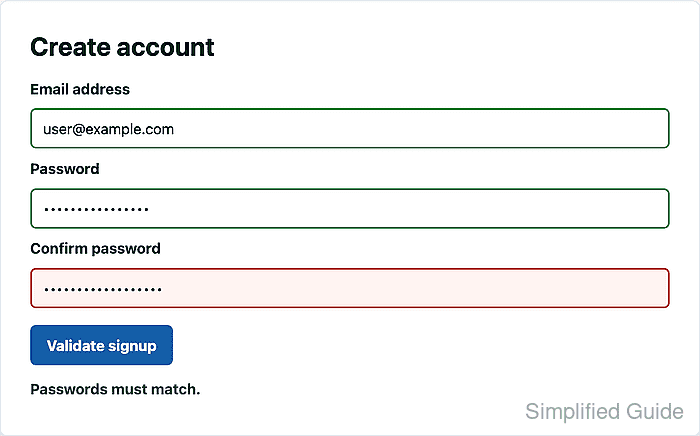
The Constraint Validation API exposes the browser's form validity state through checkValidity(), reportValidity(), validity, validationMessage, and setCustomValidity(). Native constraints handle field-level rules, while setCustomValidity() covers page-specific rules such as matching confirmation fields.
Client-side validation improves the page experience but does not protect the backend. Keep the same rules on the server, call reportValidity() before the success path, and clear custom validity messages with an empty string when the field becomes valid again.
Related: Handle form submission with JavaScript
Related: Add a JavaScript event listener
Steps to validate forms with the Constraint Validation API:
- Add the form controls and a status message.
- index.html
<form id="signup-form" class="signup-form" aria-labelledby="signup-heading">
  <h1 id="signup-heading">Create account</h1>

  <label for="signup-email">Email address</label>
  <input id="signup-email" name="email" type="email" autocomplete="email" required>

  <label for="signup-password">Password</label>
  <input id="signup-password" name="password" type="password" minlength="8" required>

  <label for="confirm-password">Confirm password</label>
  <input id="confirm-password" name="confirm_password" type="password" required>

  <button id="validate-signup" type="button">Validate signup</button>
  <p id="form-status" role="status">Form has not been checked yet.</p>
</form>
Native constraints such as required, type=“email”, and minlength are available to the validation API without extra JavaScript.
- Add visible styles for checked fields.
- styles.css
.signup-form {
  display: grid;
  gap: 0.75rem;
}

.signup-form input {
  border: 2px solid #b9c5d6;
  border-radius: 0.375rem;
  padding: 0.65rem 0.75rem;
}

.signup-form.was-validated input:invalid {
  border-color: #b42318;
  background: #fff4f2;
}

.signup-form.was-validated input:valid {
  border-color: #1a7f37;
}
The was-validated class keeps required empty fields from looking invalid before the user asks for validation.
- Select the form, password controls, button, and status element.
- signup-validation.js
const form = document.querySelector("#signup-form");
const password = document.querySelector("#signup-password");
const confirmPassword = document.querySelector("#confirm-password");
const validateButton = document.querySelector("#validate-signup");
const status = document.querySelector("#form-status");
Match these selectors to the real markup before using their properties.
Related: Select DOM elements with JavaScript - Add the custom password match rule.
- signup-validation.js
function validatePasswordMatch() {
  const hasConfirmation = confirmPassword.value.length > 0;
  const passwordsMatch = password.value === confirmPassword.value;

  confirmPassword.setCustomValidity(
    hasConfirmation && !passwordsMatch ? "Passwords must match." : "",
  );
}
Passing an empty string to setCustomValidity() clears the custom error. Any non-empty string keeps that field invalid and becomes its validationMessage.
- Add a helper that prints the first validation message.
- signup-validation.js
function showFirstValidationMessage() {
  const firstInvalid = form.querySelector(":invalid");
  status.textContent = firstInvalid
    ? firstInvalid.validationMessage
    : "All form fields pass validation.";
}
- Recheck the custom rule while the user types.
- signup-validation.js
password.addEventListener("input", validatePasswordMatch);
confirmPassword.addEventListener("input", validatePasswordMatch);
Updating the custom validity on input keeps the confirm field from staying invalid after the user fixes it.
Related: Add a JavaScript event listener - Validate the form before the success path.
- signup-validation.js
validateButton.addEventListener("click", () => {
  validatePasswordMatch();
  form.classList.add("was-validated");

  if (!form.reportValidity()) {
    showFirstValidationMessage();
    return;
  }

  const formData = new FormData(form);
  status.textContent = `Ready to create account for ${formData.get("email")}.`;
});
Repeat required validation on the server before accepting the submitted data. Browser validation can be bypassed by scripts, older clients, or direct HTTP requests.
Use the same check inside a submit listener when the form should submit after validation. Avoid form.submit() for that path because it bypasses constraint validation; requestSubmit() follows the normal validation path.
Related: Handle form submission with JavaScript - Load the stylesheet and deferred script from the page.
- index.html
<link rel="stylesheet" href="styles.css">
<script src="signup-validation.js" defer></script>
defer lets the browser parse the form controls before signup-validation.js runs its selectors.
Related: Load JavaScript with defer - Open the page in a browser, enter a valid email with mismatched passwords, and click Validate signup.
- Confirm that the custom rule blocks the form.
> document.querySelector("#signup-form").checkValidity() false > document.querySelector("#confirm-password").validationMessage "Passwords must match." > document.querySelector("#form-status").textContent "Passwords must match." - Correct the confirmation password and click Validate signup again.
- Confirm that the valid form reaches the success path.
> document.querySelector("#signup-form").checkValidity()
true
> document.querySelector("#form-status").textContent
"Ready to create account for user@example.com."