HTML forms can submit from a button click, the Enter key, or a scripted submit request, so client-side behavior should listen on the form instead of only on one button. Handling the submit event lets the page read field values, keep the browser from navigating away, and route the payload through one controlled path.
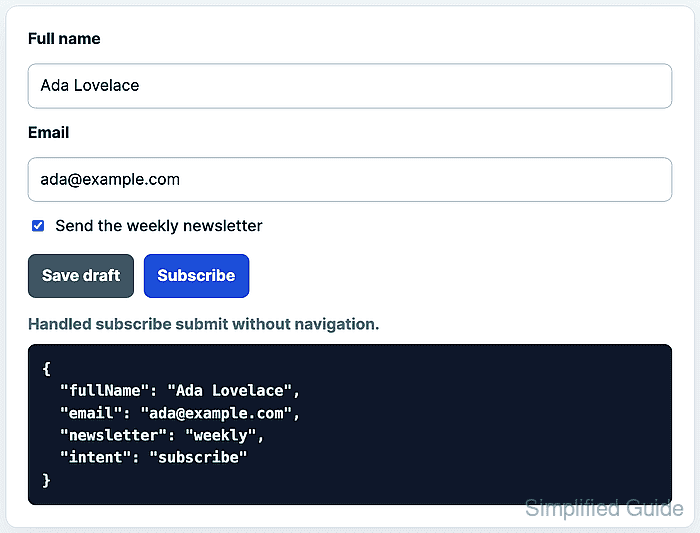
The submit event fires on the <form> element after built-in validation allows the submission to continue. Calling event.preventDefault() inside that handler cancels the browser's default page load, while event.submitter identifies the submit button that triggered the event.
FormData reads the successful named controls from the form, including the clicked submit button when it is passed as the constructor's submitter argument. Rendering the payload to the page makes the no-navigation behavior visible before replacing the render step with a fetch() request or another application-specific action.
Related: Add a JavaScript event listener
Related: Validate forms with the Constraint Validation API
Related: Fetch JSON with JavaScript
Steps to handle form submission with JavaScript:
- Add the form fields, submit buttons, and status output to the page.
- index.html
<form id="signup-form" action="/subscribe" method="post">
  <label for="full-name">Full name</label>
  <input id="full-name" name="fullName" autocomplete="name" required>

  <label for="email">Email</label>
  <input id="email" name="email" type="email" autocomplete="email" required>

  <label>
    <input name="newsletter" type="checkbox" value="weekly" checked>
    Send the weekly newsletter
  </label>

  <button type="submit" name="intent" value="draft">Save draft</button>
  <button type="submit" name="intent" value="subscribe">Subscribe</button>
</form>

<p id="submit-status" role="status">Waiting for submission.</p>
<pre id="submit-payload" aria-live="polite">No payload yet.</pre>
Every control that should appear in FormData needs a name attribute. The two submit buttons share the intent name so the handler can see which path the user chose.
- Select the form and output elements in JavaScript.
- form-handler.js
const form = document.querySelector("#signup-form");
const status = document.querySelector("#submit-status");
const output = document.querySelector("#submit-payload");

if (!form || !status || !output) {
  throw new Error("The form handler markup was not found.");
}
- Add the submit handler.
- form-handler.js
let submitCount = 0;

form.addEventListener("submit", (event) => {
  event.preventDefault();

  const formData = event.submitter
    ? new FormData(form, event.submitter)
    : new FormData(form);
  const payload = Object.fromEntries(formData.entries());

  submitCount += 1;
  output.dataset.submitted = "true";
  output.dataset.submitCount = String(submitCount);
  output.dataset.defaultPrevented = String(event.defaultPrevented);
  output.textContent = JSON.stringify(payload, null, 2);
  status.textContent = `Handled ${payload.intent} submit without navigation.`;
});
FormData includes successful named controls. Disabled controls and controls without name are omitted, and repeated field names need formData.getAll(“name”) instead of Object.fromEntries().
- Load the deferred script from the page.
- index.html
<script src="form-handler.js" defer></script>
defer lets the browser parse the form before the script selects it.
Related: Load JavaScript with defer - Open index.html in a browser, fill the required fields, and click Subscribe.
- Confirm that the handler kept the browser on the page and captured the subscribe payload.
> document.querySelector("#submit-status").textContent "Handled subscribe submit without navigation." > document.querySelector("#submit-payload").dataset.defaultPrevented "true" > JSON.parse(document.querySelector("#submit-payload").textContent).email "ada@example.com" > JSON.parse(document.querySelector("#submit-payload").textContent).intent "subscribe" - Trigger the same handler from script with the draft button.
> document.querySelector("#signup-form").requestSubmit(document.querySelector('button[value="draft"]'))
undefined
> JSON.parse(document.querySelector("#submit-payload").textContent).intent
"draft"
> document.querySelector("#submit-payload").dataset.submitCount
"2"
Use requestSubmit() when script needs the same validation and submit event path as a user action. Calling form.submit() bypasses the submit event and built-in constraint validation.

Mohd Shakir Zakaria is a cloud architect with deep roots in software development and open-source advocacy. Certified in AWS, Red Hat, VMware, ITIL, and Linux, he specializes in designing and managing robust cloud and on-premises infrastructures.


