How to stabilize selectors in Espresso tests
Espresso selectors should identify the control that belongs to the app, not the current English label or row position that happens to be visible. Selector cleanup matters when a harmless copy edit, localization pass, or layout refactor breaks a UI test even though the screen still behaves the same for the user.
onView() evaluates a Hamcrest matcher against the current Android view hierarchy and must resolve to the intended view before perform() or check() can run. Resource IDs are the first choice for app-owned controls, content descriptions fit icon-only actions, and scoped matchers keep repeated row layouts from matching the wrong child view.
Keep the selector that finds a control separate from the assertion that proves user-visible behavior. The sample checkout test replaces a text-only button matcher with a resource-ID helper, keeps the receipt assertion on the expected screen text, and reruns the same connected test after the button label changes.
Steps to stabilize Espresso selectors:
- Find a selector that depends on visible copy or layout position.
// Brittle: breaks when the button label changes.
onView(withText("Continue")).perform(click())

// Brittle: can click the wrong item after sorting or filtering.
onView(withText("Espresso beans")).perform(click())
Text matchers still fit final content assertions when visible text is the behavior under test. Use a stronger selector for controls that already expose app-owned IDs or accessibility labels.
- Add or confirm a resource ID on the app control.
- res/layout/activity_checkout.xml
<Button
    android:id="@+id/checkout_continue"
    android:layout_width="match_parent"
    android:layout_height="wrap_content"
    android:text="@string/checkout_continue" />
Prefer IDs owned by the target view instead of parent indexes or child order. A layout refactor can move the view without changing the resource ID.
- Add a content description when the action is icon-only.
- res/layout/activity_checkout.xml
<ImageButton
    android:id="@+id/cart_button"
    android:layout_width="48dp"
    android:layout_height="48dp"
    android:contentDescription="@string/open_cart"
    android:src="@drawable/ic_cart" />
A content description is part of the app's accessibility surface. Do not add one only for a test if it would give screen-reader users the wrong label.
- Create selector helpers in the androidTest source set.
- CheckoutSelectors.kt
package com.example.checkout

import android.view.View
import androidx.test.espresso.matcher.ViewMatchers.isDisplayed
import androidx.test.espresso.matcher.ViewMatchers.isEnabled
import androidx.test.espresso.matcher.ViewMatchers.withContentDescription
import androidx.test.espresso.matcher.ViewMatchers.withId
import org.hamcrest.Matcher
import org.hamcrest.Matchers.allOf

fun checkoutContinueButton(): Matcher<View> =
    allOf(
        withId(R.id.checkout_continue),
        isDisplayed(),
        isEnabled()
    )

fun cartButton(): Matcher<View> =
    allOf(
        withContentDescription(R.string.open_cart),
        isDisplayed()
    )
The helper name records the screen intent. Keeping matcher construction in one place makes later copy or layout changes easier to review.
- Scope reused row controls to the row content instead of an adapter position.
import android.view.View
import androidx.test.espresso.matcher.ViewMatchers.hasDescendant
import androidx.test.espresso.matcher.ViewMatchers.isDescendantOfA
import androidx.test.espresso.matcher.ViewMatchers.isDisplayed
import androidx.test.espresso.matcher.ViewMatchers.withId
import androidx.test.espresso.matcher.ViewMatchers.withText
import org.hamcrest.Matcher
import org.hamcrest.Matchers.allOf

fun addToCartButtonFor(productName: String): Matcher<View> =
    allOf(
        withId(R.id.add_to_cart),
        isDescendantOfA(
            hasDescendant(withText(productName))
        ),
        isDisplayed()
    )
Use an adapter position only when the position itself is the behavior being tested. Sorting, filtering, paging, and inserted rows can make position-based selectors click the wrong record.
- Replace the brittle action selector in the test.
- CheckoutSelectorTest.kt
package com.example.checkout

import androidx.test.espresso.Espresso.onView
import androidx.test.espresso.action.ViewActions.click
import androidx.test.espresso.assertion.ViewAssertions.matches
import androidx.test.espresso.matcher.ViewMatchers.withId
import androidx.test.espresso.matcher.ViewMatchers.withText
import androidx.test.ext.junit.rules.ActivityScenarioRule
import androidx.test.ext.junit.runners.AndroidJUnit4
import org.junit.Rule
import org.junit.Test
import org.junit.runner.RunWith

@RunWith(AndroidJUnit4::class)
class CheckoutSelectorTest {

    @get:Rule
    val activityRule =
        ActivityScenarioRule(CheckoutActivity::class.java)

    @Test
    fun tappingPrimaryActionShowsReceipt() {
        onView(checkoutContinueButton()).perform(click())

        onView(withId(R.id.receipt_title))
            .check(matches(withText(R.string.receipt_title)))
    }
}
The action selector uses the control ID and state. The assertion still checks the user-visible receipt title because that text is the expected screen result.
- Change the button label without changing its ID.
- res/values/strings.xml
<resources>
    <string name="checkout_continue">Place order</string>
    <string name="receipt_title">Receipt</string>
</resources>
A selector based on R.id.checkout_continue should keep finding the button after this copy-only change. A selector based on withText("Continue") would fail here.
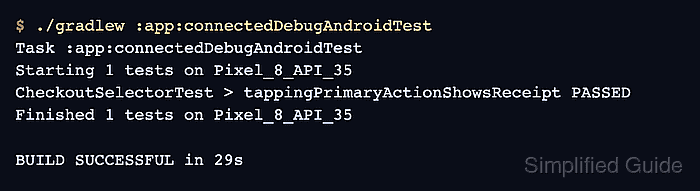
- Run the connected Espresso test task.
$ ./gradlew :app:connectedDebugAndroidTest
Task :app:connectedDebugAndroidTest
Starting 1 tests on Pixel_8_API_35
CheckoutSelectorTest > tappingPrimaryActionShowsReceipt PASSED
Finished 1 tests on Pixel_8_API_35

BUILD SUCCESSFUL in 29s
The module and variant may expose a different connected task, such as :mobile:connectedFreeDebugAndroidTest. A passing run after the label change proves the action selector no longer depends on the old button text.
Related: How to run Espresso tests locally