How to grant runtime permissions in Espresso tests
Permission dialogs break Espresso control because the system owns the dialog instead of the app under test. Granting a declared runtime permission before the screen opens lets a camera, location, contacts, or notification assertion reach the protected UI without a manual tap.
GrantPermissionRule belongs to the AndroidX Test rules artifact and runs inside the instrumentation test process. For screens launched by ActivityScenarioRule, a RuleChain makes the permission grant run before the activity rule opens the target activity.
Use this pattern for tests that need an already-granted permission, not for denial, rationale, or “don't ask again” flows. The app still must declare the permission in its manifest, and Android M / API 23 or newer is the runtime-permission boundary.
Steps to grant runtime permissions in Espresso tests:
- Add the AndroidX Test runner, JUnit extension, Espresso core, and rules dependencies to the app module if they are not already present.
- build.gradle.kts
android {
    defaultConfig {
        testInstrumentationRunner =
            "androidx.test.runner.AndroidJUnitRunner"
    }
}

val espressoVersion = "3.7.0"
val junitExtVersion = "1.3.0"
val testRunnerVersion = "1.7.0"
val testRulesVersion = "1.7.0"

dependencies {
    androidTestImplementation(
        "androidx.test.espresso:" +
            "espresso-core:$espressoVersion"
    )
    androidTestImplementation(
        "androidx.test.ext:" +
            "junit:$junitExtVersion"
    )
    androidTestImplementation(
        "androidx.test:" +
            "runner:$testRunnerVersion"
    )
    androidTestImplementation(
        "androidx.test:" +
            "rules:$testRulesVersion"
    )
}
Use the project's version catalog instead when the app already centralizes AndroidX Test versions.
- Declare the runtime permission in the app manifest.
- AndroidManifest.xml
<manifest ...>
    <uses-permission android:name="android.permission.CAMERA" />

    <application ...>
        ...
    </application>
</manifest>
GrantPermissionRule can grant only permissions requested by the target app. Replace CAMERA with the permission that gates the screen under test.
- Create a permission-gated test class under the app module's androidTest source set.
- CameraPermissionTest.kt
package com.example.app

import android.Manifest
import android.content.pm.PackageManager
import androidx.test.espresso.Espresso.onView
import androidx.test.espresso.assertion.ViewAssertions.matches
import androidx.test.espresso.matcher.ViewMatchers.isDisplayed
import androidx.test.espresso.matcher.ViewMatchers.withId
import androidx.test.ext.junit.rules.ActivityScenarioRule
import androidx.test.ext.junit.runners.AndroidJUnit4
import androidx.test.filters.SdkSuppress
import androidx.test.platform.app.InstrumentationRegistry
import androidx.test.rule.GrantPermissionRule
import org.junit.Assert.assertEquals
import org.junit.Rule
import org.junit.Test
import org.junit.rules.RuleChain
import org.junit.rules.TestRule
import org.junit.runner.RunWith

@RunWith(AndroidJUnit4::class)
@SdkSuppress(minSdkVersion = 23)
class CameraPermissionTest {
    private val permissionRule =
        GrantPermissionRule.grant(Manifest.permission.CAMERA)
    private val activityRule =
        ActivityScenarioRule(CameraActivity::class.java)

    @get:Rule
    val rules: TestRule = RuleChain
        .outerRule(permissionRule)
        .around(activityRule)

    @Test
    fun cameraScreenOpensWithPermissionGranted() {
        val context = InstrumentationRegistry
            .getInstrumentation()
            .targetContext

        assertEquals(
            PackageManager.PERMISSION_GRANTED,
            context.checkSelfPermission(Manifest.permission.CAMERA)
        )

        onView(withId(R.id.camera_preview))
            .check(matches(isDisplayed()))
    }
}
The RuleChain grants the permission before ActivityScenarioRule launches CameraActivity. A standalone GrantPermissionRule is enough when the test opens the screen inside the test method.
- Replace the sample permission, activity class, and view ID with the protected feature from the app.
Use Manifest.permission.POST_NOTIFICATIONS with SdkSuppress(minSdkVersion = 33) for Android notification permission tests. Keep denial-flow tests in a separate class or separate device state because GrantPermissionRule does not revoke permissions after granting them.
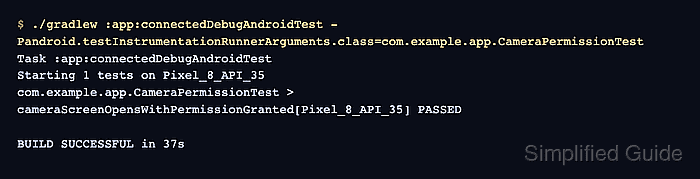
- Run the focused connected Espresso test.
$ ./gradlew :app:connectedDebugAndroidTest \
  -Pandroid.testInstrumentationRunnerArguments.class=com.example.app.CameraPermissionTest
> Task :app:connectedDebugAndroidTest
Starting 1 tests on Pixel_8_API_35
com.example.app.CameraPermissionTest > cameraScreenOpensWithPermissionGranted[Pixel_8_API_35] PASSED

BUILD SUCCESSFUL in 37s
The passing class proves that the permission was granted before the protected screen assertion ran. Use the connected task for the app module and build variant, such as :mobile:connectedFreeDebugAndroidTest in a flavored project.
Related: How to run Espresso tests locally