How to use an Elasticsearch ingest pipeline from Logstash
Using an Elasticsearch ingest pipeline from Logstash sends each event through a named processor chain before the document lands in the target index. This fits pipelines where Logstash collects and routes data while Elasticsearch owns final normalization such as shared labels, enrichment fields, or index-side parsing.
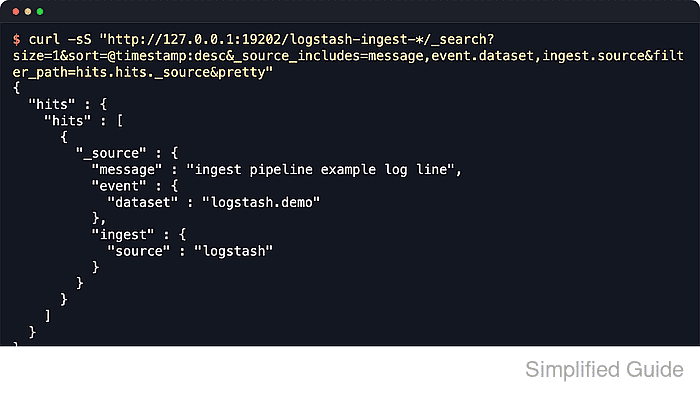
The elasticsearch output plugin runs an ingest pipeline by sending its ID in the Bulk API request. The pipeline value is case-sensitive and must match a pipeline that already exists in the destination cluster; dynamic pipeline values are skipped when they resolve to an empty string.
The sample flow uses one fixed pipeline ID, one Logstash file input, and one demo index so the handoff can be checked from input event to indexed document. Secured clusters need the same pipeline setting plus the current authentication and TLS options for the output, such as ssl_enabled, ssl_certificate_authorities, api_key, user, or password.
Steps to use an Elasticsearch ingest pipeline from Logstash:
- Confirm the pipeline ID, target index, and sample input path.
Pipeline ID: normalize-logs
Target index: logstash-ingest-demo
Sample input: /var/lib/logstash/examples/ingest-pipeline.log
Use a dedicated test index or a clearly scoped application index while proving the handoff. The same pipeline ID can later be reused by other Logstash outputs that need the same Elasticsearch-side normalization.
- Create or update the ingest pipeline in Elasticsearch.
$ curl --silent --show-error --fail \
  --header "Content-Type: application/json" \
  --request PUT "http://elasticsearch.example.net:9200/_ingest/pipeline/normalize-logs?filter_path=acknowledged&pretty" \
  --data '{
  "description": "Mark documents received through Logstash",
  "processors": [
    { "set": { "field": "event.dataset", "value": "logstash.demo" } },
    { "set": { "field": "ingest.source", "value": "logstash" } }
  ]
}'
{
  "acknowledged" : true
}
A PUT request with an existing pipeline ID replaces that ingest pipeline immediately. Use versioned pipeline updates when other writers already depend on the current processor chain.
- Simulate the ingest pipeline with a sample document.
$ curl --silent --show-error --fail \
  --header "Content-Type: application/json" \
  --request POST "http://elasticsearch.example.net:9200/_ingest/pipeline/normalize-logs/_simulate?filter_path=docs.doc._source&pretty" \
  --data '{
  "docs": [
    { "_source": { "message": "ingest pipeline example log line" } }
  ]
}'
{
  "docs" : [
    {
      "doc" : {
        "_source" : {
          "message" : "ingest pipeline example log line",
          "event" : {
            "dataset" : "logstash.demo"
          },
          "ingest" : {
            "source" : "logstash"
          }
        }
      }
    }
  ]
}
The _simulate API proves the processors produce the expected fields without indexing a document.
- Create the sample input and file-input state directories for the Logstash service account.
$ sudo install -d -o logstash -g logstash /var/lib/logstash/examples /var/lib/logstash/plugins/inputs/file
- Create or update the Logstash pipeline file.
input {
  file {
    path => "/var/lib/logstash/examples/ingest-pipeline.log"
    start_position => "beginning"
    sincedb_path => "/var/lib/logstash/plugins/inputs/file/ingest-pipeline.sincedb"
  }
}

output {
  elasticsearch {
    hosts => ["http://elasticsearch.example.net:9200"]
    ilm_enabled => false
    index => "logstash-ingest-demo"
    pipeline => "normalize-logs"
  }
}
Save the file as /etc/logstash/conf.d/50-ingest-pipeline.conf on package-based installs. Replace the sample file input with the real input after the smoke test, and add the secured-cluster output options before sending production data.
Related: How to configure a Logstash file input
Related: How to configure Logstash output to Elasticsearch
Related: How to use an Elasticsearch API key with Logstash output - Test the Logstash pipeline configuration.
$ sudo -u logstash /usr/share/logstash/bin/logstash --path.settings /etc/logstash --path.data /tmp/logstash-ingest-configtest --config.test_and_exit
Using bundled JDK: /usr/share/logstash/jdk
Configuration OK
[2026-06-18T15:42:12,000][INFO ][logstash.runner          ] Using config.test_and_exit mode. Config Validation Result: OK. Exiting Logstash
The temporary --path.data directory must be writable by the logstash user. Configuration validation checks syntax and plugin settings; it does not prove the ingest pipeline ID exists or that Elasticsearch accepts events.
Related: How to test a Logstash pipeline configuration - Remove the temporary validation data path.
$ sudo rm --recursive --force /tmp/logstash-ingest-configtest
- Restart the Logstash service so the updated pipeline is loaded.
$ sudo systemctl restart logstash
Restarting Logstash briefly pauses pipeline workers while outputs reconnect and queued events drain.
- Append a sample event to the watched file.
$ printf '%s\n' 'ingest pipeline example log line' | sudo tee -a /var/lib/logstash/examples/ingest-pipeline.log
ingest pipeline example log line
The file input reads newline-delimited records. If the real pipeline already has another input, send one fresh event through that input instead.
- Search the target index for the document written through the ingest pipeline.
$ curl --silent --show-error --fail "http://elasticsearch.example.net:9200/logstash-ingest-demo/_search?size=1&_source_includes=message,event.dataset,ingest.source&filter_path=hits.hits._source&pretty"
{
  "hits" : {
    "hits" : [
      {
        "_source" : {
          "message" : "ingest pipeline example log line",
          "event" : {
            "dataset" : "logstash.demo"
          },
          "ingest" : {
            "source" : "logstash"
          }
        }
      }
    ]
  }
}
If the document appears without event.dataset or ingest.source, the event reached Elasticsearch without the expected ingest pipeline. Check the output pipeline value, the stored pipeline definition, and recent Logstash logs for bulk indexing errors.