How to use an Elasticsearch API key with Filebeat output
Using an Elasticsearch API key for Filebeat output keeps log shipping separate from human or setup account passwords. A dedicated key per Filebeat host, deployment group, or environment can be revoked without changing the credentials used for cluster administration.
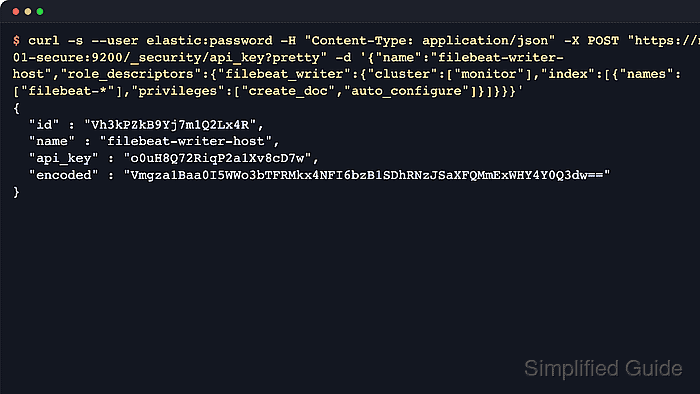
Filebeat reads the API key from output.elasticsearch.api_key and sends it to the Elasticsearch HTTP API when publishing events. The value is the API key id joined to api_key with a colon, such as id:api_key; the encoded value returned by Elasticsearch belongs in direct Authorization: ApiKey HTTP headers, not in Filebeat output configuration.
Use a setup credential before the switch if templates, ILM assets, dashboards, or module ingest pipelines still need to be loaded. The publishing key can stay narrower after setup, with monitor at the cluster level and create_doc plus auto_configure on filebeat-*; add read_pipeline for module pipeline checks or keep setup.ilm.check_exists enabled only when the key also has the needed ILM read privilege.
Steps to use an Elasticsearch API key with Filebeat output:
- Create a Filebeat publishing API key with a setup or administrator credential.
$ curl --silent --show-error --fail \
  --user "elastic:${ELASTIC_PASSWORD}" \
  --header "Content-Type: application/json" \
  --request POST "https://elasticsearch.example.net:9200/_security/api_key?pretty" \
  --data '{
  "name": "filebeat-writer-host",
  "role_descriptors": {
    "filebeat_writer": {
      "cluster": ["monitor"],
      "indices": [
        {
          "names": ["filebeat-*"],
          "privileges": ["create_doc", "auto_configure"]
        }
      ]
    }
  }
}'
{
  "id" : "Vh3kPZkB9Yj7m1Q2Lx4R",
  "name" : "filebeat-writer-host",
  "api_key" : "o0uH8Q72RiqP2a1Xv8cD7w",
  "encoded" : "Vmgza1Baa0I5WWo3bTFRMkx4NFI6bzB1SDhRNzJSaXFQMmExWHY4Y0Q3dw=="
}
Use the id and api_key fields as a single id:api_key value. Add expiration when the key should rotate automatically, and do not copy encoded into Filebeat.
- Create the Filebeat keystore if the host does not already use one.
$ sudo filebeat keystore create
Created filebeat keystore
The keystore is stored under Filebeat's active path.data directory, so run the command as the same service user or through the same package layout used by the Filebeat service.
Related: How to create a Filebeat keystore
- Read the combined id:api_key value into a shell variable without echoing it.
$ read -r -s FILEBEAT_API_KEY
Paste the value in the form Vh3kPZkB9Yj7m1Q2Lx4R:o0uH8Q72RiqP2a1Xv8cD7w and press Enter.
- Store the value in the Filebeat keystore.
$ printf '%s' "$FILEBEAT_API_KEY" | sudo filebeat keystore add FILEBEAT_API_KEY --stdin --force
Successfully updated the keystore
--force replaces an older key during rotation. Omit it when a first-time setup should fail rather than overwrite an existing secret.
- Clear the temporary shell variable.
$ unset FILEBEAT_API_KEY
- Configure Filebeat's Elasticsearch output to read the keystore key.
- /etc/filebeat/filebeat.yml
setup.ilm.check_exists: false

output.elasticsearch:
  hosts: ["https://elasticsearch.example.net:9200"]
  api_key: "${FILEBEAT_API_KEY}"
  ssl.certificate_authorities: ["/etc/filebeat/certs/elasticsearch-ca.crt"]
Keep the placeholder quoted because the resolved secret contains a colon. Use setup.ilm.check_exists: false only after setup assets are loaded or when the publishing key intentionally avoids read_ilm.
- Test the Filebeat configuration syntax.
$ sudo filebeat test config -c /etc/filebeat/filebeat.yml
Config OK
Related: How to test a Filebeat configuration
- Test the Elasticsearch output connection with the stored API key.
$ sudo filebeat test output -c /etc/filebeat/filebeat.yml
elasticsearch: https://elasticsearch.example.net:9200...
  parse url... OK
  connection...
    parse host... OK
    dns lookup... OK
    addresses: 192.0.2.44
    dial up... OK
  TLS...
    security: server's certificate chain verification is enabled
    handshake... OK
    TLS version: TLSv1.3
    dial up... OK
  talk to server... OK
  version: 9.4.2
filebeat test output proves endpoint reachability, TLS trust, and authentication. It does not publish an event.
- Restart the Filebeat service to apply the output setting.
$ sudo systemctl restart filebeat
- Verify that Filebeat indexed a recent event.
$ curl --silent --show-error --fail \
  --user "elastic:${ELASTIC_PASSWORD}" \
  --cacert /etc/filebeat/certs/elasticsearch-ca.crt \
  "https://elasticsearch.example.net:9200/filebeat-*/_search?pretty&size=1&sort=@timestamp:desc&filter_path=hits.total,hits.hits._index,hits.hits._source.message"
{
  "hits" : {
    "total" : {
      "value" : 1,
      "relation" : "eq"
    },
    "hits" : [
      {
        "_index" : ".ds-filebeat-9.4.2-2026.06.18-000001",
        "_source" : {
          "message" : "Filebeat API key validation event"
        }
      }
    ]
  }
}
Use a read-capable credential for this search because a write-only Filebeat API key should not be able to query indexed data.
If enabled inputs are idle, write or wait for a new log line before checking Elasticsearch.