How to configure a voting-only node in Elasticsearch
Voting-only nodes add quorum capacity to an Elasticsearch cluster without turning the extra node into a candidate for elected master. That makes them useful as dedicated tiebreakers during maintenance, small-cluster growth, and other topology changes where losing quorum would stall index creation, mapping updates, ILM transitions, and other cluster-state work.
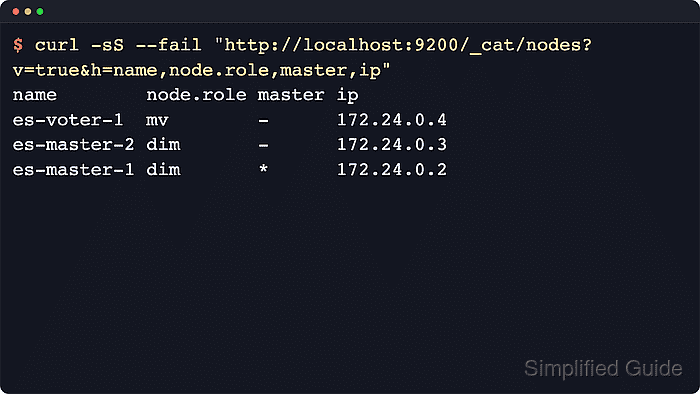
A dedicated voting-only node is still master-eligible, so it participates in elections and acknowledges cluster-state publications, but it cannot become the elected master itself. Current Elastic guidance keeps this role explicit with node.roles: [ master, voting_only ] and requires high-availability clusters to retain at least two other non-voting-only master-eligible nodes so the cluster can still elect a master if one node fails.
Voting-only nodes still store cluster metadata in path.data and remain on the cluster-state critical path, so they need persistent storage and low-latency network connectivity even though they do not host shards. When repurposing a former data node, drain its shards before removing data roles and run the repurpose tool only while the service is stopped if leftover shard data blocks startup; secured self-managed deployments also need the normal HTTPS endpoint, authentication, and trusted CA settings for the API checks.
Steps to configure a voting-only node in Elasticsearch:
- Confirm the final cluster design will still keep at least two non-voting-only master-eligible nodes.
Current Elastic guidance for high-availability clusters keeps at least three master-eligible nodes overall, with at least two that are not voting_only, so the cluster can still elect a master after a node failure.
- If the target node currently stores shards, exclude it from shard allocation before removing its data roles.
$ curl -sS --fail -H "Content-Type: application/json" --request PUT "http://localhost:9200/_cluster/settings?pretty&flat_settings=true" --data '{
  "persistent" : {
    "cluster.routing.allocation.exclude._name" : "es-voter-1"
  }
}'
{
  "acknowledged" : true,
  "persistent" : {
    "cluster.routing.allocation.exclude._name" : "es-voter-1"
  },
  "transient" : { }
}
Skip this step for a brand-new tiebreaker node or a host that never held shard data.
- Wait for shard relocation to settle after applying the temporary exclude.
$ curl -sS --fail "http://localhost:9200/_cluster/health?wait_for_no_relocating_shards=true&wait_for_events=languid&timeout=30m&filter_path=cluster_name,status,timed_out,number_of_nodes,number_of_data_nodes,relocating_shards,initializing_shards,unassigned_shards,number_of_pending_tasks&pretty"
{
  "cluster_name" : "sg-voting-only",
  "status" : "green",
  "timed_out" : false,
  "number_of_nodes" : 3,
  "number_of_data_nodes" : 2,
  "relocating_shards" : 0,
  "initializing_shards" : 0,
  "unassigned_shards" : 0,
  "number_of_pending_tasks" : 0
}
Large clusters can need a longer wait while shards copy away from the node being repurposed.
- Open /etc/elasticsearch/elasticsearch.yml on the target node with sudo privileges.
$ sudoedit /etc/elasticsearch/elasticsearch.yml
- Set node.roles to master and voting_only while keeping the node's existing discovery, security, and network settings intact.
node.roles: [ master, voting_only ]
Setting node.roles replaces the default role set, so any roles the node must keep must be listed explicitly. A dedicated voting-only node still stores cluster metadata locally, but routine client traffic is better kept on data or coordinating-only nodes.
- Restart the Elasticsearch service to load the new role set.
$ sudo systemctl restart elasticsearch
Restarting the currently elected master triggers a new master election. If the service fails after data roles were removed, stop it again and run sudo /usr/share/elasticsearch/bin/elasticsearch-node repurpose only while the node is down to remove leftover shard data.
- Confirm the service is active after the restart.
$ systemctl is-active elasticsearch
active
If the unit fails, check journalctl --unit=elasticsearch.service --no-pager and /var/log/elasticsearch/elasticsearch.log before retrying.
- Verify the target node now reports the master and voting_only roles.
$ curl -sS --fail "http://localhost:9200/_nodes/es-voter-1?filter_path=nodes.*.name,nodes.*.roles&pretty"
{
  "nodes" : {
    "eGOLcg5JTWi78uRaDgbfyg" : {
      "name" : "es-voter-1",
      "roles" : [
        "master",
        "voting_only"
      ]
    }
  }
}
Match the top-level node ID from this response with the committed voting configuration in the next step. Secured clusters usually require the authenticated HTTPS endpoint used by operators for that cluster.
- Confirm the cluster-wide node role view marks the node as a voting-only tiebreaker.
$ curl -sS --fail "http://localhost:9200/_cat/nodes?v=true&h=name,node.role,master,ip"
name        node.role master ip
es-master-2 dim       *      192.0.2.12
es-voter-1  mv        -      192.0.2.13
es-master-1 dim       -      192.0.2.11
The current CAT node.role column shows m for master and v for voting_only, so mv identifies a voting-only master-eligible node.
- Inspect the committed voting configuration to confirm the node ID now participates in quorum decisions.
$ curl -sS --fail "http://localhost:9200/_cluster/state?filter_path=metadata.cluster_coordination.last_committed_config&pretty"
{
  "metadata" : {
    "cluster_coordination" : {
      "last_committed_config" : [
        "jdlClwyaS3m-hrKI5q6EOg",
        "j9tPRTl-RPqgkZOYJnURow",
        "eGOLcg5JTWi78uRaDgbfyg"
      ]
    }
  }
}
The last_committed_config list shows the current voting node IDs. Match it against the node ID from the previous step to confirm the tiebreaker is in the active voting configuration.
- Check cluster health after the node rejoins with the voting-only role.
$ curl -sS --fail "http://localhost:9200/_cluster/health?filter_path=cluster_name,status,timed_out,number_of_nodes,number_of_data_nodes,unassigned_shards,number_of_pending_tasks&pretty"
{
  "cluster_name" : "sg-voting-only",
  "status" : "green",
  "timed_out" : false,
  "number_of_nodes" : 3,
  "number_of_data_nodes" : 2,
  "unassigned_shards" : 0,
  "number_of_pending_tasks" : 0
}
After master-role changes, number_of_pending_tasks and the node counts quickly show whether cluster coordination has settled again.
- Clear the temporary allocation exclude after the node has rejoined as voting-only.
$ curl -sS --fail -H "Content-Type: application/json" --request PUT "http://localhost:9200/_cluster/settings?pretty&flat_settings=true" --data '{
  "persistent" : {
    "cluster.routing.allocation.exclude._name" : null
  }
}'
{
  "acknowledged" : true,
  "persistent" : { },
  "transient" : { }
}
Skip this cleanup step when no temporary allocation exclude was set earlier.