Cluster-level shard allocation filters in Elasticsearch move or block shards by node name, IP address, host name, data tier, or custom node attribute. They are useful when a data node must be drained before maintenance or when shards must stay on hardware that matches a rack, zone, or tier rule.
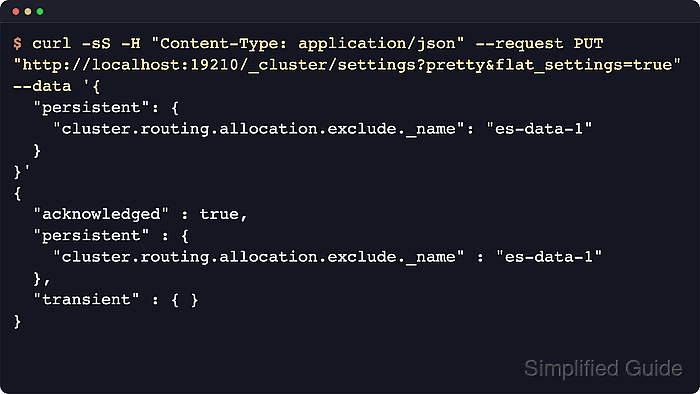
The dynamic /_cluster/settings API stores cluster-wide include, require, and exclude rules under cluster.routing.allocation.*. Elasticsearch evaluates those rules together with index-level allocation filters, allocation awareness, disk watermarks, and the primary/replica separation rule, so a strict filter can leave shards UNASSIGNED when no eligible node remains.
Use persistent settings for planned placement changes and clear the exact keys with null after temporary maintenance. Elastic no longer recommends transient cluster settings because instability can clear them unexpectedly, and secured clusters need an authenticated account with cluster manage privilege plus the same https and CA options used for other admin requests.
Steps to set shard allocation filters in Elasticsearch:
- Check cluster health before changing shard placement.
$ curl -sS "http://localhost:9200/_cluster/health?pretty"
{
  "cluster_name" : "sg-allocation-filter",
  "status" : "green",
  "timed_out" : false,
  "number_of_nodes" : 3,
  "number_of_data_nodes" : 3,
  "active_primary_shards" : 12,
  "active_shards" : 24,
  "relocating_shards" : 0,
  "initializing_shards" : 0,
  "unassigned_shards" : 0,
  "unassigned_primary_shards" : 0,
  "delayed_unassigned_shards" : 0,
  "number_of_pending_tasks" : 0,
  "number_of_in_flight_fetch" : 0,
  "task_max_waiting_in_queue_millis" : 0,
  "active_shards_percent_as_number" : 100.0
}
Resolve a red cluster, unassigned primary shards, or master instability before applying placement rules. Allocation filters can make an unhealthy cluster harder to interpret.
- List the current nodes and choose the exact node name, IP address, host name, or tier value to match.
$ curl -sS "http://localhost:9200/_cat/nodes?v&h=ip,name,node.role,master"
ip         name      node.role master
192.0.2.40 es-data-1 dim       *
192.0.2.41 es-data-2 dim       -
192.0.2.42 es-data-3 dim       -
Built-in cluster filter attributes include _name, _host_ip, _publish_ip, _ip, _host, _id, and _tier. Use _tier for data-tier placement when tier roles already express the desired target.
- Review custom node attributes when the filter should match a rack, zone, or hardware label.
$ curl -sS "http://localhost:9200/_cat/nodeattrs?v&h=node,attr,value"
node      attr                     value
es-data-1 zone                     rack-a
es-data-1 ml.config_version        12.0.0
es-data-1 transform.config_version 10.0.0
es-data-2 zone                     rack-b
es-data-2 ml.config_version        12.0.0
es-data-2 transform.config_version 10.0.0
es-data-3 zone                     rack-c
es-data-3 ml.config_version        12.0.0
es-data-3 transform.config_version 10.0.0
Custom filters use attributes configured as node.attr.* on the nodes. Keep the filter on a built-in attribute when no stable custom attribute is already deployed.
- Read the current explicit cluster allocation settings.
$ curl -sS "http://localhost:9200/_cluster/settings?pretty&flat_settings=true"
{
  "persistent" : { },
  "transient" : { }
}
GET /_cluster/settings returns explicit overrides by default. An empty response means no cluster-setting filter has been stored through the API.
- Apply a persistent allocation filter for the placement rule.
$ curl -sS -H "Content-Type: application/json" --request PUT "http://localhost:9200/_cluster/settings?pretty&flat_settings=true" --data '{
  "persistent": {
    "cluster.routing.allocation.exclude._name": "es-data-3"
  }
}'
{
  "acknowledged" : true,
  "persistent" : {
    "cluster.routing.allocation.exclude._name" : "es-data-3"
  },
  "transient" : { }
}
Use cluster.routing.allocation.include.<attribute> to allow at least one listed value, require.<attribute> to require all listed values, and exclude.<attribute> to block any listed value. Comma-separated values and wildcards such as 192.0.2.* are supported where the attribute value makes sense.
- Confirm the explicit filter is stored.
$ curl -sS "http://localhost:9200/_cluster/settings?pretty&flat_settings=true"
{
  "persistent" : {
    "cluster.routing.allocation.exclude._name" : "es-data-3"
  },
  "transient" : { }
}
Persistent settings survive cluster restarts. Avoid transient filters for normal maintenance because they can disappear during instability and leave the cluster in a different placement state than expected.
- Wait for active relocations and queued allocation events to finish.
$ curl -sS "http://localhost:9200/_cluster/health?wait_for_no_relocating_shards=true&wait_for_events=languid&timeout=30m&pretty"
{
  "cluster_name" : "sg-allocation-filter",
  "status" : "green",
  "timed_out" : false,
  "number_of_nodes" : 3,
  "number_of_data_nodes" : 3,
  "active_primary_shards" : 12,
  "active_shards" : 24,
  "relocating_shards" : 0,
  "initializing_shards" : 0,
  "unassigned_shards" : 0,
  "unassigned_primary_shards" : 0,
  "delayed_unassigned_shards" : 0,
  "number_of_pending_tasks" : 0,
  "number_of_in_flight_fetch" : 0,
  "task_max_waiting_in_queue_millis" : 0,
  "active_shards_percent_as_number" : 100.0
}
Increase timeout for large clusters or slow storage. Use /_cat/recovery?v&active_only=true when per-shard recovery progress is needed during a long drain.
- Confirm the filtered node no longer holds shards.
$ curl -sS "http://localhost:9200/_cat/allocation?v&h=shards,disk.percent,node"
shards disk.percent node
    12           14 es-data-1
     0           14 es-data-3
    12           14 es-data-2
If the excluded node still shows shards after relocation settles, another allocation rule, disk watermark, or tier constraint may be blocking movement. Use the allocation explain API before tightening the filter further.
Related: How to explain shard allocation decisions in Elasticsearch - Clear the explicit filter when maintenance or temporary placement control is complete.
$ curl -sS -H "Content-Type: application/json" --request PUT "http://localhost:9200/_cluster/settings?pretty&flat_settings=true" --data '{
  "persistent": {
    "cluster.routing.allocation.exclude._name": null
  }
}'
{
  "acknowledged" : true,
  "persistent" : { },
  "transient" : { }
}
Set every active filter key to null when clearing multiple rules in one request, such as both require.zone and exclude._name.
- Confirm the filter is removed from cluster settings.
$ curl -sS "http://localhost:9200/_cluster/settings?pretty&flat_settings=true" { "persistent" : { }, "transient" : { } } - Check the cluster is settled after clearing the filter.
$ curl -sS "http://localhost:9200/_cluster/health?wait_for_no_relocating_shards=true&wait_for_events=languid&timeout=30m&pretty"
{
  "cluster_name" : "sg-allocation-filter",
  "status" : "green",
  "timed_out" : false,
  "number_of_nodes" : 3,
  "number_of_data_nodes" : 3,
  "active_primary_shards" : 12,
  "active_shards" : 24,
  "relocating_shards" : 0,
  "initializing_shards" : 0,
  "unassigned_shards" : 0,
  "unassigned_primary_shards" : 0,
  "delayed_unassigned_shards" : 0,
  "number_of_pending_tasks" : 0,
  "number_of_in_flight_fetch" : 0,
  "task_max_waiting_in_queue_millis" : 0,
  "active_shards_percent_as_number" : 100.0
}

Mohd Shakir Zakaria is a cloud architect with deep roots in software development and open-source advocacy. Certified in AWS, Red Hat, VMware, ITIL, and Linux, he specializes in designing and managing robust cloud and on-premises infrastructures.


