Monitoring Elasticsearch cluster health shows whether nodes are present, primary shards are available, replicas are assigned, and cluster-state work is backing up. That view is useful during node restarts, shard recovery, disk-pressure checks, and routine service monitoring.
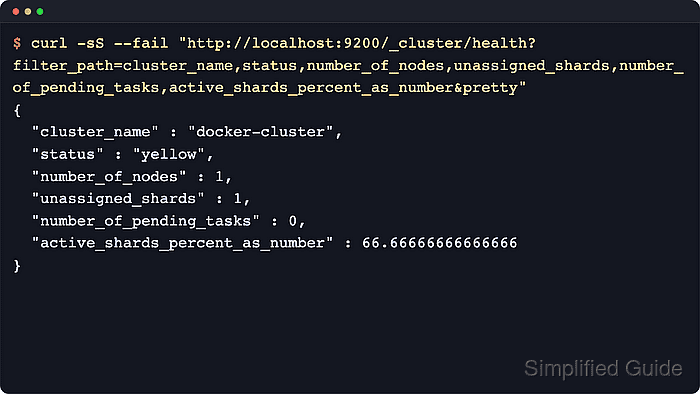
The _cluster/health API gives a JSON summary that works for scripts and alerting, while CAT endpoints give compact tables for a person at a terminal. Start with the health API, then use CAT views to narrow the problem to nodes, allocation, indices, shards, or pending cluster tasks.
Secured clusters usually require the same HTTPS endpoint, credentials, API key, and CA trust already used by operators. Use _cluster/health for monitoring integrations because CAT APIs are intended for human command-line or Kibana Console use.
Steps to monitor Elasticsearch cluster health:
- Request a concise cluster-wide health summary.
$ curl -sS --fail "http://localhost:9200/_cluster/health?filter_path=cluster_name,status,number_of_nodes,number_of_data_nodes,active_primary_shards,active_shards,relocating_shards,initializing_shards,unassigned_shards,number_of_pending_tasks,active_shards_percent_as_number&pretty"
{
  "cluster_name" : "docker-cluster",
  "status" : "yellow",
  "number_of_nodes" : 1,
  "number_of_data_nodes" : 1,
  "active_primary_shards" : 2,
  "active_shards" : 2,
  "relocating_shards" : 0,
  "initializing_shards" : 0,
  "unassigned_shards" : 1,
  "number_of_pending_tasks" : 0,
  "active_shards_percent_as_number" : 66.66666666666666
}
green means all primary and replica shards are assigned, yellow means all primary shards are assigned but at least one replica is unassigned, and red means at least one primary shard is unassigned.
- Use the CAT health view for a one-line operator snapshot.
$ curl -sS --fail "http://localhost:9200/_cat/health?v=true&h=cluster,status,node.total,node.data,shards,pri,relo,init,unassign,pending_tasks,active_shards_percent"
cluster        status node.total node.data shards pri relo init unassign pending_tasks active_shards_percent
docker-cluster yellow          1         1      2   2    0    0        1             0                 66.7%
The h= parameter selects the CAT columns shown here, which keeps repeated terminal checks focused on health, shard movement, unassigned shards, and pending cluster-state work.
- List nodes with resource indicators and role flags.
$ curl -sS --fail "http://localhost:9200/_cat/nodes?v&h=ip,heap.percent,ram.percent,cpu,load_1m,load_5m,load_15m,node.role,master,name"
ip         heap.percent ram.percent cpu load_1m load_5m load_15m node.role   master name
10.0.0.11           35          97   7    7.43    5.10     3.32 cdfhilmrstw *      es-node-1
The node.role column uses compact letters such as m for master-eligible, d for data, i for ingest, and - for a coordinating-only node.
- Review shard allocation and disk pressure across nodes.
$ curl -sS --fail "http://localhost:9200/_cat/allocation?v&h=shards,disk.indices,disk.used,disk.avail,disk.total,disk.percent,host,ip,node"
shards disk.indices disk.used disk.avail disk.total disk.percent host      ip         node
     2        9.8kb   270.1gb      1.5tb      1.7tb           14 es-node-1 10.0.0.11 es-node-1
     1                                                                                UNASSIGNED
An UNASSIGNED row means at least one shard is not placed on any node, and rising disk.percent can block new allocations when disk watermarks are crossed.
- Check index-level health, replica counts, and store growth.
$ curl -sS --fail "http://localhost:9200/_cat/indices?v&s=health,status,index&h=health,status,index,pri,rep,docs.count,store.size"
health status index           pri rep docs.count store.size
green  open   metrics-2026.04   1   0          1      4.8kb
yellow open   logs-2026.04      1   1          1      4.9kb
A single-node cluster commonly shows yellow for indices with replicas, because Elasticsearch will not assign a replica shard to the same node as its primary shard.
- Inspect shard placement and unassigned shard reasons.
$ curl -sS --fail "http://localhost:9200/_cat/shards?v=true&s=state,index,shard,prirep&h=index,shard,prirep,state,node,unassigned.reason"
index           shard prirep state      node      unassigned.reason
logs-2026.04    0     r      UNASSIGNED           INDEX_CREATED
logs-2026.04    0     p      STARTED    es-node-1
metrics-2026.04 0     p      STARTED    es-node-1
Focus first on prirep = p entries in UNASSIGNED state, because unassigned primary shards make the affected data unavailable. The unassigned.reason field records the last reason the shard became unassigned; use allocation explain when that value does not explain the current blocker.
- Check pending cluster tasks when health stays degraded or node events take too long to settle.
$ curl -sS --fail "http://localhost:9200/_cluster/pending_tasks?pretty"
{
  "tasks" : [ ]
}
An empty tasks array means there is no queued cluster-state work at that moment. Non-empty results expose fields such as priority, source, and time_in_queue_millis for backlog triage.

Mohd Shakir Zakaria is a cloud architect with deep roots in software development and open-source advocacy. Certified in AWS, Red Hat, VMware, ITIL, and Linux, he specializes in designing and managing robust cloud and on-premises infrastructures.


