Voting configuration exclusions let an Elasticsearch cluster remove a departing master-eligible node from quorum decisions before the node is stopped. Use them when a maintenance window removes half or more of the master-eligible nodes in a short time, or when a two-node voting configuration must be reduced to one node without losing the ability to elect a master.
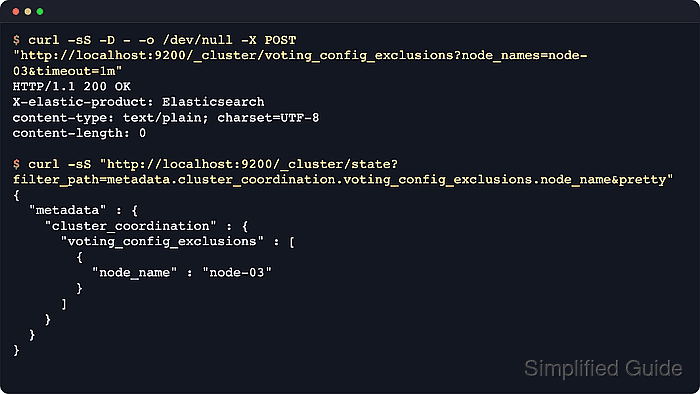
Elasticsearch normally adjusts the voting configuration automatically as master-eligible nodes join and leave. The /_cluster/voting_config_exclusions API is the manual coordination control for cases where automatic shrink cannot keep enough voters online during the removal.
The exclusion list persists in cluster state until it is cleared, and excluded nodes are not added back into the voting configuration while the exclusion remains. Secured self-managed clusters usually require the same HTTPS endpoint, credentials, and CA file used for other cluster APIs, so substitute those connection options before mutating cluster coordination state.
Steps to set Elasticsearch voting configuration exclusions:
- Check cluster health before changing the voting configuration.
$ curl --silent --show-error --fail "http://localhost:9200/_cluster/health?filter_path=cluster_name,status,number_of_nodes,number_of_data_nodes,number_of_pending_tasks&pretty"
{
  "cluster_name" : "search-cluster",
  "status" : "green",
  "number_of_nodes" : 2,
  "number_of_data_nodes" : 2,
  "number_of_pending_tasks" : 0
}
Delay the removal if status is red, if there is no elected master, or if cluster-state tasks are already backing up.
- List nodes and choose the departing master-eligible node.
$ curl --silent --show-error --fail "http://localhost:9200/_cat/nodes?v=true&h=id,ip,node.role,master,name"
id   ip         node.role   master name
A1b2 192.0.2.41 cdfhilmrstw *      node-01
C3d4 192.0.2.42 cdfhilmrstw -      node-02
The compact node.role string contains m on master-eligible nodes. Use node_ids instead of node_names when the node name can change but the persistent ID is known.
- Review the current voting configuration exclusions list.
$ curl --silent --show-error --fail "http://localhost:9200/_cluster/state?filter_path=metadata.cluster_coordination.voting_config_exclusions&pretty"
{
  "metadata" : {
    "cluster_coordination" : {
      "voting_config_exclusions" : [ ]
    }
  }
}
Clusters should normally keep this list empty. The list is limited by cluster.max_voting_config_exclusions, which defaults to 10.
- Add the departing node to the voting configuration exclusions list.
$ curl -sS -i --request POST "http://localhost:9200/_cluster/voting_config_exclusions?node_names=node-02&timeout=1m"
HTTP/1.1 200 OK
X-elastic-product: Elasticsearch
content-type: text/plain; charset=UTF-8
content-length: 0
An HTTP 200 OK response means Elasticsearch has removed the node from the voting configuration and will not reinstate it until the exclusions are cleared. If the request fails or times out, retry it or fix the cluster issue before stopping the node.
- Confirm the exclusion and committed voting configuration.
$ curl --silent --show-error --fail "http://localhost:9200/_cluster/state?filter_path=metadata.cluster_coordination.voting_config_exclusions,metadata.cluster_coordination.last_committed_config&pretty"
{
  "metadata" : {
    "cluster_coordination" : {
      "last_committed_config" : [
        "A1b2Node01PersistentNodeId"
      ],
      "voting_config_exclusions" : [
        {
          "node_id" : "C3d4Node02PersistentNodeId",
          "node_name" : "node-02"
        }
      ]
    }
  }
}
The last_committed_config list should no longer include the excluded node ID.
- Stop the excluded Elasticsearch node after the exclusion request succeeds.
$ sudo systemctl stop elasticsearch
Stopping the node before the exclusion returns 200 OK can leave the remaining master-eligible nodes without enough votes to publish cluster-state updates.
- Verify the remaining cluster still has an elected master.
$ curl --silent --show-error --fail "http://localhost:9200/_cat/master?v=true"
id                         host       ip         node
A1b2Node01PersistentNodeId 192.0.2.41 192.0.2.41 node-01
- Confirm the node count after the excluded node leaves.
$ curl --silent --show-error --fail "http://localhost:9200/_cluster/health?filter_path=cluster_name,status,number_of_nodes,number_of_pending_tasks&pretty" { "cluster_name" : "search-cluster", "status" : "green", "number_of_nodes" : 1, "number_of_pending_tasks" : 0 } - Clear the voting configuration exclusions after the node has left the cluster.
$ curl -sS -i --request DELETE "http://localhost:9200/_cluster/voting_config_exclusions?wait_for_removal=true"
HTTP/1.1 200 OK
X-elastic-product: Elasticsearch
content-type: text/plain; charset=UTF-8
content-length: 0
wait_for_removal=true is the default and waits until excluded nodes have left. Use wait_for_removal=false only when an exclusion was added in error or the node is expected to remain in the cluster.
- Verify the voting configuration exclusions list is empty again.
$ curl --silent --show-error --fail "http://localhost:9200/_cluster/state?filter_path=metadata.cluster_coordination.voting_config_exclusions&pretty"
{
  "metadata" : {
    "cluster_coordination" : {
      "voting_config_exclusions" : [ ]
    }
  }
}

Mohd Shakir Zakaria is a cloud architect with deep roots in software development and open-source advocacy. Certified in AWS, Red Hat, VMware, ITIL, and Linux, he specializes in designing and managing robust cloud and on-premises infrastructures.


