How to configure data tier nodes in Elasticsearch
Configuring Elasticsearch data tier nodes assigns each self-managed node to the storage tier it should serve, such as hot, warm, cold, frozen, or content. Tier roles let newer, write-heavy data stay on faster nodes while older data can move to hardware sized for lower query frequency or searchable snapshots.
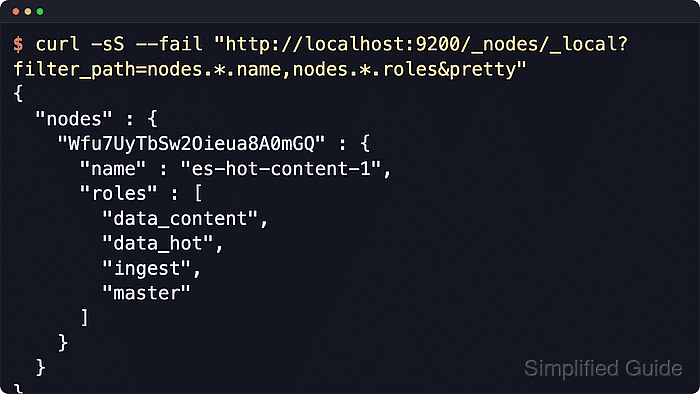
Self-managed tier placement starts with the node.roles setting in the node configuration file. Indices use the index-level _tier_preference setting to choose a tier, and ILM or index templates can update that preference as data ages.
Setting node.roles explicitly replaces the default all-roles profile, so keep every role the node still needs. Use either the generic data role or specialized data_* tier roles, not both on the same node, and keep content and hot tier coverage available for normal indices and data stream writes.
Steps to configure Elasticsearch data tier nodes:
- Record the current node names and roles before changing the tier layout.
$ curl -sS --fail \
  "http://localhost:9200/_nodes?pretty"
{
  "nodes" : {
    "node-id" : {
      "name" : "es-hot-content-1",
      ##### snipped #####
      "roles" : [
        "data_content",
        "data_hot",
        "ingest",
        "master"
      ]
    }
  }
}
Use the real node names from this output when mapping hosts to hot, warm, cold, frozen, or content responsibilities. Secured clusters usually require https:// and authentication options on the same API calls.
- Decide which nodes will provide each tier.
Use specialized roles only when the cluster needs separate tier hardware. A generic data node can serve all data tiers, while specialized tier nodes should include only the needed roles such as data_hot, data_warm, data_cold, data_frozen, or data_content.
- Open the Elasticsearch configuration file on each affected node.
$ sudoedit \
  /etc/elasticsearch/elasticsearch.yml
If a role change removes a node from a tier that already holds shards, migrate or drain the affected shards before the restart. Starting a repurposed node with unexpected shard or index metadata can prevent Elasticsearch from starting.
- Set the intended tier roles for that node.
# Hot and content node
node.roles:
  - master
  - ingest
  - data_content
  - data_hot

# Warm node
node.roles:
  - data_warm

# Cold node
node.roles:
  - data_cold
Do not combine data with data_hot, data_warm, data_cold, data_frozen, or data_content on the same node. Add other non-tier roles only when that node should still perform those jobs, such as master, ingest, ml, transform, or remote_cluster_client.
- Use data_frozen only for frozen searchable snapshot nodes.
# Frozen node
node.roles:
  - data_frozen
The frozen tier stores partially mounted indices and requires a snapshot repository. Keep frozen nodes dedicated when possible because frozen searches may need to fetch data from repository storage.
- Restart one affected Elasticsearch node.
$ sudo systemctl restart \
  elasticsearch
Use a rolling restart in production. Restarting multiple shard-holding nodes together can reduce availability and trigger heavy relocation work.
- Confirm the restarted node advertises the intended tier roles.
$ curl -sS --fail \
  "http://localhost:9200/_nodes/"\
"_local?pretty"
{
  "nodes" : {
    "node-id" : {
      "name" : "es-hot-content-1",
      ##### snipped #####
      "roles" : [
        "data_content",
        "data_hot",
        "ingest",
        "master"
      ]
    }
  }
}
The node info API returns explicit role names, which is easier to audit than the condensed role letters in CAT node output.
- Repeat the restart and role check for each changed node.
Keep at least one data_content target for regular indices and system indices, and at least one data_hot target for data stream backing indices. A single node can provide both tiers when the hardware and workload fit.
- Check a representative index tier preference after the tier nodes rejoin.
$ curl -sS --fail \
  "http://localhost:9200/tier/"\
"_settings?pretty"
{
  "tier" : {
    "settings" : {
      "index" : {
        ##### snipped #####
        "routing" : {
          "allocation" : {
            "include" : {
              "_tier_preference" : "data_content"
            }
          }
        },
        "number_of_replicas" : "0"
      }
    }
  }
}
Replace tier with a real index or backing index from the workload being tiered. Directly created indices default to data_content, while data stream backing indices default to data_hot. The generic data role is not a valid _tier_preference value.
- Verify the representative index is healthy on an available tier node.
$ curl -sS --fail \ "http://localhost:9200/_cluster/health/"\ "tier?pretty" { "cluster_name" : "sg-tier-verify", "status" : "green", "number_of_nodes" : 1, "number_of_data_nodes" : 1, "active_primary_shards" : 1, "active_shards" : 1, "unassigned_shards" : 0 ##### snipped ##### } - Confirm a shard for the representative index is started on a tier node.
$ curl -sS --fail \
  "http://localhost:9200/_cat/shards/"\
"tier?v&h=index,state,node"
index state   node
tier  STARTED es-hot-content-1
An index with _tier_preference set to data_warm,data_hot can allocate to a hot node when no warm node is available. If shards remain unassigned after a tier change, check replica counts, tier coverage, disk watermarks, and competing allocation filters.