Updating index settings in Elasticsearch changes the behavior of an existing index without recreating it. Operators commonly use the settings API to adjust replica counts for a node change, pause refreshes during a bulk load, or switch stored-field compression for future segment merges.
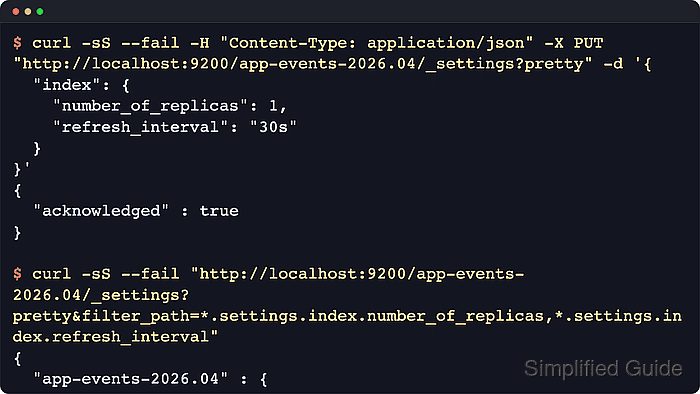
The /_settings API stores per-index values such as index.number_of_replicas, index.refresh_interval, and index.codec. Dynamic settings apply while the index remains open, while reopen=true can temporarily close and reopen a targeted index so many non-dynamic settings can be applied in one request.
Secured clusters need HTTPS, authentication, and an index role with manage privilege for update calls. Creation-time settings such as index.number_of_shards cannot be changed later, data stream write indices cannot be closed directly, and assigning null removes an explicit override so the setting falls back to its default behavior.
Steps to update index settings in Elasticsearch:
- Confirm the target index name and current state.
$ curl -sS --fail "http://localhost:9200/_cat/indices/app-events-2026.04?v"
health status index              uuid                   pri rep docs.count docs.deleted store.size pri.store.size dataset.size
yellow open   app-events-2026.04 eYjqbYegT5-IRT94jT8JOQ   1   1          0            0       227b           227b         227b
Replace http://localhost:9200 with the cluster endpoint and add authentication options when security is enabled. A one-node cluster with one replica normally shows yellow because the replica cannot be assigned to the same node.
- Read the current explicit settings on the index.
$ curl -sS --fail "http://localhost:9200/app-events-2026.04/_settings?pretty&filter_path=*.settings.index.number_of_replicas,*.settings.index.refresh_interval"
{
  "app-events-2026.04" : {
    "settings" : {
      "index" : {
        "refresh_interval" : "1s",
        "number_of_replicas" : "1"
      }
    }
  }
}
A missing field in this filtered response means the index is using a default, template, or inherited value instead of an explicit stored override.
- Apply dynamic settings to the open index.
$ curl -sS --fail -H "Content-Type: application/json" -X PUT "http://localhost:9200/app-events-2026.04/_settings?pretty" -d '{
  "index": {
    "number_of_replicas": 0,
    "refresh_interval": "-1"
  }
}'
{
  "acknowledged" : true
}
Zero replicas removes the redundant shard copy, and refresh_interval set to -1 disables automatic refreshes. Use those values only for a single-node cluster, a controlled bulk-load window, or another case where the availability and search-freshness tradeoff is intentional.
- Verify the dynamic settings now stored on the index.
$ curl -sS --fail "http://localhost:9200/app-events-2026.04/_settings?pretty&filter_path=*.settings.index.number_of_replicas,*.settings.index.refresh_interval" { "app-events-2026.04" : { "settings" : { "index" : { "refresh_interval" : "-1", "number_of_replicas" : "0" } } } } - Check index health after the replica setting change.
$ curl -sS --fail "http://localhost:9200/_cluster/health/app-events-2026.04?pretty&filter_path=status,number_of_nodes,number_of_data_nodes,active_primary_shards,active_shards,unassigned_shards,active_shards_percent_as_number"
{
  "status" : "green",
  "number_of_nodes" : 1,
  "number_of_data_nodes" : 1,
  "active_primary_shards" : 1,
  "active_shards" : 1,
  "unassigned_shards" : 0,
  "active_shards_percent_as_number" : 100.0
}
If number_of_replicas is greater than 0, the success signal is still unassigned_shards at 0 after allocation finishes.
- Apply a non-dynamic setting by allowing Elasticsearch to reopen the index.
$ curl -sS --fail -H "Content-Type: application/json" -X PUT "http://localhost:9200/app-events-2026.04/_settings?pretty&reopen=true" -d '{
  "index": {
    "codec": "best_compression"
  }
}'
{
  "acknowledged" : true
}
reopen=true temporarily closes and reopens the targeted index. Use a maintenance window when a brief interruption would affect writers or searches.
- Verify the non-dynamic setting now stored on the index.
$ curl -sS --fail "http://localhost:9200/app-events-2026.04/_settings?pretty&filter_path=*.settings.index.codec"
{
  "app-events-2026.04" : {
    "settings" : {
      "index" : {
        "codec" : "best_compression"
      }
    }
  }
}
Changing index.codec affects newly written or merged segments. Existing segments are rewritten only as merges occur.
- Reset the refresh interval override by assigning null.
$ curl -sS --fail -H "Content-Type: application/json" -X PUT "http://localhost:9200/app-events-2026.04/_settings?pretty" -d '{
  "index": {
    "refresh_interval": null
  }
}'
{
  "acknowledged" : true
}
Use preserve_existing=true when a wildcard or alias targets multiple indices and only missing settings should be filled in without overwriting stored values.
- Read the final settings to confirm the explicit refresh override is gone.
$ curl -sS --fail "http://localhost:9200/app-events-2026.04/_settings?pretty&filter_path=*.settings.index.refresh_interval,*.settings.index.number_of_replicas,*.settings.index.codec"
{
  "app-events-2026.04" : {
    "settings" : {
      "index" : {
        "codec" : "best_compression",
        "number_of_replicas" : "0"
      }
    }
  }
}
Current Elastic Stack defaults to a 1s refresh interval, while Elastic Cloud Serverless uses 5s. Search-idle shards may also defer automatic refreshes until search traffic resumes.

Mohd Shakir Zakaria is a cloud architect with deep roots in software development and open-source advocacy. Certified in AWS, Red Hat, VMware, ITIL, and Linux, he specializes in designing and managing robust cloud and on-premises infrastructures.


