How to recover DRBD split brain
Recovering DRBD split brain means choosing one node's data as authoritative and deliberately discarding divergent writes from the other node. The task is urgent after a network partition, mistaken promotion, or cluster-manager failure leaves a resource disconnected after both sides acted as Primary.
DRBD detects split brain during the peer handshake and drops the replication connection instead of trying to merge block-level changes. The node whose data will be overwritten is the victim, and the node whose data remains is the survivor; choosing the wrong side can remove the only current copy of application data.
Pause any cluster manager, mount unit, or application layer that can reopen the block device before changing roles. Recovery is complete only after the victim reconnects as SyncTarget, resynchronization finishes, and both nodes report Connected with UpToDate data.
Related: How to check DRBD resource status
Related: How to configure DRBD fencing
Related: How to configure DRBD quorum
Steps to recover DRBD split brain:
- Stop the workload or cluster resource that can write to the affected DRBD device.
Do not run split-brain recovery while an application, filesystem, Pacemaker, DRBD Reactor, or manual mount can keep writing to both data sets.
- Confirm the split-brain signal in the kernel log.
$ sudo journalctl --dmesg --grep "Split-Brain" --since "30 minutes ago"
Jun 19 12:40:18 node-a kernel: drbd wwwdata/0 drbd1000: Split-Brain detected, dropping connection!
DRBD reports split brain when the peer handshake finds divergent primary histories after connectivity returns.
Related: How to view DRBD logs - Check the affected resource on each node.
$ sudo drbdadm status wwwdata
wwwdata role:Primary
  disk:UpToDate
  node-b connection:StandAlone
Replace wwwdata with the real resource name. StandAlone or Connecting after a split-brain log entry means the recovery decision still has to be made.
Related: How to check DRBD resource status - Choose the survivor node before running any recovery command.
The victim node loses its divergent local modifications. Use application checks, recent writes, backups, and operator approval to decide which node's data remains authoritative.
- Force the victim resource into a disconnected state.
victim$ sudo drbdadm disconnect wwwdata
drbdadm disconnect is safe to repeat when the victim is already StandAlone.
- Demote the victim resource to secondary.
victim$ sudo drbdadm secondary wwwdata
If demotion fails because the device is open, stop the remaining workload, unmount the filesystem, or pause the cluster resource before retrying. Do not force the survivor side to discard data to work around a busy victim.
- Reconnect the victim while discarding its divergent writes.
victim$ sudo drbdadm connect --discard-my-data wwwdata
Run --discard-my-data only on the victim. Running it on the survivor reverses the recovery decision and can overwrite the chosen data set.
- Disconnect the survivor if it is also StandAlone.
survivor$ sudo drbdadm disconnect wwwdata
Skip the survivor-side reconnect pair when the survivor already shows Connecting; DRBD will complete the handshake when the victim reconnects.
- Reconnect the survivor resource.
survivor$ sudo drbdadm connect wwwdata
- Confirm that the victim is receiving the survivor's data.
victim$ sudo drbdadm status wwwdata
wwwdata role:Secondary
  disk:Inconsistent
  node-a role:Primary
    replication:SyncTarget peer-disk:UpToDate done:63.24
SyncTarget on the victim means its local divergent blocks are being overwritten from the survivor.
- Wait for resynchronization to finish.
victim$ sudo drbdadm wait-sync wwwdata
drbdadm wait-sync returns after the resource finishes any pending resynchronization.
- Verify the recovered connection and disk state.
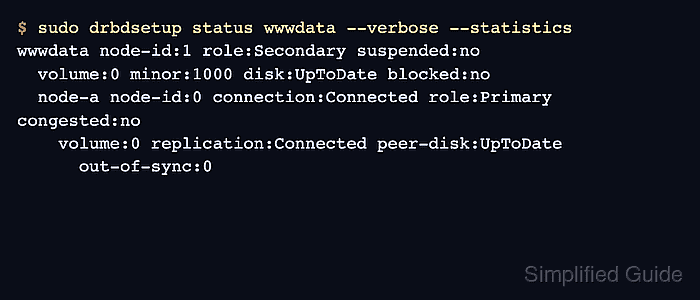
victim$ sudo drbdsetup status wwwdata --verbose --statistics wwwdata node-id:1 role:Secondary suspended:no volume:0 minor:1000 disk:UpToDate blocked:no node-a node-id:0 connection:Connected role:Primary congested:no volume:0 replication:Connected peer-disk:UpToDate out-of-sync:0connection:Connected, replication:Connected, peer-disk:UpToDate, and out-of-sync:0 show that the split-brain recovery has completed.
Related: How to verify DRBD synchronization state - Return the workload through its normal owner after both nodes show UpToDate data.
Use the cluster manager, mount unit, or application service that normally owns the resource. Investigate fencing, quorum, or promotion policy before putting the service back under automatic failover control.