How to configure DRBD fencing
DRBD fencing controls what happens when a primary resource loses contact with a peer and continuing writes could leave the peer with stale data. A fencing policy gives DRBD a handler path for constraining or fencing the other side before the cluster allows an unsafe promotion.
Pacemaker-managed DRBD resources normally use the handlers shipped with drbd-utils. crm-fence-peer.9.sh asks Pacemaker to stop promoting the fenced peer, and crm-unfence-peer.9.sh removes that restriction after the resource reconnects and synchronizes.
Use resource-only when the cluster manager can keep the peer from being promoted, and reserve resource-and-stonith for designs where the handler can confirm or power-fence the peer while local I/O waits. The resource file must be consistent on every node, and a controlled maintenance-window test is the only proof that the cluster fencing path works end to end.
Related: How to integrate DRBD with Pacemaker
Related: How to check DRBD resource status
Related: How to recover DRBD split brain
Steps to configure DRBD fencing:
- Confirm the Pacemaker fencing handler scripts are installed.
$ ls /usr/lib/drbd/crm-fence-peer.9.sh /usr/lib/drbd/crm-unfence-peer.9.sh
/usr/lib/drbd/crm-fence-peer.9.sh
/usr/lib/drbd/crm-unfence-peer.9.sh
These handlers are normally installed with drbd-utils on Pacemaker-capable DRBD 9 systems.
- Back up the current resource file.
$ sudo cp -a /etc/drbd.d/webdata.res /etc/drbd.d/webdata.res.bak
Replace webdata with the resource file name used by the cluster.
Related: How to back up DRBD metadata before a change - Open the resource configuration file.
$ sudoedit /etc/drbd.d/webdata.res
- Add the fencing policy and Pacemaker handlers to the resource.
resource webdata {
    net {
        protocol C;
        fencing resource-only;
    }
    handlers {
        fence-peer "/usr/lib/drbd/crm-fence-peer.9.sh";
        unfence-peer "/usr/lib/drbd/crm-unfence-peer.9.sh";
    }

    # existing on <node> sections stay here
}
Use resource-and-stonith only when Pacemaker STONITH is already configured and tested. Without a working fencing device, a disconnected primary can wait with suspended I/O until the peer state is resolved.
- Install the same resource file on every DRBD node.
The net and handlers sections must match across peers. A node with an older resource file can parse and apply different fencing behavior.
- Parse the active resource configuration.
$ sudo drbdadm dump webdata
# resource webdata on node-a: not ignored, not stacked
# defined at /etc/drbd.d/webdata.res:1
resource webdata {
    on node-a {
        node-id 0;
        volume 0 {
            device       minor 0;
            disk         /dev/vg0/webdata;
            meta-disk    internal;
        }
        address          ipv4 192.0.2.10:7788;
    }
##### snipped #####
    net {
        protocol           C;
        fencing          resource-only;
    }
    handlers {
        fence-peer       /usr/lib/drbd/crm-fence-peer.9.sh;
        unfence-peer     /usr/lib/drbd/crm-unfence-peer.9.sh;
    }
}
Run the parser check on each node that has an on section for the resource.
Related: How to validate DRBD configuration - Preview the runtime change without applying it.
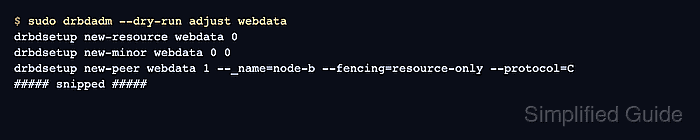
$ sudo drbdadm --dry-run adjust webdata
drbdsetup new-resource webdata 0
drbdsetup new-minor webdata 0 0
drbdsetup new-peer webdata 1 --_name=node-b --fencing=resource-only --protocol=C
drbdsetup new-path webdata 1 ipv4:192.0.2.10:7788 ipv4:192.0.2.11:7788
drbdmeta 0 v09 /dev/vg0/webdata internal apply-al
drbdsetup attach 0 /dev/vg0/webdata /dev/vg0/webdata internal
drbdsetup connect webdata 1
The dry run should show --fencing=resource-only, or --fencing=resource-and-stonith when that policy was intentionally configured.
- Apply the updated resource configuration.
$ sudo drbdadm adjust webdata
Apply the same validated file on all nodes before testing a disconnection. Mixed fencing settings can leave Pacemaker and DRBD making different promotion decisions.
- Check the resource state after the adjustment.
$ sudo drbdadm status webdata
webdata role:Primary
  volume:0 disk:UpToDate
  node-b role:Secondary
    volume:0 peer-disk:UpToDate
Start the failure test only when the intended primary and secondary are connected and UpToDate.
Related: How to check DRBD resource status - Trigger a controlled fencing test in a lab or approved maintenance window.
$ sudo drbdadm disconnect webdata
This interrupts the replication connection for the resource. Do not run it on a production service without an approved failover and recovery plan.
- Check the Pacemaker promotion constraint created by the handler.
$ sudo pcs constraint location
Location Constraints:
  Resource: ms_drbd_webdata
    Disabled on: node-b (score:-INFINITY) (role:Promoted)
Replace ms_drbd_webdata with the Pacemaker promotable clone name for the DRBD resource. No promotion constraint after a controlled disconnect means the handler path, Pacemaker resource name, or cluster communication needs correction.
- Reconnect the resource after the test.
$ sudo drbdadm connect webdata
- Verify the resource returns to a connected, synchronized state.
$ sudo drbdadm status webdata
webdata role:Primary
  volume:0 disk:UpToDate
  node-b role:Secondary
    volume:0 peer-disk:UpToDate
The crm-unfence-peer.9.sh handler should remove the Pacemaker promotion restriction after DRBD reconnects and synchronizes.