How to debug Detox synchronization timeouts
Detox synchronization timeouts happen when the test runner waits for the app to become idle and the app keeps reporting pending work. Debugging the timeout starts with the busy-resource log, because that output names whether Detox is waiting on animation, layout, timers, network requests, or another app-side signal.
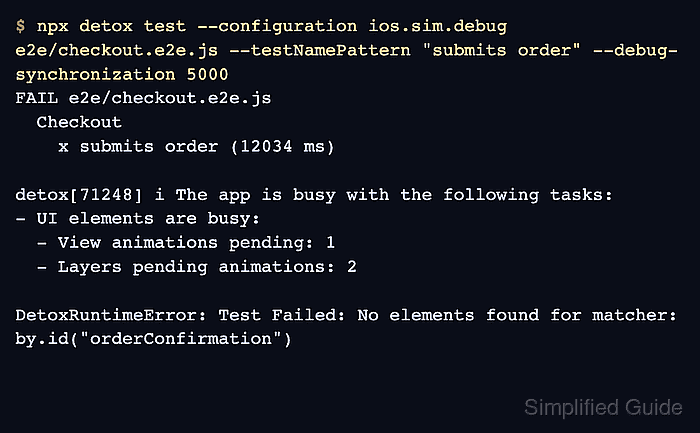
The --debug-synchronization option controls how long an action or expectation can run before Detox asks the app why it is still busy. A lower value, such as 5000, makes the busy-resource block appear earlier during a focused rerun, while --loglevel trace and failure-only artifacts keep enough context for the app log and screenshot review.
Treat the first repeated busy resource as the investigation target instead of raising the test timeout immediately. A spinner animation, a missing error state after a server failure, a recurring timer, or a long-polling request each needs a different fix, and the retest should show that the same spec passes without the busy-resource block repeating.
Related: How to debug flaky Detox tests
Related: How to disable animations for Detox
Related: How to wait for UI elements in Detox
Steps to debug Detox synchronization timeouts:
- Re-run the failing spec with synchronization diagnostics enabled.
$ npx detox test --configuration ios.sim.debug e2e/checkout.e2e.js --testNamePattern "submits order" --debug-synchronization 5000 --loglevel trace --record-logs failing --take-screenshots failing --artifacts-location artifacts/sync-timeout/
FAIL e2e/checkout.e2e.js
  Checkout
    x submits order (12034 ms)

detox[71248] i The app is busy with the following tasks:
- UI elements are busy:
  - View animations pending: 1
  - Layers pending animations: 2

DetoxRuntimeError: Test Failed: No elements found for matcher: by.id("orderConfirmation")
Artifacts saved to artifacts/sync-timeout/
Use the real configuration and spec name from the failing run. Detox prints synchronization status by default after a longer wait, but --debug-synchronization 5000 makes a focused diagnostic rerun easier to read.
- Locate the repeated busy-resource line in the saved Detox log.
$ grep -n "View animations pending" artifacts/sync-timeout/detox.log
artifacts/sync-timeout/detox.log:96:  - View animations pending: 1
artifacts/sync-timeout/detox.log:97:  - Layers pending animations: 2
For network-related timeouts, look for repeated URL lines instead of animation lines. A request to a long-polling endpoint, websocket fallback, or unreachable server should be fixed or excluded from synchronization rather than hidden with a larger timeout.
- Match the busy-resource signal to the failure screenshot or device log.
$ grep -n "CheckoutService" artifacts/sync-timeout/device.log
artifacts/sync-timeout/device.log:1542: CheckoutService request failed with 504 Gateway Timeout
artifacts/sync-timeout/device.log:1543: CheckoutScreen left loading spinner visible
If the Detox log only reports UI animation while the device log shows a server, parser, or app error, fix the app error path so the loader leaves the screen.
Tool: Application Log Pattern Analyzer - Isolate the busy animation with a test launch argument when the app already supports one.
- e2e/checkout.e2e.js
beforeEach(async () => {
  await device.launchApp({
    newInstance: true,
    launchArgs: { disableAnimations: 'true' },
  });
});

it('submits order', async () => {
  await element(by.id('submitOrder')).tap();
  await expect(element(by.id('orderConfirmation'))).toBeVisible();
});
Use this branch only for animations that do not change the feature being tested. If the app does not already support a no-animation launch argument, add that app-side switch first.
Related: How to disable animations for Detox - Use manual synchronization only for a screen that cannot be made idle.
await device.disableSynchronization();

await waitFor(element(by.id('orderConfirmation')))
  .toBeVisible()
  .withTimeout(8000);

await device.enableSynchronization();
Call device.enableSynchronization() only after the app returns to a screen that can become idle. Re-enabling synchronization while the same endless animation, timer, or request is still active can block until Detox times out again.
- Re-run the same spec after the targeted fix or isolation.
$ npx detox test --configuration ios.sim.debug e2e/checkout.e2e.js --testNamePattern "submits order" --debug-synchronization 5000
PASS e2e/checkout.e2e.js
  Checkout
    PASS submits order (6421 ms)

Test Suites: 1 passed, 1 total
Tests:       1 passed, 1 total
A passing rerun with no repeated busy-resource block proves the selected timeout signature was removed for this spec. Keep the diagnostic artifacts until the fix is reviewed, then remove the temporary artifact folder from routine runs.