How to troubleshoot Certbot challenge failures
A Certbot challenge failure means the ACME certificate authority could not prove control of one requested name, even though Certbot reached the order stage. Repeating the same production command can turn a webroot, firewall, redirect, or DNS mistake into a rate-limit problem, so preserve the failed signal before another live attempt.
HTTP-01 failures come from the public port 80 route that serves /.well-known/acme-challenge/. The failing host can still load its normal website while the challenge path returns a default virtual host, old token, login page, CDN block, stale cache, broken IPv6 listener, or missing file.
DNS-01 failures come from the TXT owner, value, delegation route, or resolver timing for _acme-challenge. Use Certbot's staging service or --dry-run while correcting the signal, because production authorization failures are rate limited per identifier and account.
Related: Use the Certbot staging environment
Related: Use a webroot challenge with Certbot
Related: Use a DNS challenge with Certbot
Related: Troubleshoot Certbot rate limit errors
Steps to troubleshoot Certbot challenge failures:
- Save the exact Certbot challenge error.
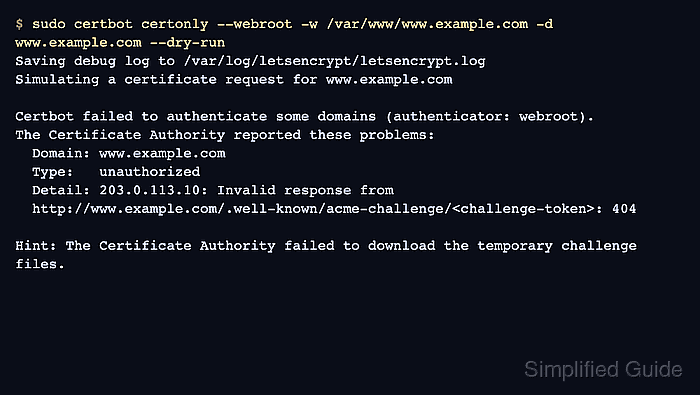
$ sudo certbot certonly --webroot -w /var/www/www.example.com -d www.example.com --dry-run
Saving debug log to /var/log/letsencrypt/letsencrypt.log
Simulating a certificate request for www.example.com

Certbot failed to authenticate some domains (authenticator: webroot).
The Certificate Authority reported these problems:
  Domain: www.example.com
  Type:   unauthorized
  Detail: 203.0.113.10: Invalid response from http://www.example.com/.well-known/acme-challenge/<challenge-token>: 404

Hint: The Certificate Authority failed to download the temporary challenge files.
Do not keep running the production command while this signal is unresolved. Capture one failure, fix the route or TXT value, and retest against staging.
- Identify the challenge type and the failing proof surface.
HTTP-01  http://www.example.com/.well-known/acme-challenge/<challenge-token>
DNS-01   TXT _acme-challenge.www.example.com
HTTP-01 always starts on port 80. For a wildcard order such as *.example.com, DNS-01 checks _acme-challenge.example.com instead of a name containing the literal asterisk.
- Stop live retries until the failed proof can be reproduced outside Certbot.
The production certificate authority allows only a small number of failed authorizations for the same identifier and account per hour. Staging and dry-run tests provide the same challenge path without issuing a trusted production certificate.
- Create the HTTP-01 challenge directory in the same webroot when the failed command used the webroot authenticator.
$ sudo mkdir -p /var/www/www.example.com/.well-known/acme-challenge
For standalone or web server plugins, use the equivalent public challenge handler instead of an unrelated document root.
- Write a temporary HTTP-01 probe file.
$ printf 'probe-token.account-thumbprint\n' | sudo tee /var/www/www.example.com/.well-known/acme-challenge/probe-token
probe-token.account-thumbprint
- Request the HTTP-01 probe through the public hostname.
$ curl http://www.example.com/.well-known/acme-challenge/probe-token
probe-token.account-thumbprint
The body should be only the probe text. Fix the virtual host, firewall, redirect, CDN, WAF, cache, load balancer, or IPv6 route when the response is a timeout, 404, HTML page, authentication redirect, or old token.
Tool: ACME HTTP 01 Readiness Validator - Check the DNS-01 TXT owner when the failure names DNS validation.
$ dig +short TXT _acme-challenge.www.example.com
"current-validation-string-from-certbot"
The visible TXT value must match the current Certbot prompt or DNS plugin output. A stale value from an older order, a record at the wrong owner, or a delegated owner that does not expose the current value will fail validation.
Tool: ACME DNS Challenge Readiness Check - Repair the single failing validation surface.
For HTTP-01, serve the exact challenge body on the public port 80 path for every public A and AAAA answer. For DNS-01, publish the current TXT value at the exact owner or terminal delegated owner and wait until public resolvers return that value.
- Remove the temporary HTTP-01 probe after the public request succeeds.
$ sudo rm /var/www/www.example.com/.well-known/acme-challenge/probe-token
Certbot removes its own challenge files after validation. Removing manual probes avoids confusing later checks with stale content.
- Retest the original validation flow against staging.
$ sudo certbot certonly --webroot -w /var/www/www.example.com -d www.example.com --dry-run
Saving debug log to /var/log/letsencrypt/letsencrypt.log
Simulating a certificate request for www.example.com
The dry run was successful.
Keep the same authenticator, domain list, webroot path, DNS plugin, and challenge options used by the failed order. --dry-run uses the staging service for certonly and renew tests.
Related: Use the Certbot staging environment - Retry production once after staging succeeds.
$ sudo certbot certonly --webroot -w /var/www/www.example.com -d www.example.com
Saving debug log to /var/log/letsencrypt/letsencrypt.log
Requesting a certificate for www.example.com

Successfully received certificate.
Certificate is saved at: /etc/letsencrypt/live/www.example.com/fullchain.pem
Key is saved at:         /etc/letsencrypt/live/www.example.com/privkey.pem
Remove --dry-run, --test-cert, and any staging --server override before the production request. A successful staging certificate is intentionally untrusted by normal browsers.
- Confirm that Certbot saved or renewed the expected certificate lineage.
$ sudo certbot certificates --cert-name www.example.com
Saving debug log to /var/log/letsencrypt/letsencrypt.log
Found the following certs:
  Certificate Name: www.example.com
    Domains: www.example.com
    Expiry Date: 2026-09-16 12:00:00+00:00 (VALID: 89 days)
    Certificate Path: /etc/letsencrypt/live/www.example.com/fullchain.pem
    Private Key Path: /etc/letsencrypt/live/www.example.com/privkey.pem
If the original problem was a renewal failure, run sudo certbot renew --cert-name www.example.com --dry-run after the repair so the saved renewal configuration proves the same challenge path.
Related: Test Certbot certificate renewal