How to tune MaxRequestWorkers in Apache
Tuning MaxRequestWorkers sets the upper limit on how many HTTP requests Apache can serve at the same time. A ceiling that is too low leaves requests queued behind busy workers and can trigger 503 responses under bursts, while a ceiling that is too high can push the host into swap or out-of-memory kills.
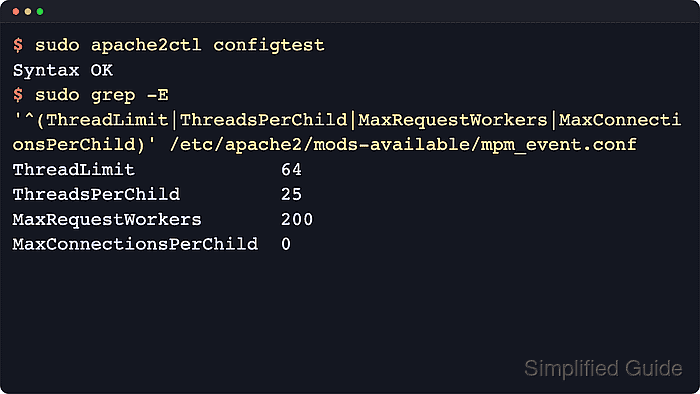
The active MPM (multi-processing module) decides how that ceiling is enforced. prefork handles one request per child process, while worker and event spread requests across threads inside multiple child processes, so the usable limit is shaped by ServerLimit, ThreadLimit, and ThreadsPerChild as well as the memory footprint of the workload behind each request.
Examples use current Debian and Ubuntu packaging with apache2ctl, the apache2 service, and /etc/apache2/mods-available/mpm_*.conf. On Red Hat-family systems, the same directives are usually managed with apachectl or httpd in /etc/httpd/conf.modules.d/00-mpm.conf. If the new target also needs higher ServerLimit or ThreadLimit values, plan a full restart because a graceful reload does not apply those hard-limit changes.
Steps to tune MaxRequestWorkers in Apache:
- Identify the active Apache multi-processing module.
$ apache2ctl -V Server version: Apache/2.4.66 (Ubuntu) ##### snipped ##### Server MPM: event threaded: yes (fixed thread count) forked: yes (variable process count) ##### snipped ##### - Read the live worker limits from the active MPM configuration link.
$ sudo grep -E '^(ThreadLimit|ThreadsPerChild|MaxRequestWorkers|MaxConnectionsPerChild)' /etc/apache2/mods-enabled/mpm_event.conf
ThreadLimit             64
ThreadsPerChild         25
MaxRequestWorkers       150
MaxConnectionsPerChild  0
On Debian and Ubuntu, /etc/apache2/mods-enabled/mpm_event.conf usually points back to /etc/apache2/mods-available/mpm_event.conf for editing.
- Calculate whether the new ceiling still fits inside the current hard limits.
For event and worker, divide MaxRequestWorkers by ThreadsPerChild and round up to get the required child-process count; if that result exceeds ServerLimit, raise ServerLimit too because the effective cap is ServerLimit * ThreadsPerChild. If ServerLimit is not set explicitly, event and worker default to 16 child processes, so the package values above top out at 400 requests.
- Check the error log for signs that the current ceiling is already saturating.
$ sudo grep -n 'MaxRequestWorkers' /var/log/apache2/error.log || echo "No MaxRequestWorkers warnings found"
No MaxRequestWorkers warnings found
- Back up the active MPM file before changing the worker ceiling.
$ sudo cp /etc/apache2/mods-available/mpm_event.conf /etc/apache2/mods-available/mpm_event.conf.backup
- Measure the Apache child-process RSS during representative traffic so the new ceiling stays inside real memory limits.
$ ps -o pid,rss,cmd -C apache2 --sort=-rss
    PID   RSS CMD
   3435 60448 /usr/sbin/apache2 -k start
   3434 60444 /usr/sbin/apache2 -k start
   3372  5768 /usr/sbin/apache2 -k start
##### snipped #####
Estimate the working set from busy child processes, not from an idle service, before multiplying it across the planned worker count.
- Edit the active MPM configuration file with the new ceiling.
<IfModule mpm_event_module>
    StartServers            2
    MinSpareThreads         25
    MaxSpareThreads         75
    ThreadLimit             64
    ThreadsPerChild         25
    MaxRequestWorkers       200
    MaxConnectionsPerChild  0
</IfModule>
Add or raise ServerLimit only when the new MaxRequestWorkers target no longer fits inside the current ThreadsPerChild math.
- Test the updated configuration before applying it.
$ sudo apache2ctl configtest
Syntax OK
The AH00558 message about a missing global ServerName is a warning, not a syntax failure.
Related: How to test Apache configuration
- Reload Apache when only MaxRequestWorkers changed and the existing ServerLimit plus ThreadLimit still cover the new value.
$ sudo systemctl reload apache2
Current Debian and Ubuntu packages map systemctl reload apache2 to apachectl graceful.
- Restart Apache when the change also raises ServerLimit or ThreadLimit.
$ sudo systemctl restart apache2
ServerLimit and ThreadLimit changes are ignored during a graceful reload, so a full restart is required when either hard limit changes.
- Confirm that the tuned MPM file now shows the new ceiling.
$ sudo grep MaxRequestWorkers /etc/apache2/mods-available/mpm_event.conf
MaxRequestWorkers       200
- Read the live worker counters from server-status?auto after the change.
$ curl -sS http://127.0.0.1/server-status?auto
127.0.0.1
ServerVersion: Apache/2.4.66 (Ubuntu)
ServerMPM: event
##### snipped #####
BusyWorkers: 1
GracefulWorkers: 0
IdleWorkers: 49
Processes: 2
Stopping: 0
##### snipped #####
Current Debian and Ubuntu packages usually enable mod_status with Require local on server-status, which is why the localhost check works here.
- Benchmark a representative URL with the intended concurrency after the change.
$ ab -n 200 -c 20 -k http://127.0.0.1/
This is ApacheBench, Version 2.3 <$Revision: 1923142 $>
##### snipped #####
Concurrency Level:      20
Time taken for tests:   0.005 seconds
Complete requests:      200
Failed requests:        0
Keep-Alive requests:    200
Requests per second:    39580.45 [#/sec] (mean)
Time per request:       0.505 [ms] (mean)
Time per request:       0.025 [ms] (mean, across all concurrent requests)
Use a representative endpoint and a safe maintenance window because overly aggressive ab settings can overload backends, caches, or application workers behind Apache.