The server-status page shows what Apache workers are doing while the server is under load, which helps separate slow backends, traffic spikes, and exhausted worker pools before a vague performance complaint becomes an outage.
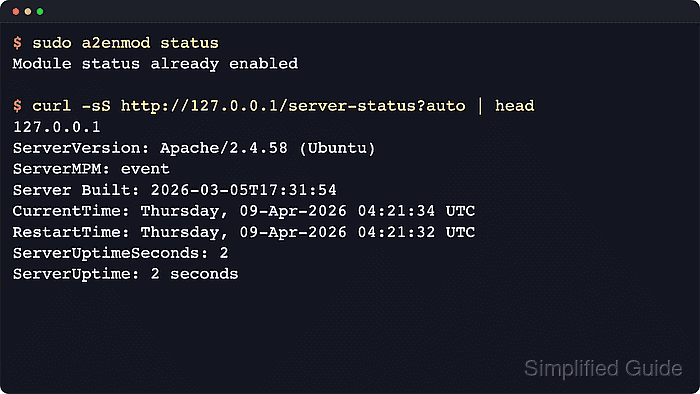
mod_status publishes the HTML status page at /server-status and a machine-readable status list at /server-status?auto. Current Debian and Ubuntu packages ship status.conf with a <Location /server-status> handler, Require local access, and ExtendedStatus On, so enabling the module is often a confirmation step unless that file was changed earlier.
Status output can expose client addresses, requested URLs, worker state, proxy load-balancer status, and overall server activity. On Debian and Ubuntu systems, the relevant command path uses a2enmod, status.conf, apache2ctl, and the apache2 systemd unit; keep access local-only unless a trusted admin subnet is explicitly required.
Steps to enable Apache server-status page:
- Enable the status module.
$ sudo a2enmod status
Module status already enabled
Current Debian and Ubuntu packages usually install the default status-page snippet together with the module definition, so this command often confirms the module is already active rather than changing anything.
- Inspect the packaged status-page configuration.
$ sudo cat /etc/apache2/mods-available/status.conf
# Allow server status reports generated by mod_status,
# with the URL of http://servername/server-status
# Uncomment and change the "192.0.2.0/24" to allow access from other hosts.

<Location /server-status>
	SetHandler server-status
	Require local
	#Require ip 192.0.2.0/24
</Location>

# Keep track of extended status information for each request
ExtendedStatus On

# Determine if mod_status displays the first 63 characters of a request or
# the last 63, assuming the request itself is greater than 63 chars.
# Default: Off
#SeeRequestTail On


<IfModule mod_proxy.c>
	# Show Proxy LoadBalancer status in mod_status
	ProxyStatus On
</IfModule>
Leave Require local in place unless the page must be reachable from a trusted admin network. The optional ProxyStatus On block adds proxy load-balancer details only when mod_proxy is loaded.
- If the file was customized previously or remote admin access is required, edit status.conf so the status handler exists and access stays restricted.
$ sudoedit /etc/apache2/mods-available/status.conf
<Location /server-status>
    SetHandler server-status
    Require local
    #Require ip 192.0.2.0/24
</Location>

ExtendedStatus On
Do not publish /server-status openly without an allowlist or authentication because the page can reveal current requests, client addresses, and worker state.
Add one or more Require ip rules alongside Require local when both local and remote admin access are needed.
- Validate the Apache configuration syntax.
$ sudo apache2ctl configtest
AH00558: apache2: Could not reliably determine the server's fully qualified domain name, using 192.0.2.10. Set the 'ServerName' directive globally to suppress this message
Syntax OK
The AH00558 line is a hostname warning, not a syntax failure.
Related: How to test Apache configuration
- Restart Apache so the enabled module and status-page configuration load together.
$ sudo systemctl restart apache2
If the status module was already enabled and only status.conf changed, sudo systemctl reload apache2 is usually enough. On hosts where systemd is not managing Apache, use sudo apache2ctl graceful instead.
- Verify the machine-readable status endpoint locally.
$ curl -sS http://127.0.0.1/server-status?auto
127.0.0.1
ServerVersion: Apache/2.4.66 (Ubuntu)
ServerMPM: event
Server Built: 2026-06-03T15:25:00
CurrentTime: Saturday, 06-Jun-2026 07:43:16 UTC
RestartTime: Saturday, 06-Jun-2026 07:43:15 UTC
ParentServerConfigGeneration: 1
ParentServerMPMGeneration: 0
ServerUptimeSeconds: 1
ServerUptime: 1 second
##### snipped #####
BusyWorkers: 1
GracefulWorkers: 0
IdleWorkers: 49
Processes: 2
Stopping: 0
##### snipped #####
Scoreboard: _________________________W________________________
##### snipped #####
Use the HTML page at /server-status when the worker scoreboard or current requests are easier to inspect visually, and use ?auto for scripts or monitoring.
- If the page should remain local-only, test from a different machine that is not in the allowlist and confirm Apache returns HTTP 403.
$ curl -I -sS http://192.0.2.40/server-status
HTTP/1.1 403 Forbidden
Date: Sat, 06 Jun 2026 07:46:01 GMT
Server: Apache/2.4.66 (Ubuntu)
Content-Type: text/html; charset=iso-8859-1
This negative test must run from another host or a separate network namespace. A request generated on the Apache host can still satisfy Require local when the client and server addresses are both local.

Mohd Shakir Zakaria is a cloud architect with deep roots in software development and open-source advocacy. Certified in AWS, Red Hat, VMware, ITIL, and Linux, he specializes in designing and managing robust cloud and on-premises infrastructures.


