How to protect Apache against DoS request floods
Repeated HTTP requests from one client can exhaust Apache workers, produce slow responses, and hide real users behind a stream of 403 or 503 errors. mod_evasive gives Apache a local request-rate guard for simple same-URI bursts and brute-force style traffic, so the server can deny abusive clients before every request reaches application code.
On Ubuntu and Debian systems, the libapache2-mod-evasive package installs the module and enables it through the normal /etc/apache2/mods-available/ and /etc/apache2/mods-enabled/ layout. Current Ubuntu 26.04 packages load the module as evasive_module, and the configuration must explicitly set DOSEnabled true before threshold checks produce blocks.
Treat mod_evasive as one layer for short request floods, not as complete DDoS protection. Tune thresholds against normal traffic, keep load tests away from production users, and configure trusted real-client address handling first when Apache sits behind a reverse proxy, load balancer, or CDN.
Steps to configure mod_evasive for Apache request-flood blocking:
- Install mod_evasive and ApacheBench from the distribution packages.
$ sudo apt-get update
##### snipped #####
$ sudo apt-get install --assume-yes --no-install-recommends libapache2-mod-evasive apache2-utils
##### snipped #####
Setting up libapache2-mod-evasive (2.4.0-3) ...
info: Executing deferred 'a2enmod evasive' for package libapache2-mod-evasive
apache2-utils provides ab for the controlled verification burst. The mod_evasive package recommends mail utilities for DOSEmailNotify, so install a mailer separately only when email alerts will be used.
- Confirm the evasive module is enabled.
$ sudo a2query -m evasive
evasive (enabled by maintainer script)
If the module is disabled, run sudo a2enmod evasive and continue with the same configuration test and restart steps below.
- Create a private directory for mod_evasive marker and lock files.
$ sudo install -d -o www-data -g www-data -m 0750 /var/log/mod_evasive
The directory must be writable by the Apache runtime user and should not be writable by ordinary shell users.
- Edit the evasive.conf module file under /etc/apache2/mods-available/ and set the blocking thresholds.
<IfModule evasive_module>
    DOSEnabled          true
    DOSHashTableSize    3097
    DOSPageCount        2
    DOSSiteCount        20
    DOSPageInterval     1
    DOSSiteInterval     1
    DOSBlockingPeriod   10
    DOSLogDir           "/var/log/mod_evasive"
    #DOSEmailNotify     admin@host.example.net
    #DOSSystemCommand   "su - user -c '/sbin/... %s ...'"
    #DOSWhitelist       203.0.113.10
</IfModule>
- DOSEnabled turns threshold checks on. Set it to true.
- DOSPageCount and DOSPageInterval limit repeated requests for the same URI.
- DOSSiteCount and DOSSiteInterval limit total requests from the same client IP.
- DOSBlockingPeriod controls how long the client receives denials after crossing a threshold.
- DOSLogDir stores marker and lock files outside world-writable temporary directories.
- DOSEmailNotify and DOSSystemCommand are optional alert and automation hooks.
- DOSWhitelist excludes trusted client addresses from blocking when they have a clear operational reason.
Use <IfModule evasive_module> on current Ubuntu packages. An old <IfModule mod_evasive20.c> wrapper does not match the loaded module name in Ubuntu 26.04 and can leave the directives ignored.
When traffic arrives through a reverse proxy or CDN, configure mod_remoteip with trusted proxy ranges before relying on per-client thresholds. Otherwise mod_evasive may block the proxy address instead of the abusive client.
Tool: Proxy Server Checker
These example thresholds are intentionally low enough to prove blocking in a local test. Raise them for asset-heavy pages, health checks, crawlers, and busy API clients after reviewing normal traffic.
- Test the Apache configuration before applying the change.
$ sudo apache2ctl -t
Syntax OK
Related: How to test Apache configuration
- Restart the apache2 service so the module state and thresholds apply together.
$ sudo systemctl restart apache2
- Confirm Apache loaded mod_evasive under the current module name.
$ sudo apache2ctl -M
Loaded Modules:
##### snipped #####
 evasive_module (shared)
##### snipped #####
- Confirm the local test endpoint answers before generating a request burst.
$ curl -I -sS http://127.0.0.1/
HTTP/1.1 200 OK
Date: Sat, 06 Jun 2026 07:26:22 GMT
Server: Apache/2.4.66 (Ubuntu)
##### snipped #####
Use a staging hostname or local endpoint that belongs to the Apache server being configured. Do not run the burst test against a shared production site.
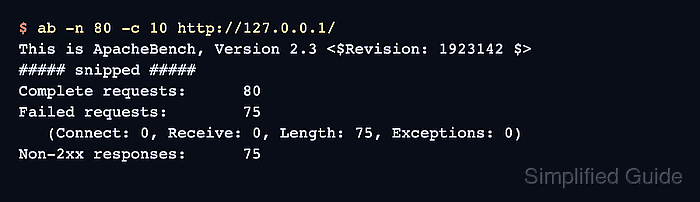
- Run a controlled ApacheBench burst against the local endpoint.
$ ab -n 80 -c 10 http://127.0.0.1/
This is ApacheBench, Version 2.3 <$Revision: 1923142 $>
##### snipped #####
Complete requests:      80
Failed requests:        75
   (Connect: 0, Receive: 0, Length: 75, Exceptions: 0)
Non-2xx responses:      75
##### snipped #####
Failed requests can count length mismatches because ab receives both the normal page and shorter 403 responses during the same run. The decisive signal is that Non-2xx responses appears after the threshold is crossed.
Only run load tests against systems you control and only at request counts that will not disrupt real users or upstream applications.
- Confirm that requests from the blocked client receive 403 Forbidden during the block window.
$ curl -I -sS http://127.0.0.1/
HTTP/1.1 403 Forbidden
Date: Sat, 06 Jun 2026 07:26:22 GMT
Server: Apache/2.4.66 (Ubuntu)
Content-Type: text/html; charset=iso-8859-1
- Review the Apache error log for evasive denial entries.
$ sudo cat /var/log/apache2/error.log
##### snipped #####
[Sat Jun 06 07:26:22.640890 2026] [evasive:warn] [pid 755:tid 763] [client 127.0.0.1:58814] Blacklisting address 127.0.0.1: possible DoS attack.
[Sat Jun 06 07:26:22.640901 2026] [evasive:notice] [pid 755:tid 763] [client 127.0.0.1:58814] [host 127.0.0.1] [resource "/var/www/html/"] [reason "URI DOS"] client denied by server configuration
- Check /var/log/mod_evasive for the per-client marker file created during the block period.
$ sudo ls -l /var/log/mod_evasive
total 4
-rw-r--r-- 1 www-data www-data 4 Jun  6 07:26 dos-127.0.0.1
The marker can disappear after DOSBlockingPeriod expires. If legitimate clients are being denied, raise the thresholds first and whitelist only trusted automation that has a clear reason to exceed them.