Blocking a User-Agent string in Apache is useful when a known crawler, scraper, monitor, or broken client keeps hitting a site with a predictable header value. The block should be narrow enough to stop that repeat traffic without turning a spoofable request header into a security boundary.
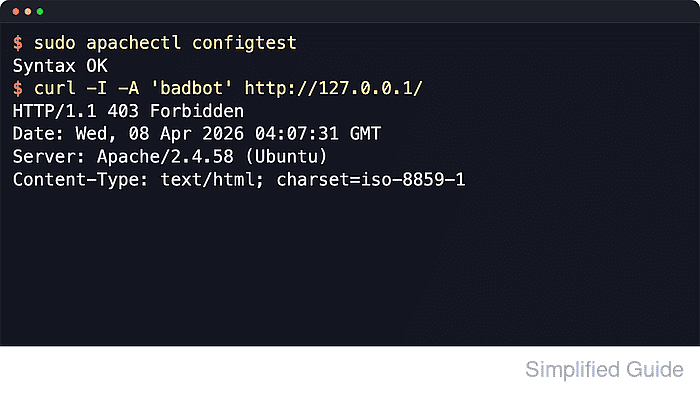
Apache 2.4 can tag matching requests with SetEnvIfNoCase from mod_setenvif, then deny only tagged requests with Require not env. The negated requirement must sit inside a RequireAll block with a positive rule such as Require all granted, because a negated Require line cannot authorize a request by itself.
The examples below use the Debian and Ubuntu layout with /etc/apache2/conf-available, a2enconf, and the apache2 service. On RHEL-family systems, place the same directives in the appropriate virtual host or a file under /etc/httpd/conf.d/ and reload the httpd service after the syntax test.
Steps to block user agents in Apache:
- Choose the smallest scope that should receive the block.
For one site, place the rule inside that site's <VirtualHost> block. For one URL tree, use a narrower <Location "/path/"> block. Use a global drop-in only when the block should affect every site served by the host.
- Identify the exact User-Agent token to match from logs, support reports, or upstream crawler documentation.
Match a distinctive token such as BadBot or SiteScraper instead of broad words such as bot, crawler, or curl. Broad patterns can block search crawlers, uptime checks, API clients, and internal automation.
Tool: User-Agent Parser
- Create a dedicated Apache configuration snippet.
$ sudoedit /etc/apache2/conf-available/block-user-agent.conf
Default Debian and Ubuntu Apache packages load mod_setenvif during installation. If a custom build reports Invalid command 'SetEnvIfNoCase' during the syntax test, enable or load mod_setenvif before continuing.
- Add the environment match and authorization rule.
SetEnvIfNoCase User-Agent "BadBot|SiteScraper|ExampleCrawler" bad_ua=1

<Location "/">
    <RequireAll>
        Require all granted
        Require not env bad_ua
    </RequireAll>
</Location>
Replace the example regex with the actual token or token group from your traffic. Use Require all granted only for public content. If the path already has authentication or IP rules, add Require not env bad_ua inside the existing authorization structure instead of replacing it with this open example.
- Enable the configuration snippet.
$ sudo a2enconf block-user-agent
Enabling conf block-user-agent.
To activate the new configuration, you need to run:
  service apache2 reload
On RHEL-family systems, there is no a2enconf step when the file already lives under /etc/httpd/conf.d/.
- Test the Apache configuration syntax.
$ sudo apache2ctl configtest
Syntax OK
The AH00558 fully qualified domain name warning can appear before Syntax OK on fresh Debian or Ubuntu systems. It is separate from this user-agent rule.
Related: How to test Apache configuration
- Reload Apache to apply the rule.
$ sudo systemctl reload apache2
The a2enconf helper still prints service apache2 reload on Debian and Ubuntu, but systemctl reload apache2 is the normal equivalent on systemd hosts.
- Send a request with a blocked User-Agent string.
$ curl -sI -A 'BadBot/1.0' http://127.0.0.1/
HTTP/1.1 403 Forbidden
Date: Sat, 06 Jun 2026 03:39:21 GMT
Server: Apache/2.4.66 (Ubuntu)
Content-Type: text/html; charset=iso-8859-1
If the rule is inside a name-based virtual host, add the matching host header with -H 'Host: www.example.net' so the request reaches the intended site.
- Send a request with a non-matching User-Agent string.
$ curl -sI -A 'Mozilla/5.0' http://127.0.0.1/
HTTP/1.1 200 OK
Date: Sat, 06 Jun 2026 03:39:21 GMT
Server: Apache/2.4.66 (Ubuntu)
Last-Modified: Sat, 06 Jun 2026 03:39:19 GMT
ETag: "29b0-6538d85ba5a45"
Accept-Ranges: bytes
Content-Length: 10672
Vary: Accept-Encoding
Content-Type: text/html
Rollback: run sudo a2disconf block-user-agent and reload Apache again, or remove the directives from the target virtual host and reload that service.

Mohd Shakir Zakaria is a cloud architect with deep roots in software development and open-source advocacy. Certified in AWS, Red Hat, VMware, ITIL, and Linux, he specializes in designing and managing robust cloud and on-premises infrastructures.


