JUnit XML is the test-report shape many CI systems, dashboards, and quality gates understand. An XCUITest run produces Xcode's native .xcresult bundle first, so converting that bundle into JUnit XML gives the pipeline a small structured artifact while preserving the richer Xcode result bundle for screenshots, logs, and attachments.
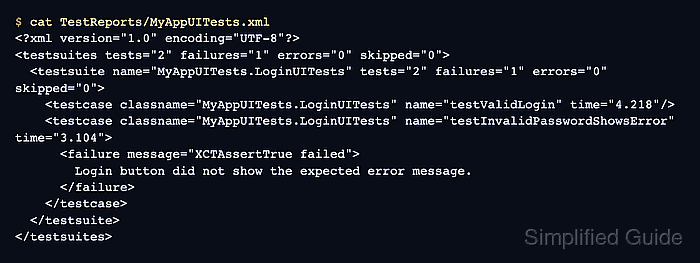
xcodebuild writes the result bundle with -resultBundlePath, and xcresultparser reads the bundle through Apple's result tooling to print JUnit XML to standard output. Redirecting that output into TestReports/MyAppUITests.xml keeps the conversion explicit and lets the same command run locally or in a macOS CI job.
Start from a completed UI test run such as TestResults/MyAppUITests.xcresult. Keep the .xcresult bundle as the primary diagnostic artifact, generate the XML report beside it, and compare the XML counts with the native Xcode summary before trusting a CI widget or release gate.
Steps to generate a JUnit report from XCUITest results:
- Confirm the XCUITest result bundle exists.
$ ls -d TestResults/MyAppUITests.xcresult
TestResults/MyAppUITests.xcresult
The bundle should come from an xcodebuild test run that used -resultBundlePath. Generate it before converting the report.
Related: How to save XCUITest result bundles - Install xcresultparser on the Mac or CI runner that will convert the bundle.
$ brew install xcresultparser
xcresultparser is available from Homebrew and supports JUnit output from .xcresult bundles.
- Check that the converter is available.
$ xcresultparser
Error: Missing expected argument '<xcresult-file>'
OVERVIEW: xcresultparser 2.0.1
Interpret binary .xcresult files and print summary in different formats: txt,
xml, html or colored cli output.
- Create the report output directory.
$ mkdir -p TestReports
- Convert the result bundle into JUnit XML.
$ xcresultparser -o junit TestResults/MyAppUITests.xcresult > TestReports/MyAppUITests.xml
The converter writes the report to standard output, so the shell redirection creates the XML file. Use a fresh output path for each CI job or shard.
- Validate that the XML file is well formed.
$ xmllint --noout TestReports/MyAppUITests.xml
No output from xmllint means the XML parser accepted the file.
- Inspect the generated JUnit report.
$ cat TestReports/MyAppUITests.xml
<?xml version="1.0" encoding="UTF-8"?>
<testsuites tests="2" failures="1" errors="0" skipped="0">
  <testsuite name="MyAppUITests.LoginUITests" tests="2" failures="1" errors="0" skipped="0">
    <testcase classname="MyAppUITests.LoginUITests" name="testValidLogin" time="4.218"/>
    <testcase classname="MyAppUITests.LoginUITests" name="testInvalidPasswordShowsError" time="3.104">
      <failure message="XCTAssertTrue failed">
        Login button did not show the expected error message.
      </failure>
    </testcase>
  </testsuite>
</testsuites>
The XML should show the same test count and failure names that belong to the Xcode run.
Tool: JUnit Test Report Analyzer - Compare the native Xcode summary with the XML counts.
$ xcrun xcresulttool get test-results summary --path TestResults/MyAppUITests.xcresult
{
  "failedTests" : 1,
  "passedTests" : 1,
  "result" : "Failed",
  "testFailures" : [
    {
      "testName" : "testInvalidPasswordShowsError()"
    }
  ],
  "totalTestCount" : 2
}
Use xcresulttool from the selected full Xcode installation. A Mac with only Command Line Tools selected cannot inspect iOS UI test bundles.
- Add the conversion and upload steps to the CI workflow after the xcodebuild test step.
- .github/workflows/xcuitest.yml
      - name: Generate XCUITest JUnit report
        if: always()
        run: |
          brew install xcresultparser
          mkdir -p TestReports
          xcresultparser -o junit TestResults/MyAppUITests.xcresult > TestReports/MyAppUITests.xml
          xmllint --noout TestReports/MyAppUITests.xml

      - name: Upload XCUITest JUnit report
        if: always()
        uses: actions/upload-artifact@v7
        with:
          name: xcuitest-junit-report
          path: TestReports/MyAppUITests.xml
          if-no-files-found: error
Keep the native .xcresult upload as a separate artifact so failed UI tests still have screenshots and activity logs for debugging.
- Confirm the CI job uploaded the XML artifact.
Run actions/upload-artifact@v7
With the provided path, there will be 1 file uploaded
Artifact xcuitest-junit-report has been successfully uploaded

Mohd Shakir Zakaria is a cloud architect with deep roots in software development and open-source advocacy. Certified in AWS, Red Hat, VMware, ITIL, and Linux, he specializes in designing and managing robust cloud and on-premises infrastructures.


