Versioning WordPress static assets changes stylesheet and script URLs when the underlying files change. A new URL gives browsers and CDN edge caches a new cache key after a theme or plugin deployment, so visitors stop receiving stale CSS or JavaScript that belonged to the previous release.
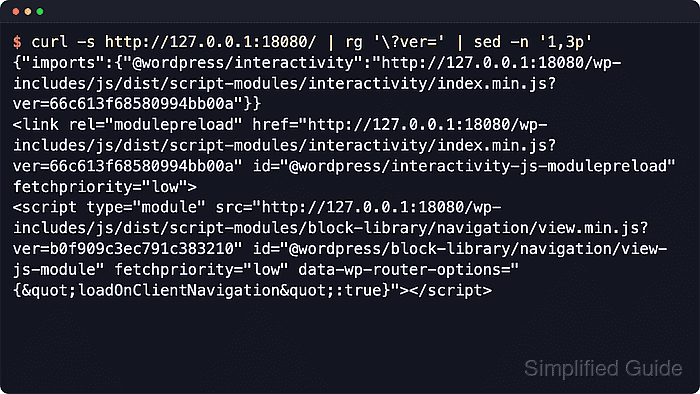
The version value comes from the fourth argument passed to wp_enqueue_style() or wp_enqueue_script(). WordPress appends that value as a ?ver= query string; leaving the argument as false makes WordPress use the installed core version instead, while null suppresses the version query string completely.
Use filemtime() when one origin filesystem serves the site and the file modification time is the intended cache-busting value. Use a build hash, release string, or versioned filename when multiple web heads, container images, or build artifacts must all emit the same asset URL. If the CDN cache policy ignores query strings, change the built filename or path instead of relying on ?ver=.
Steps to version WordPress static assets for CDN cache busting:
- Locate the enqueue call for the asset that changes during deployment.
$ grep -R -n "wp_enqueue_" wp-content/themes/example
wp-content/themes/example/functions.php:18:wp_enqueue_style( 'site-style',
wp-content/themes/example/functions.php:26:wp_enqueue_script( 'site-app',
Use the wp_enqueue_scripts hook for public front-end assets, admin_enqueue_scripts for dashboard assets, and login_enqueue_scripts for the login screen.
- Version a theme stylesheet from the file modification time.
$site_css_path = get_stylesheet_directory() . '/assets/css/site.css';
$site_css_ver  = file_exists( $site_css_path ) ? filemtime( $site_css_path ) : wp_get_theme()->get( 'Version' );

wp_enqueue_style(
    'site-style',
    get_stylesheet_directory_uri() . '/assets/css/site.css',
    array(),
    $site_css_ver
);
For parent-theme assets, use get_template_directory() and get_template_directory_uri(). For plugin assets, pair plugin_dir_path( FILE ) with plugins_url() so the filesystem path and public URL point at the same file.
- Use one release value for generated assets that are deployed to more than one server.
$asset_version = 'release-2026-06-21-a1b2c3d4';

wp_enqueue_script(
    'site-app',
    get_stylesheet_directory_uri() . '/assets/js/app.js',
    array(),
    $asset_version,
    array( 'in_footer' => true )
);
Replace the sample release string with the build hash, Git commit, or deployment version emitted by the release pipeline. Every origin node should print the same value for the same release.
- Switch to a versioned filename when the CDN ignores query strings in the cache key.
wp_enqueue_script(
    'site-app',
    get_stylesheet_directory_uri() . '/dist/app.a1b2c3d4.js',
    array(),
    null,
    array( 'in_footer' => true )
);
Passing null removes the ?ver= query string because the filename already carries the cache-busting value. Configure the build to write a new filename whenever the file content changes.
- Deploy the enqueue-code change and the matching asset file in the same release.
If page HTML references a new asset URL before that file exists on every origin node, the CDN can cache a temporary 404 or stale response for the new cache key.
- Inspect the rendered page source or browser Network panel and confirm the asset URL contains the new version value.
<link rel='stylesheet' id='site-style-css'
  href='https://www.example.com/wp-content/themes/example/assets/css/site.css?ver=1743210025'
  type='text/css' media='all' />
<script src='https://www.example.com/wp-content/themes/example/assets/js/app.js?ver=release-2026-06-21-a1b2c3d4'
  id='site-app-js'></script>
Success is visible when the page markup references the new ?ver= value or the new hashed filename.
Tool: URL Parser - Request the versioned asset URL through the public CDN hostname.
$ curl -I -sS 'https://www.example.com/wp-content/themes/example/assets/css/site.css?ver=1743210025'
HTTP/2 200
content-type: text/css
cache-control: public, max-age=31536000
x-cache: Miss from cloudfront
A 200 or expected 304 response confirms the new URL reaches a real asset. Repeat the request after the first fill if the CDN should return a cache hit for that exact versioned URL.
- Invalidate stale HTML or old error objects only when the CDN still serves old markup after deployment.
Versioned asset URLs reduce full-site invalidations, but a targeted purge is still useful when cached page HTML points at the old asset or the edge cached a temporary error for the new path.

Mohd Shakir Zakaria is a cloud architect with deep roots in software development and open-source advocacy. Certified in AWS, Red Hat, VMware, ITIL, and Linux, he specializes in designing and managing robust cloud and on-premises infrastructures.


