WHOIS rate-limit responses mean the registry, registrar, or gateway has stopped answering from the current source. More retries can replace a clear quota message with dropped connections, incomplete output, or a longer block, so preserve the first failure before changing lookup paths.
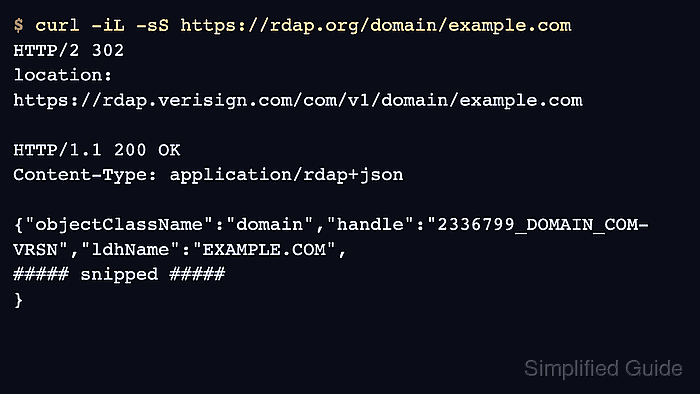
RDAP gives the same registration-data task an HTTPS path with status codes and response headers. A 429 Too Many Requests response is a quota signal, and Retry-After gives the wait time when the server includes it.
Do not bypass limits by rotating source addresses, hiding traffic, or sending the same query to every server in the namespace. Use the authoritative server named by IANA, a referral, or the RDAP redirect path, then slow any batch that triggered the limit.
Related: How to check domains in bulk with whois
Related: How to query RDAP for a domain
Related: How to save raw whois output
Steps to handle whois rate limits:
- Stop the batch or repeated lookup as soon as quota text appears.
Do not keep retrying to test whether the limit has cleared. Additional queries can extend the block or replace a clear rate-limit response with a timeout or partial record.
- Save the exact response and lookup time before changing tools or servers.
$ mkdir -p whois-evidence
$ whois example.com > whois-evidence/example.com.rate-limit.whois 2>&1
$ date -u +"%Y-%m-%dT%H:%M:%SZ" > whois-evidence/example.com.rate-limit.checked-at.txt
Related: How to save raw whois output
- Pause the source that hit the limit.
$ sleep 300
If the server provides a retry time, wait at least that long. If there is no retry value, start with a conservative pause and resume with a much lower query rate.
- Use RDAP and inspect the HTTP status before retrying WHOIS.
$ curl -iL -sS https://rdap.org/domain/example.com
HTTP/2 302
location: https://rdap.verisign.com/com/v1/domain/example.com

HTTP/1.1 200 OK
Content-Type: application/rdap+json

{"objectClassName":"domain","handle":"2336799_DOMAIN_COM-VRSN","ldhName":"EXAMPLE.COM",
##### snipped #####
}
A 429 Too Many Requests response is a rate-limit result. Slow down and honor Retry-After when that header is present.
Related: How to query RDAP for a domain
Related: How to read domain status codes from whois - Use IANA to identify the authoritative WHOIS server before trying a server-specific lookup.
$ whois -h whois.iana.org com
##### snipped #####
whois:        whois.verisign-grs.com
status:       ACTIVE
source:       IANA
- Retry one authoritative WHOIS query only after the pause or RDAP check.
$ whois -h whois.verisign-grs.com example.com > whois-evidence/example.com.verisign.whois 2>&1
Do not send the same domain to unrelated WHOIS servers. A server-specific query should come from IANA, a referral, RDAP bootstrap, or the registry record.
Related: How to follow a WHOIS referral server
Related: How to find a TLD WHOIS server - Slow any batch that triggered the limit before resuming.
$ sleep 10
Insert the delay between domain lookups, then resume from the first unfinished domain instead of starting the whole list again.
- Verify the final state.
The lookup is handled when the raw rate-limit response is saved, the retry wait is recorded, and the final evidence is either a completed WHOIS or RDAP record or a documented blocker naming the server, status, and next allowed retry path.

Mohd Shakir Zakaria is a cloud architect with deep roots in software development and open-source advocacy. Certified in AWS, Red Hat, VMware, ITIL, and Linux, he specializes in designing and managing robust cloud and on-premises infrastructures.


