An offline mirror keeps a documentation site, migration source, or point-in-time site copy readable without network access. GNU wget can crawl the linked HTML and CSS tree, save page requisites such as stylesheets and images, and rewrite links so the saved entry page opens from disk.
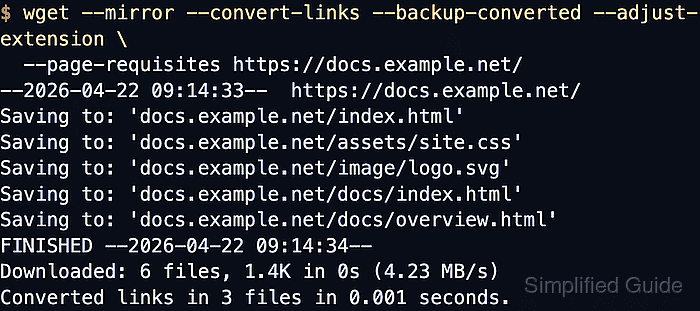
GNU wget documents --mirror as the mirror shortcut that enables recursive retrieval and timestamping, sets unlimited recursion depth, and keeps FTP directory listings. --convert-links rewrites downloaded HTML and CSS for local browsing, --backup-converted saves original files with a .orig suffix when a file is rewritten, and --adjust-extension appends .html when the server returns HTML from an extensionless or script-shaped URL.
Keep the crawl bounded to approved hostnames and expect weaker results on pages that depend on browser-side rendering, authenticated sessions, or live APIs. Running the same mirror command again later rechecks timestamps and refreshes only the files that changed on the origin when the server provides usable freshness metadata.
Steps to mirror an entire website with wget:
- Run the mirror command with local-browsing options against the site root.
$ wget --mirror --convert-links --backup-converted --adjust-extension --page-requisites http://docs.example.net/
--2026-06-06 02:21:05--  http://docs.example.net/
Resolving docs.example.net (docs.example.net)... 203.0.113.50
Connecting to docs.example.net (docs.example.net)|203.0.113.50|:80... connected.
HTTP request sent, awaiting response... 200 OK
Length: 338 [text/html]
Saving to: 'docs.example.net/index.html'

##### snipped #####

Saving to: 'docs.example.net/assets/site.css'
Saving to: 'docs.example.net/image/logo.svg'
Saving to: 'docs.example.net/docs/index.html'
Saving to: 'docs.example.net/docs/overview.html'

FINISHED --2026-06-06 02:21:05--
Total wall clock time: 0.007s
Downloaded: 6 files, 841 in 0s (47.1 MB/s)
Converting links in docs.example.net/index.html... 4.

##### snipped #####

Converted links in 4 files in 0 seconds.
--page-requisites brings in files needed to display the pages, such as stylesheets and images. If approved assets live on another host such as cdn.docs.example.net, add --span-hosts --domains=docs.example.net,cdn.docs.example.net so host spanning stays limited to the named domains.
- Check that the converted HTML backups were created for the rewritten pages.
$ find docs.example.net -name '*.orig'
docs.example.net/docs/index.html.orig
docs.example.net/index.html.orig
The .orig files are the pre-conversion copies for files whose links were rewritten. HTML files that already needed no link changes may not receive a .orig backup.
- List the saved tree and confirm the mirror contains both pages and required assets.
$ find docs.example.net -type f
docs.example.net/image/logo.svg
docs.example.net/robots.txt
docs.example.net/index.html
docs.example.net/docs/overview.html
docs.example.net/docs/index.html
docs.example.net/docs/index.html.orig
docs.example.net/assets/site.css
docs.example.net/index.html.orig
A usable mirror needs the HTML entry points and the files those pages reference, not just the first document that started the crawl. The order of this listing comes from the local filesystem; check for the expected paths, not a specific sort order.
- Check the saved entry page and confirm the internal links now point at local relative paths.
$ cat docs.example.net/index.html
<!doctype html>
<html lang="en">
<head>
  <meta charset="utf-8">
  <title>Docs Example</title>
  <link rel="stylesheet" href="assets/site.css">
</head>
<body>
  <img src="image/logo.svg" alt="Docs Example">
  <nav>
    <a href="docs/index.html">Documentation</a>
    <a href="docs/overview.html">Overview</a>
  </nav>
</body>
</html>
Relative links such as docs/index.html and assets/site.css are the signal that the mirror can be browsed from disk without falling back to the remote host.

Mohd Shakir Zakaria is a cloud architect with deep roots in software development and open-source advocacy. Certified in AWS, Red Hat, VMware, ITIL, and Linux, he specializes in designing and managing robust cloud and on-premises infrastructures.


