Recursive wget downloads fit the case where one published directory needs to be copied locally without pulling the rest of the site around it. The main risk is scope: a loose recursive command can climb into parent paths, follow more link levels than expected, or save a host-prefixed tree that another script is not prepared to read.
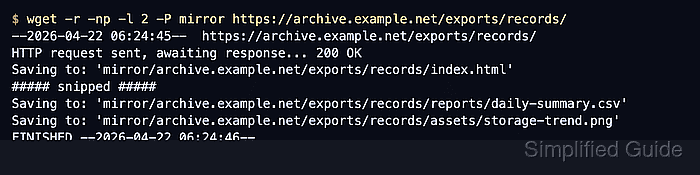
GNU wget follows links from the starting page when --recursive is enabled. --no-parent keeps the crawl below the starting directory, --level limits how many link levels wget may follow, and --no-host-directories --cut-dirs control how much of the remote path appears in the local copy.
Use a starting URL that ends with a trailing slash and a new destination directory for each run. Recursive HTTP downloads respect /robots.txt by default and still fetch listing pages such as index.html while discovering files, so add suffix filters only when the saved copy should exclude those listing pages.
Steps to download a directory recursively with wget:
- Run wget with bounded recursion, a no-parent limit, and local path controls.
$ wget --recursive --no-parent --level=2 \
  --no-host-directories --cut-dirs=2 \
  --directory-prefix=mirror \
  https://archive.example.net/exports/records/
--2026-06-06 02:01:21--  https://archive.example.net/exports/records/
Resolving archive.example.net (archive.example.net)... 203.0.113.50
Connecting to archive.example.net (archive.example.net)|203.0.113.50|:443... connected.
HTTP request sent, awaiting response... 200 OK
Saving to: 'mirror/index.html'

Loading robots.txt; please ignore errors.
Saving to: 'mirror/reports/index.html'
Saving to: 'mirror/assets/storage-trend.png'
Saving to: 'mirror/reports/daily-summary.csv'
Saving to: 'mirror/reports/monthly-summary.csv'

FINISHED --2026-06-06 02:01:21--
Downloaded: 5 files, 312 in 0s (21.9 MB/s)
--level=1 is enough when the starting directory page links directly to every file. Use --level=2 when the listing first links to immediate subdirectories such as reports/.
- Match --cut-dirs to the leading remote path components that should disappear from the local tree.
$ wget --recursive --no-parent --level=2 \
  --no-host-directories --cut-dirs=3 \
  --directory-prefix=mirror \
  https://downloads.example.net/pub/exports/records/
--no-host-directories removes the host directory, and --cut-dirs=3 strips /pub/exports/records/ so saved files start directly under /mirror/.
- Add an accept list when the directory contains extra formats that should not remain in the local copy.
$ wget --recursive --no-parent --level=2 \
  --no-host-directories --cut-dirs=2 \
  --accept=csv,png \
  --directory-prefix=mirror \
  https://archive.example.net/exports/records/
--accept=csv,png keeps matching files after wget has used the listing pages to discover links. Leave the filter out when the saved directory should include the generated index.html files too.
- Add pacing before running the same recursive pattern against a shared or rate-limited origin.
$ wget --recursive --no-parent --level=2 \
  --no-host-directories --cut-dirs=2 \
  --wait=2 --random-wait \
  --directory-prefix=mirror \
  https://archive.example.net/exports/records/
- List the downloaded files and confirm nothing above the target directory was pulled into the local tree.
$ find mirror -type f
mirror/index.html
mirror/assets/storage-trend.png
mirror/reports/index.html
mirror/reports/monthly-summary.csv
mirror/reports/daily-summary.csv
The absence of an /archive/ parent directory or host-prefixed path is the signal that --no-parent, --no-host-directories, and --cut-dirs kept the download inside the intended directory boundary.

Mohd Shakir Zakaria is a cloud architect with deep roots in software development and open-source advocacy. Certified in AWS, Red Hat, VMware, ITIL, and Linux, he specializes in designing and managing robust cloud and on-premises infrastructures.


