Internal links help visitors and search engines move from broad navigation pages to the pages that actually matter, such as service pages, product pages, category pages, and contact or conversion pages. A clear internal-link structure reduces buried content, shortens the path to important pages, and gives supporting pages a defined job instead of leaving them isolated.
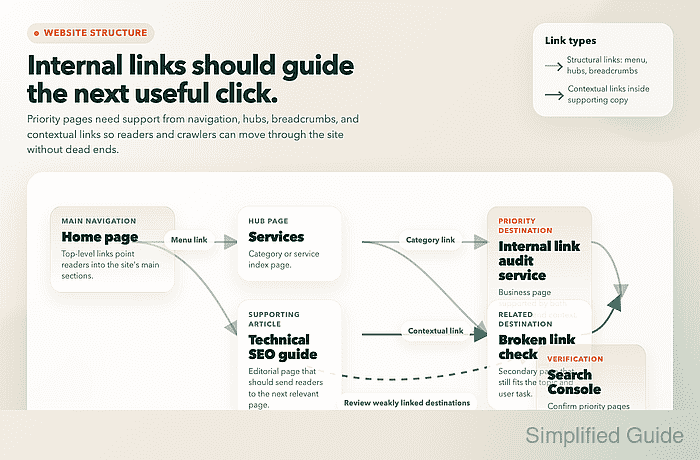
For a webmaster, improving internal links means deciding which pages should receive the most attention, then connecting those destination pages from menus, breadcrumbs, category hubs, and relevant body copy. The work is partly structural and partly editorial, because the destination URL, the source page, the position of the link, and the anchor text all affect how useful the link is to both readers and crawlers.
Current Google guidance still depends on crawlable <a href> links and descriptive anchor text, while the Links report in Google Search Console shows internal links Google has found over time rather than a live count of every recent edit. That means internal-linking work should be checked in three places: the page templates or CMS output, the visible page experience on desktop and mobile, and the search-facing reports that confirm important pages are not being left behind.
Steps to improve internal links for a website:
- List the destination pages that should be easiest to reach from across the site, such as the homepage, primary category pages, service pages, product collections, lead forms, and other pages that directly support the site's business goal.
Do not start by linking to everything. Start with the small set of pages that should receive the clearest internal emphasis, then work outward from those priorities.
- Map the strongest source pages for each destination page, including navigation menus, breadcrumb trails, category hubs, high-traffic articles, comparison pages, and other pages where a reader would naturally expect the next click.
A useful internal link connects two pages with a clear relationship, such as an article linking to the service that solves the problem described in the article.
- Make sure the site's important internal links are real HTML anchor links with an accessible URL target instead of JavaScript-only click handlers or empty link elements.
<a href="/services/internal-link-audit">internal link audit service</a>
Google currently recommends crawlable <a href> links because they give both users and crawlers a direct path to the destination page, while nonstandard link patterns can weaken discovery or context. Image links still need useful alt text because that text can help explain the destination.
- Replace vague anchor text such as click here, learn more, or repeated generic read more links with short descriptive text that tells the reader what page will open next.
<a href="/guides/internal-linking-checklist">internal linking checklist</a>
Forcing the same keyword-heavy anchor text into every source page makes the site harder to read and can create awkward, repetitive copy that no longer matches the surrounding sentence.
- Add or strengthen the structural links that help users move through the site's hierarchy, including the main menu, breadcrumbs, category pages, related-link modules, and footer links that genuinely belong on every page.
Menu and breadcrumb links explain the site's hierarchy, while contextual links inside the page body explain why one specific page should lead to another specific page.
- Add contextual links from supporting pages to the priority destination pages where the destination meaningfully continues the topic, decision, or task introduced on the source page.
One well-placed contextual link near the point of decision is usually more useful than a cluster of repeated links in the same paragraph or sidebar.
- Remove or rewrite internal links that point to redirected, outdated, thin, or off-topic pages so the link graph supports the current preferred URL structure instead of old site history.
- Review the important templates and changed pages on desktop and mobile so the new links are visible, tappable, and placed where readers can use them without hunting through collapsed menus, tabs, or hidden widgets.
If important links are injected late with JavaScript, confirm that the final rendered HTML still contains the expected <a href> element and readable anchor text.
- Check the internal-link distribution in Google Search Console under Links → Internal links → Top linked pages and inspect the source pages for any destination page that still looks weakly linked or disconnected.
The report is useful for spotting which pages Google has found links to within your site, but it is not a real-time edit checker, so compare it with the live page and recent template changes before deciding a link was missed.
- Recheck the site after the edits are published and keep refining until every priority page is reachable from the main site structure and from at least one relevant supporting page without relying on search or the browser back button.
A page that exists only in the XML sitemap, on-site search, or an old redirect path is still weakly integrated even if it is technically crawlable.


Mohd Shakir Zakaria is a cloud architect with deep roots in software development and open-source advocacy. Certified in AWS, Red Hat, VMware, ITIL, and Linux, he specializes in designing and managing robust cloud and on-premises infrastructures.


