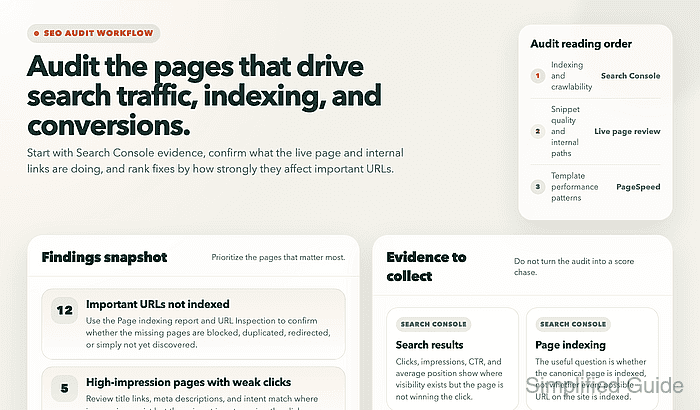
An SEO audit should show why important canonical URLs are losing qualified search traffic or failing to appear in Google at all. The useful scope is the homepage, the main revenue or lead pages, and one representative URL for each major template rather than every page on the domain.
Current Google audit work starts in Search Console. The Search results report shows clicks, impressions, average CTR, and average position, Page indexing shows which canonical URLs are missing or excluded from the index, URL Inspection compares the indexed and live states of one URL, the Links report shows internal support, and the Sitemaps report confirms that Google can fetch the submitted sitemap. PageSpeed Insights adds field and lab performance data for the URLs that matter most.
Search Console data is delayed rather than live, the default Search results view covers the past three months, the Links report is a sample rather than a full crawl, the Page indexing report cannot search one URL directly, and a live URL inspection only confirms current crawl access rather than every indexing condition. PageSpeed Insights uses a trailing 28-day CrUX field-data window and can fall back to origin-level data when a page lacks enough traffic, so the audit should stay tied to representative URLs and end with a short repair list plus a recheck.
Steps to perform an SEO audit for your website:
- Open the verified Search Console property for the live site and list the canonical URLs and page templates that matter most to the business.
Home page Primary category or service pages Highest-value landing pages Lead or checkout flow Representative article or help page
Keep one representative URL for each important template so a template fault can be separated from a single weak page.
- Open Search results, switch on Total clicks, Total impressions, Average CTR, and Average position, compare the last three months against the previous period, and note the pages with weaker traffic or weaker visibility.
Search Console > Search results
The chart is aggregated by property, so switch to the Pages tab before deciding which URLs need deeper review.
- Open the Queries view for one weak priority URL and note the search terms with impressions but weak CTR or weaker position.
Search Console > Search results > Pages > select URL > Queries
Impressions with weak CTR usually point to a snippet or intent problem, while falling position points to weaker relevance or competition.
- Open Page indexing and review only the non-indexed reasons that affect canonical URLs that should appear in Google Search.
Search Console > Page indexing
Redirects, intentional duplicates, parameter URLs, admin paths, and planned noindex pages do not belong on the repair list just because they appear as not indexed.
- Inspect each affected priority URL in URL Inspection and run Test live URL when the indexed result looks stale or blocked.
Search Console > URL Inspection
Use URL Inspection for one page at a time because the Page indexing report does not support URL search or URL filtering.
Related: search-console-request-indexing
- Review the live page title, meta description, canonical target, and visible internal path for each affected URL before deciding whether the problem is relevance, snippet writing, or weak site support.
Title matches page purpose Description matches search intent Canonical points to the preferred URL Navigation or contextual links reach the page
A page with good impressions but weak clicks often needs better snippet alignment, while a wrong canonical or buried internal path points to a structural issue.
- Open Sitemaps and confirm that the live sitemap URL is submitted in the same property and that its latest status is Success.
https://www.example.com/sitemap.xml
Submitting a sitemap tells Google where the file lives, but it does not upload the file and it does not guarantee that every listed URL will be indexed.
- Open Links and review the internal links for each weak priority URL to confirm that the page is still reached from relevant site paths.
Search Console > Links > Internal links
The Links report is a sample rather than a complete crawl, so confirm the real click path on the live site before treating a low link count as the whole story.
- Open Manual actions when traffic or visibility drops sharply without a matching indexing or snippet explanation.
Search Console > Manual actions
A manual action can suppress pages or the whole site in search until the problem is fixed and a reconsideration request is submitted.
- Open Security issues when the site shows hacked content, suspicious redirects, or warning labels that routine SEO reports do not explain.
Search Console > Security issues
Security issues can trigger warnings in search results or the browser before a visitor reaches the page, so they take priority over normal ranking work.
- Test the homepage and one representative URL for each main template in PageSpeed Insights on both Mobile and Desktop.
https://pagespeed.web.dev/
PageSpeed Insights mixes trailing 28-day CrUX field data with the current Lighthouse lab run, and low-traffic pages can fall back to origin-level field data.
- Rank the findings by business impact and recheck each fixed URL in the same report that surfaced the problem.
High Canonical service page excluded from index High Lead page has weak internal support Medium Title or description underperforms on a high-impression query Medium Mobile template fails Core Web Vitals
Do not close the audit on exported notes alone, because the useful end state is a confirmed recheck after the fix rather than a longer issue list.
Mohd Shakir Zakaria is a cloud architect with deep roots in software development and open-source advocacy. Certified in AWS, Red Hat, VMware, ITIL, and Linux, he specializes in designing and managing robust cloud and on-premises infrastructures.