Check the Tomcat version before upgrading Java, deploying a WAR file, or comparing a server with vendor support notes. Linux package versions, Tomcat's internal server version, and the Java runtime can differ, so collect all three before making a compatibility decision.
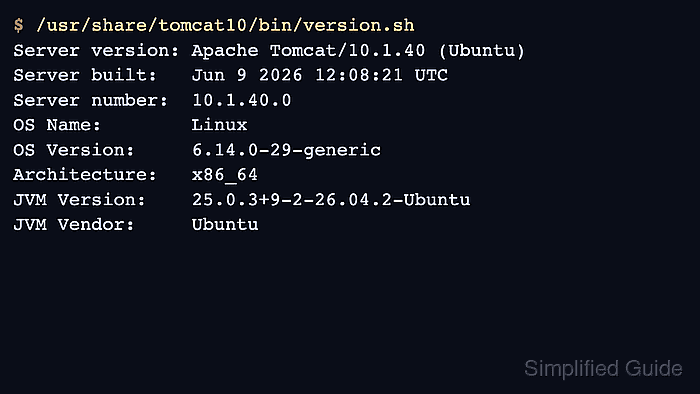
Package-managed installations usually provide a distro package record and a Tomcat version script under /usr/share/tomcat*/bin/. Manual installations use the same script under the installation's CATALINA_HOME, commonly /opt/tomcat/bin/version.sh. The script prints Tomcat's Server version, Server number, operating system details, and the JVM Version used by that script invocation.
The command examples use an Ubuntu 26.04 package-managed tomcat10 installation. Replace the package name, unit name, or installation path when the host uses tomcat9, tomcat11, a Red Hat-family package, or a manually unpacked Tomcat tree. For a running systemd service, confirm the service process as well as the installed files because service overrides can point Tomcat at a different Java binary.
Steps to check the Tomcat version on Linux:
- Query the installed Tomcat package when the host uses distro packages.
$ dpkg-query -W tomcat10
tomcat10	10.1.40-1ubuntu1.26.04.1
Use rpm -q tomcat or the exact package name on Red Hat-family systems. On older hosts, replace tomcat10 with the package that is actually installed, such as tomcat9.
- Run Tomcat's version script from the package installation.
$ /usr/share/tomcat10/bin/version.sh
Server version: Apache Tomcat/10.1.40 (Ubuntu)
Server built:   Jun 9 2026 12:08:21 UTC
Server number:  10.1.40.0
OS Name:        Linux
OS Version:     6.14.0-29-generic
Architecture:   x86_64
JVM Version:    25.0.3+9-2-26.04.2-Ubuntu
JVM Vendor:     Ubuntu
For a manual install, run the same script from that instance's CATALINA_HOME, such as /opt/tomcat/bin/version.sh.
- Confirm the systemd service name when the installed instance is service-managed.
$ systemctl status tomcat10
● tomcat10.service - Apache Tomcat 10 Web Application Server
     Loaded: loaded (/usr/lib/systemd/system/tomcat10.service; enabled; preset: enabled)
     Active: active (running) since Wed 2026-06-10 12:16:03 UTC; 2min 8s ago
##### snipped #####
If the unit name differs, use the service that actually owns the instance before checking the active Java process.
- Print the Tomcat service process ID.
$ systemctl show tomcat10 --property=MainPID --value
2487
A value of 0 means systemd does not currently have a running main process for that unit.
- Resolve the Java executable used by the running Tomcat process.
$ sudo readlink -f /proc/2487/exe
/usr/lib/jvm/java-25-openjdk-amd64/bin/java
Replace 2487 with the MainPID from the previous step. Do not assume the shell's default java command is the same Java binary used by the Tomcat service.
- Check the resolved Java runtime when the Tomcat support matrix or application requires a specific Java version.
$ /usr/lib/jvm/java-25-openjdk-amd64/bin/java -version
openjdk version "25.0.3" 2026-04-21
OpenJDK Runtime Environment (build 25.0.3+9-2-26.04.2-Ubuntu)
OpenJDK 64-Bit Server VM (build 25.0.3+9-2-26.04.2-Ubuntu, mixed mode, sharing)
The Tomcat version is the Server version or Server number from version.sh. The package version records the distro build, and the Java output confirms the runtime layer used by the service check.

Mohd Shakir Zakaria is a cloud architect with deep roots in software development and open-source advocacy. Certified in AWS, Red Hat, VMware, ITIL, and Linux, he specializes in designing and managing robust cloud and on-premises infrastructures.


