A Tomcat-hosted application needs a defined HTTP session lifetime when idle users should be signed out predictably instead of keeping stale server-side state. Setting the timeout in the application deployment descriptor keeps the policy with the application and avoids changing unrelated contexts on the same container.
Tomcat reads <session-timeout> from /WEB-INF/web.xml when the application is deployed or reloaded. The value is written in minutes, while the servlet runtime reports the effective inactive interval in seconds through HttpSession.getMaxInactiveInterval().
Use the application descriptor for a per-application policy. The global /conf/web.xml file only provides a default for applications that do not define their own value, so changing it can affect multiple deployments on the same Tomcat instance. Reload or redeploy during a maintenance window when active users may be forced through authentication again.
Steps to configure a Tomcat application session timeout:
- Open the web.xml descriptor for the application context.
$ sudoedit /opt/tomcat/webapps/sessionprobe/WEB-INF/web.xml
Edit the source project copy, such as src/main/webapp/WEB-INF/web.xml, when the application is deployed from a WAR. Direct edits inside webapps can be overwritten by the next deployment.
- Back up the deployed descriptor when editing an exploded application directly.
$ sudo cp /opt/tomcat/webapps/sessionprobe/WEB-INF/web.xml /opt/tomcat/webapps/sessionprobe/WEB-INF/web.xml.before-session-timeout
- Add the session timeout inside the web-app element.
<web-app xmlns="https://jakarta.ee/xml/ns/jakartaee"
         xmlns:xsi="http://www.w3.org/2001/XMLSchema-instance"
         xsi:schemaLocation="https://jakarta.ee/xml/ns/jakartaee https://jakarta.ee/xml/ns/jakartaee/web-app_6_0.xsd"
         version="6.0">

  <session-config>
    <session-timeout>15</session-timeout>
  </session-config>
</web-app>
Tomcat interprets session-timeout in minutes. This example sets an idle timeout of 15 minutes for the application.
- Reload the application so Tomcat reparses /WEB-INF/web.xml.
$ curl -u deployer:******** "http://127.0.0.1:8080/manager/text/reload?path=/sessionprobe"
OK - Reloaded application at context path [/sessionprobe]
If Manager is not enabled, redeploy the WAR or restart the tomcat service during a maintenance window. Related: How to reload a Tomcat application with Manager
- Verify the runtime session interval from a staging-only endpoint, servlet, JSP, or admin screen that reads session.getMaxInactiveInterval().
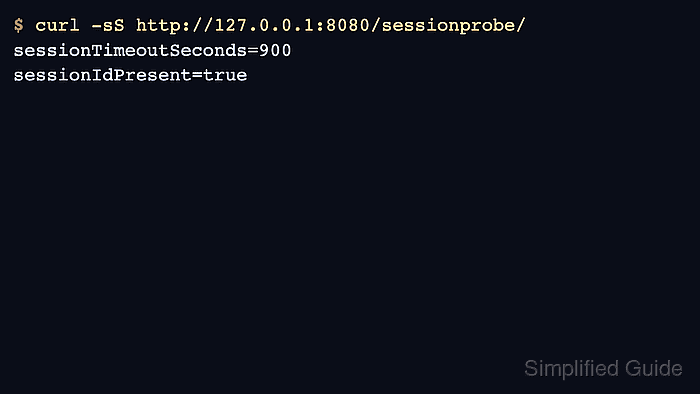
$ curl -sS http://127.0.0.1:8080/sessionprobe/
sessionTimeoutSeconds=900
sessionIdPresent=true
A 15-minute descriptor value appears as 900 seconds at runtime because the servlet API reports the inactive interval in seconds.
- Remove or disable any temporary endpoint used only for the timeout check.
$ sudo rm /opt/tomcat/webapps/sessionprobe/index.jsp
Do not leave a public page that exposes session details. Keep this check limited to staging, localhost, or an authenticated admin path.
- Test the user-facing idle behavior in the application.
Sign in to a protected page, leave the browser idle longer than the configured timeout, then refresh. The application should require a new login or create a new session according to its authentication design.

Mohd Shakir Zakaria is a cloud architect with deep roots in software development and open-source advocacy. Certified in AWS, Red Hat, VMware, ITIL, and Linux, he specializes in designing and managing robust cloud and on-premises infrastructures.


