UDP service failures are hard to place because there is no connection handshake before the application waits for a reply. Tcpdump shows whether a datagram left the client, whether a response came back, and which side of the path should be checked next.
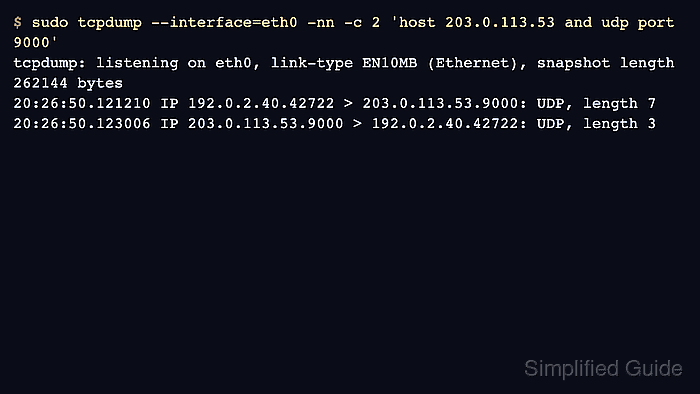
Filter by the peer address and UDP service port, then watch both directions during one controlled request. The client uses an ephemeral source port, while the service keeps the destination port on the request and the source port on the reply.
Repeated outbound datagrams without a reply do not prove that the service is down. Firewall policy, return routing, application drops, rate limits, and the capture location can create the same one-way pattern, so move the capture point when the first view does not match the application error.
Steps to capture UDP service traffic with tcpdump:
- Start a bounded UDP capture for the service host and port.
$ sudo tcpdump --interface=eth0 -nn -c 2 'host 203.0.113.53 and udp port 9000'
tcpdump: verbose output suppressed, use -v[v]... for full protocol decode
tcpdump: listening on eth0, link-type EN10MB (Ethernet), snapshot length 262144 bytes
- Send one controlled UDP request while the capture is running.
$ printf 'health\n' | nc -u -w1 203.0.113.53 9000
ok
Use the same client action that fails in the application when possible. A synthetic request is enough only when it exercises the same service port and expects the same kind of reply.
- Confirm request and response datagrams in the capture output.
20:26:50.121210 IP 192.0.2.40.42722 > 203.0.113.53.9000: UDP, length 7
20:26:50.123006 IP 203.0.113.53.9000 > 192.0.2.40.42722: UDP, length 3
2 packets captured
2 packets received by filter
0 packets dropped by kernel
The response comes back from 203.0.113.53.9000 to the client's ephemeral port 42722, so this capture point saw both directions.
- Record a one-way pattern when the service does not answer.
$ sudo tcpdump --interface=eth0 -nn -c 3 'host 203.0.113.53 and udp port 9000'
tcpdump: verbose output suppressed, use -v[v]... for full protocol decode
tcpdump: listening on eth0, link-type EN10MB (Ethernet), snapshot length 262144 bytes
20:27:00.121210 IP 192.0.2.40.42722 > 203.0.113.53.9000: UDP, length 7
20:27:01.127814 IP 192.0.2.40.42722 > 203.0.113.53.9000: UDP, length 7
20:27:03.139441 IP 192.0.2.40.42722 > 203.0.113.53.9000: UDP, length 7
3 packets captured
3 packets received by filter
0 packets dropped by kernel
Repeated outbound datagrams without replies usually move the investigation toward the server listener, return route, firewall policy, or application-level drops.
- Capture on the server or nearest firewall when the client-side view stays one-way.
$ sudo tcpdump --interface=eth0 -nn 'host 192.0.2.40 and udp port 9000'
tcpdump: verbose output suppressed, use -v[v]... for full protocol decode
tcpdump: listening on eth0, link-type EN10MB (Ethernet), snapshot length 262144 bytes
If the server-side capture sees the request, inspect the listener and application logs. If it does not, inspect routing and filtering before changing the service.

Mohd Shakir Zakaria is a cloud architect with deep roots in software development and open-source advocacy. Certified in AWS, Red Hat, VMware, ITIL, and Linux, he specializes in designing and managing robust cloud and on-premises infrastructures.


