DHCP lease failures can look like a client configuration problem even when the request never reaches a server or the offer never comes back. Capturing DHCP traffic shows where the lease exchange stops before server scopes, relay policy, VLAN tagging, or firewall rules are changed.
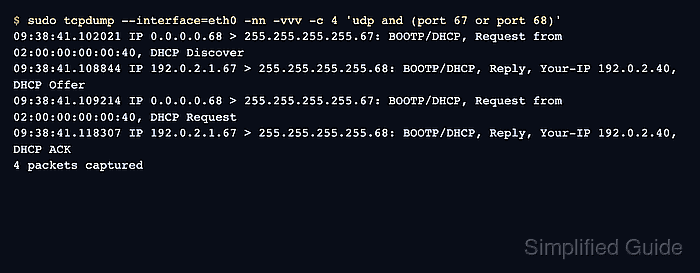
IPv4 DHCP uses UDP ports 67 and 68, and early lease packets are often broadcast because the client does not have an address yet. Verbose tcpdump output exposes the DHCP message type, offered address, server identifier, lease time, and client MAC address that a short packet summary can hide.
Renewing a live lease can interrupt network access on the test host. Use an isolated client, a maintenance window, or a switch mirror on the client-facing segment, and remember that captures on a relay or server interface show a different side of the same exchange.
Steps to capture DHCP traffic with tcpdump:
- Start a bounded verbose capture on the client-facing interface.
$ sudo tcpdump --interface=eth0 -nn -vvv -c 4 'udp and (port 67 or port 68)'
tcpdump: listening on eth0, link-type EN10MB (Ethernet), snapshot length 262144 bytes
Leave this command running while the test client requests a lease. Use the interface that sees the client broadcast, relay traffic, or switch mirror for the segment being checked.
- Release the current lease on an isolated dhclient test client.
$ sudo dhclient -r eth0
Do not release the lease on a production host unless an interruption is acceptable. Use a disposable client or a maintenance window for the renewal test.
- Request a new lease from the test client.
$ sudo dhclient -v eth0
DHCPDISCOVER on eth0 to 255.255.255.255 port 67 interval 3
DHCPOFFER of 192.0.2.40 from 192.0.2.1
DHCPREQUEST for 192.0.2.40 on eth0 to 255.255.255.255 port 67
DHCPACK of 192.0.2.40 from 192.0.2.1
If the client is managed by NetworkManager, systemd-networkd, or another network stack, trigger the renewal through that manager instead of forcing dhclient onto an interface it does not own.
- Confirm the DHCP sequence in tcpdump.
09:38:41.102021 IP (tos 0x0, ttl 64, id 0, offset 0, flags [none], proto UDP (17), length 287) 0.0.0.0.68 > 255.255.255.255.67: [udp sum ok] BOOTP/DHCP, Request from 02:00:00:00:00:40, length 259, xid 0x3903f326, Flags [Broadcast] (0x8000) Client-Ethernet-Address 02:00:00:00:00:40 Vendor-rfc1048 Extensions Magic Cookie 0x63825363 DHCP-Message (53), length 1: Discover Client-ID (61), length 7: ether 02:00:00:00:00:40 Lease-Time (51), length 4: 3600 END (255), length 0 09:38:41.108844 IP (tos 0x0, ttl 64, id 0, offset 0, flags [none], proto UDP (17), length 293) 192.0.2.1.67 > 255.255.255.255.68: [udp sum ok] BOOTP/DHCP, Reply, length 265, xid 0x3903f326, Flags [Broadcast] (0x8000) Your-IP 192.0.2.40 Client-Ethernet-Address 02:00:00:00:00:40 Vendor-rfc1048 Extensions Magic Cookie 0x63825363 DHCP-Message (53), length 1: Offer Client-ID (61), length 7: ether 02:00:00:00:00:40 Server-ID (54), length 4: 192.0.2.1 Lease-Time (51), length 4: 3600 END (255), length 0 09:38:41.109214 IP (tos 0x0, ttl 64, id 0, offset 0, flags [none], proto UDP (17), length 299) 0.0.0.0.68 > 255.255.255.255.67: [udp sum ok] BOOTP/DHCP, Request from 02:00:00:00:00:40, length 271, xid 0x3903f326, Flags [Broadcast] (0x8000) Client-Ethernet-Address 02:00:00:00:00:40 Vendor-rfc1048 Extensions Magic Cookie 0x63825363 DHCP-Message (53), length 1: Request Client-ID (61), length 7: ether 02:00:00:00:00:40 Requested-IP (50), length 4: 192.0.2.40 Server-ID (54), length 4: 192.0.2.1 Lease-Time (51), length 4: 3600 END (255), length 0 09:38:41.118307 IP (tos 0x0, ttl 64, id 0, offset 0, flags [none], proto UDP (17), length 293) 192.0.2.1.67 > 255.255.255.255.68: [udp sum ok] BOOTP/DHCP, Reply, length 265, xid 0x3903f326, Flags [Broadcast] (0x8000) Your-IP 192.0.2.40 Client-Ethernet-Address 02:00:00:00:00:40 Vendor-rfc1048 Extensions Magic Cookie 0x63825363 DHCP-Message (53), length 1: ACK Client-ID (61), length 7: ether 02:00:00:00:00:40 Server-ID (54), length 4: 192.0.2.1 Lease-Time (51), length 4: 3600 END (255), length 0 4 packets captured 4 packets received by filter 0 packets dropped by kernel - Interpret a missing step by where the sequence stops.
$ sudo tcpdump --interface=eth0 -nn -vvv 'udp and (port 67 or port 68)'
09:41:10.004221 IP 0.0.0.0.68 > 255.255.255.255.67: BOOTP/DHCP, Request, DHCP Discover
09:41:14.112913 IP 0.0.0.0.68 > 255.255.255.255.67: BOOTP/DHCP, Request, DHCP Discover
Discover packets without offers point toward server reachability, relay forwarding, VLAN placement, firewall policy, or address pool capacity before client settings. Tool: DHCP Scope Calculator

Mohd Shakir Zakaria is a cloud architect with deep roots in software development and open-source advocacy. Certified in AWS, Red Hat, VMware, ITIL, and Linux, he specializes in designing and managing robust cloud and on-premises infrastructures.


