TLS handshake failures often appear as certificate errors, protocol alerts, connection resets, or timeouts from the client. Tcpdump separates the TCP path from encrypted negotiation by showing whether the three-way handshake completed, whether the ClientHello left the client, and whether the peer answered before the connection closed.
Tcpdump cannot decrypt a modern TLS session by itself. Pair the packet capture with a client command such as curl --verbose or openssl s_client -brief so the packet timing and TCP flags can be read beside the visible client-side TLS error.
Capture the exact hostname, port, and SNI path involved in the failure, but keep shared evidence sanitized. TLS packet captures can expose IP addresses, certificate chains, SNI in some ClientHello records, traffic timing, and payload sizes even when the encrypted application data remains unreadable.
Related: How to debug TLS handshake with cURL
Related: How to analyze a TCP handshake with tcpdump
Tool: TLS Handshake Trace
Steps to troubleshoot TLS handshakes with tcpdump:
- Start a bounded full-packet capture for the affected TLS endpoint in one terminal.
$ sudo tcpdump --interface=eth0 -nn -s 0 -c 10 -w /tmp/tls-handshake.pcap 'host 203.0.113.20 and tcp port 443'
tcpdump: listening on eth0, link-type EN10MB (Ethernet), snapshot length 262144 bytes
- Run the failing TLS client command from another terminal.
$ curl --verbose --connect-timeout 5 https://api.example.net/health
* Connected to api.example.net (203.0.113.20) port 443
* TLSv1.3 (OUT), TLS handshake, Client hello (1):
* TLSv1.3 (IN), TLS alert, protocol version (582):
curl: (35) error:0A00042E:SSL routines::tlsv1 alert protocol version
Related: How to debug TLS handshake with cURL
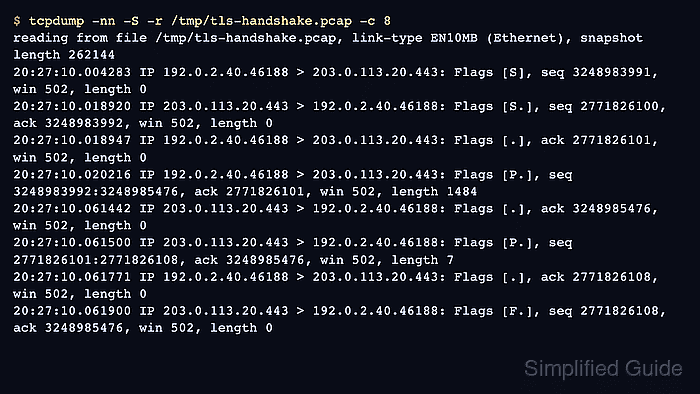
- Read the first packets from the capture to confirm where the failure moved from TCP to TLS.
$ tcpdump -nn -S -r /tmp/tls-handshake.pcap -c 8
reading from file /tmp/tls-handshake.pcap, link-type EN10MB (Ethernet), snapshot length 262144
20:27:10.004283 IP 192.0.2.40.46188 > 203.0.113.20.443: Flags [S], seq 3248983991, win 502, length 0
20:27:10.018920 IP 203.0.113.20.443 > 192.0.2.40.46188: Flags [S.], seq 2771826100, ack 3248983992, win 502, length 0
20:27:10.018947 IP 192.0.2.40.46188 > 203.0.113.20.443: Flags [.], ack 2771826101, win 502, length 0
20:27:10.020216 IP 192.0.2.40.46188 > 203.0.113.20.443: Flags [P.], seq 3248983992:3248985476, ack 2771826101, win 502, length 1484
20:27:10.061442 IP 203.0.113.20.443 > 192.0.2.40.46188: Flags [.], ack 3248985476, win 502, length 0
20:27:10.061500 IP 203.0.113.20.443 > 192.0.2.40.46188: Flags [P.], seq 2771826101:2771826108, ack 3248985476, win 502, length 7
20:27:10.061771 IP 192.0.2.40.46188 > 203.0.113.20.443: Flags [.], ack 2771826108, win 502, length 0
20:27:10.061900 IP 203.0.113.20.443 > 192.0.2.40.46188: Flags [F.], seq 2771826108, ack 3248985476, win 502, length 0
The SYN, SYN-ACK, and ACK prove TCP reached the peer. The 1484-byte client packet is the start of TLS negotiation, and the short server response matches the client-side TLS alert.
- Treat missing TCP setup as a transport problem before changing TLS settings.
$ sudo tcpdump --interface=eth0 -nn -c 4 'host 203.0.113.20 and tcp port 443'
20:31:44.301114 IP 192.0.2.40.46192 > 203.0.113.20.443: Flags [S], seq 1725156112, win 64240, length 0
20:31:45.328018 IP 192.0.2.40.46192 > 203.0.113.20.443: Flags [S], seq 1725156112, win 64240, length 0
20:31:47.343994 IP 192.0.2.40.46192 > 203.0.113.20.443: Flags [S], seq 1725156112, win 64240, length 0
- Remove or restrict the PCAP after analysis.
$ chmod 600 /tmp/tls-handshake.pcap
Do not publish raw production TLS captures, key logs, private keys, real hostnames, customer IP addresses, SNI values, or certificate inventories in shared tickets or article evidence.

Mohd Shakir Zakaria is a cloud architect with deep roots in software development and open-source advocacy. Certified in AWS, Red Hat, VMware, ITIL, and Linux, he specializes in designing and managing robust cloud and on-premises infrastructures.


