TLS handshake failures stop an HTTPS request before a server can return an HTTP status, so the first useful clue usually appears in curl's transport log rather than in the response body.
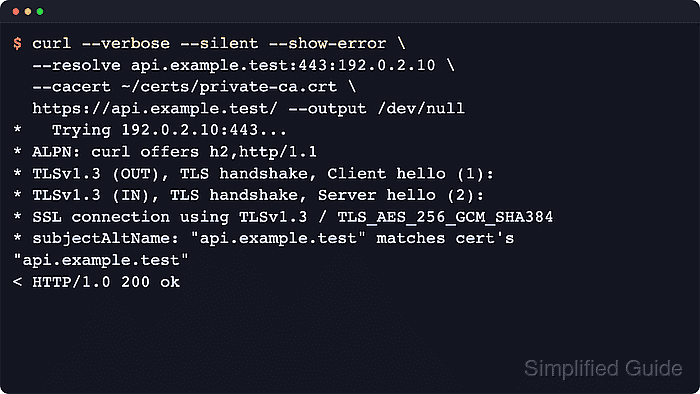
In cURL, --verbose shows name resolution, ALPN, protocol negotiation, certificate validation, and client-certificate requests on the same run. --trace-time with --trace-ascii adds event order and timestamps when the failure is too early, noisy, or intermittent for a quick verbose pass.
TLS wording depends on the curl TLS backend, so OpenSSL, Schannel, Secure Transport, GnuTLS, and Rustls do not print identical failure text for the same problem. Trace and verbose logs can expose request headers, cookies, tokens, and certificate details, and --insecure is only a short diagnostic shortcut to prove that a failure is limited to certificate verification.
Steps to debug TLS handshake with cURL:
- Run the failing HTTPS request with --verbose and send the response body to /dev/null so the handshake lines stay readable.
$ curl --silent --show-error --verbose --output /dev/null https://api.example.test/
* Host api.example.test:443 was resolved.
*   Trying 192.0.2.10:443...
* ALPN: curl offers h2,http/1.1
* TLSv1.3 (OUT), TLS handshake, Client hello (1):
##### snipped #####
* Server certificate:
*   subject: CN=api.example.test
*   issuer: CN=Example Internal Root CA
*   subjectAltName: "api.example.test" matches cert's "api.example.test"
* SSL certificate OpenSSL verify result: unable to get local issuer certificate (20)
curl: (60) SSL certificate OpenSSL verify result: unable to get local issuer certificate (20)
More details here: https://curl.se/docs/sslcerts.html
cURL prints the TLS failure before any normal HTTP status line, which makes the first curl: (…) message the fastest clue about whether the problem is trust, hostname matching, protocol policy, or client authentication.
- Repeat the same request with --trace-time and --trace-ascii - when the handshake order matters more than a compact verbose read.
$ curl --silent --show-error --trace-time --trace-ascii - --output /dev/null https://api.example.test/
13:00:22.492555 *   Trying 192.0.2.10:443...
13:00:22.718655 * ALPN: curl offers h2,http/1.1
13:00:22.720884 * TLSv1.3 (OUT), TLS handshake, Client hello (1):
13:00:22.720886 => Send SSL data, 1571 bytes (0x623)
##### snipped #####
13:00:22.935206 * TLSv1.3 (IN), TLS handshake, Certificate (11):
13:00:22.935209 <= Recv SSL data, 851 bytes (0x353)
##### snipped #####
13:00:23.152856 * SSL certificate OpenSSL verify result: unable to get local issuer certificate (20)
curl: (60) SSL certificate OpenSSL verify result: unable to get local issuer certificate (20)
--trace-ascii and --verbose are separate trace modes. Trace output can include request headers, cookies, and certificate details, so write it to a protected path and remove it after troubleshooting if the trace needs to be saved instead of streamed to the terminal.
- Retry the request with the CA source that should trust the server so the handshake failure can be separated from a missing trust anchor.
$ curl --silent --show-error --verbose \
  --cacert ~/certs/example-root-ca.pem \
  --output /dev/null \
  https://api.example.test/
* SSL Trust Anchors:
*   CAfile: /home/user/certs/example-root-ca.pem
*   CApath: /etc/ssl/certs
##### snipped #####
* SSL connection using TLSv1.3 / TLS_AES_256_GCM_SHA384 / X25519MLKEM768 / RSASSA-PSS
* Server certificate:
*   subject: CN=api.example.test
*   issuer: CN=Example Internal Root CA
*   subjectAltName: "api.example.test" matches cert's "api.example.test"
* SSL certificate verified via OpenSSL.
< HTTP/1.1 200 OK
Use --cacert for a PEM CA bundle, --capath for a hashed CA directory, or --ca-native when the operating system trust store is the intended trust source for that cURL build.
- Pin the URL hostname to the test address with --resolve when the handshake might be reaching the wrong backend.
$ curl --silent --show-error --verbose \
  --resolve wrong.example.test:443:192.0.2.10 \
  --cacert ~/certs/example-root-ca.pem \
  --output /dev/null \
  https://wrong.example.test/
* Added wrong.example.test:443:192.0.2.10 to DNS cache
* Hostname wrong.example.test was found in DNS cache
*   Trying 192.0.2.10:443...
##### snipped #####
* Server certificate:
*   subject: CN=api.example.test
*   issuer: CN=Example Internal Root CA
*  subjectAltName does not match hostname wrong.example.test
* SSL: no alternative certificate subject name matches target hostname 'wrong.example.test'
curl: (60) SSL: no alternative certificate subject name matches target hostname 'wrong.example.test'
--resolve keeps the hostname from the URL for SNI and certificate validation while forcing the network destination to one specific address. Related: How to override DNS resolution with cURL
- Add the client certificate and key when the verbose log shows that the server is requesting client authentication.
$ curl --silent --show-error --verbose \
  --cacert ~/certs/example-root-ca.pem \
  --cert ~/certs/api-client.crt \
  --key ~/certs/api-client.key \
  --output /dev/null \
  https://mtls-api.example.test:8443/health
* TLSv1.3 (IN), TLS handshake, Request CERT (13):
##### snipped #####
* SSL certificate verified via OpenSSL.
> GET /health HTTP/1.1
< HTTP/1.1 200 OK
Some servers abort the handshake immediately when no acceptable client certificate is presented, while others finish the TLS exchange and then return 400 or 403. Use --cert-type P12 for a .p12 or .pfx archive instead of the PEM example shown here. Related: How to use PKCS#12 client certificates with cURL
- Force one exact TLS version when the failure looks like a version-policy mismatch instead of a certificate problem.
$ curl --silent --show-error --verbose \
  --tlsv1.2 --tls-max 1.2 \
  --cacert ~/certs/example-root-ca.pem \
  --output /dev/null \
  https://tls13-only.example.test/
* TLSv1.2 (OUT), TLS handshake, Client hello (1):
* TLSv1.2 (IN), TLS alert, protocol version (582):
curl: (35) TLS connect error: error:0A00042E:SSL routines::tlsv1 alert protocol version
--tlsv1.2 and --tlsv1.3 set the minimum accepted version, not the exact version, so pair them with --tls-max when the test must prove one specific protocol level.
- Confirm the fixed path with a short verification command that prints the certificate result and the final HTTP status.
$ curl --silent --show-error \
  --cacert ~/certs/example-root-ca.pem \
  --output /dev/null \
  --write-out 'verify=%{ssl_verify_result} http=%{response_code}\n' \
  https://api.example.test/
verify=0 http=200
A zero verify result plus the expected status confirms that the TLS handshake finished cleanly and that the request reached the application after the fix.

Mohd Shakir Zakaria is a cloud architect with deep roots in software development and open-source advocacy. Certified in AWS, Red Hat, VMware, ITIL, and Linux, he specializes in designing and managing robust cloud and on-premises infrastructures.


