Creating a systemd template unit lets one reusable unit definition start many named service instances. That fits workers, listeners, or helper jobs that all run the same command but need different instance names, paths, or labels.
A template unit places one @ before the unit type suffix, such as demo-worker@.service. When systemd is asked to start demo-worker@tenant-api.service, it first looks for that literal file and then falls back to the matching template file if only demo-worker@.service exists. Inside the unit, %i expands to the escaped instance name and %I expands to the unescaped form.
System template units belong under /etc/systemd/system and require root access. Create the template, verify it, reload the manager, and then start or enable a named instance. systemd-analyze verify can also report warnings from other unit files on the same host, so check the filename on each warning before assuming the new template is wrong.
Steps to create a systemd template unit:
- Convert the first instance label into a valid instantiated unit name.
$ systemd-escape --template=demo-worker@.service tenant/api
demo-worker@tenant-api.service
Use the escaped unit name in systemctl commands. If an instance label is already a simple unit-safe string such as backup-db, you can use it directly without the helper.
- Create the helper script that each instance will run.
#!/usr/bin/env bash
install -d -m 0755 /var/log/demo-worker-template
printf 'instance=%s\nunescaped=%s\n' "$1" "$2" > "/var/log/demo-worker-template/$1.log"
This demo script writes one small log file per instance so the template behavior stays visible. Replace it with the real workload after the unit structure is working.
- Make the helper script executable.
$ sudo chmod 0755 /usr/local/bin/demo-worker-template.sh
Use an absolute executable path in the unit file so the service does not depend on an interactive shell PATH.
- Create the template unit file.
[Unit]
Description=Demo worker for %I

[Service]
Type=oneshot
ExecStart=/usr/local/bin/demo-worker-template.sh %i %I
RemainAfterExit=yes

[Install]
WantedBy=multi-user.target
%i passes the escaped instance name such as tenant-api, and %I passes the unescaped value such as tenant/api. RemainAfterExit=yes keeps this oneshot demo visible as active (exited) after it finishes. Add DefaultInstance=alpha only when systemctl enable demo-worker@.service should choose a default instance automatically.
Tool: systemd Unit Generator
- Verify that the new template parses cleanly before the manager loads it.
$ sudo systemd-analyze verify /etc/systemd/system/demo-worker@.service
No output from the new unit is the ideal result. If a warning appears, confirm which file it references before changing the new template.
- Reload the systemd manager so it notices the new template file.
$ sudo systemctl daemon-reload
This reloads unit files and rebuilds the dependency tree before the first instance is started or enabled.
- Enable and start the first named instance from the template.
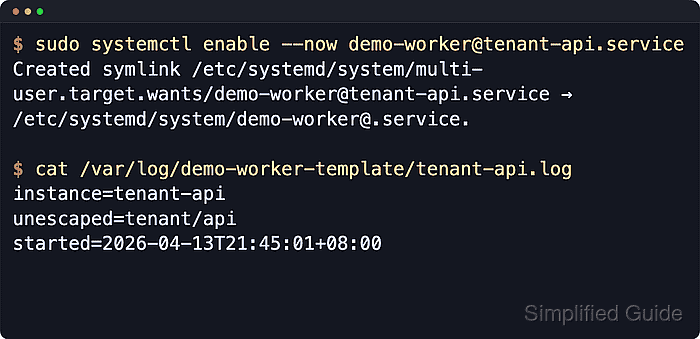
$ sudo systemctl enable --now demo-worker@tenant-api.service
Created symlink /etc/systemd/system/multi-user.target.wants/demo-worker@tenant-api.service → /etc/systemd/system/demo-worker@.service.
The symlink is named after the instance, but it still points back to the single template file. That is how one template can define many persistent instances.
- Confirm that the instance is active and backed by the template file.
$ systemctl show demo-worker@tenant-api.service -p Id -p ActiveState -p SubState -p FragmentPath -p UnitFileState
Id=demo-worker@tenant-api.service
ActiveState=active
SubState=exited
FragmentPath=/etc/systemd/system/demo-worker@.service
UnitFileState=enabled
Look for FragmentPath=/etc/systemd/system/demo-worker@.service together with ActiveState=active and SubState=exited. A long-running template service would usually show SubState=running instead.
- Confirm that the workload received both instance values.
$ cat /var/log/demo-worker-template/tenant-api.log
instance=tenant-api
unescaped=tenant/api
The log shows why template specifiers matter: the instance name stays safely escaped for filenames and unit names, while the original label is still available to the workload through %I.
- Start a second instance from the same template.
$ sudo systemctl start demo-worker@backup-db.service
You do not need to create a second unit file. Another instance name is enough.
- List the instantiated services that now share the same template.
$ systemctl list-units 'demo-worker@*.service' --all --no-pager
  UNIT                           LOAD   ACTIVE SUB    DESCRIPTION
  demo-worker@backup-db.service  loaded active exited Demo worker for backup/db
  demo-worker@tenant-api.service loaded active exited Demo worker for tenant/api

##### snipped #####

2 loaded units listed.
To show all installed unit files use 'systemctl list-unit-files'.
Both instance names stay independent even though they both come from the single demo-worker@.service template file.

Mohd Shakir Zakaria is a cloud architect with deep roots in software development and open-source advocacy. Certified in AWS, Red Hat, VMware, ITIL, and Linux, he specializes in designing and managing robust cloud and on-premises infrastructures.


