Socket activation lets systemd bind a port or local socket before the service process exists, so clients can connect immediately and the daemon starts only when traffic arrives. That fits small helper services, compatibility daemons, and on-demand tools that should stay idle until a request reaches a known endpoint.
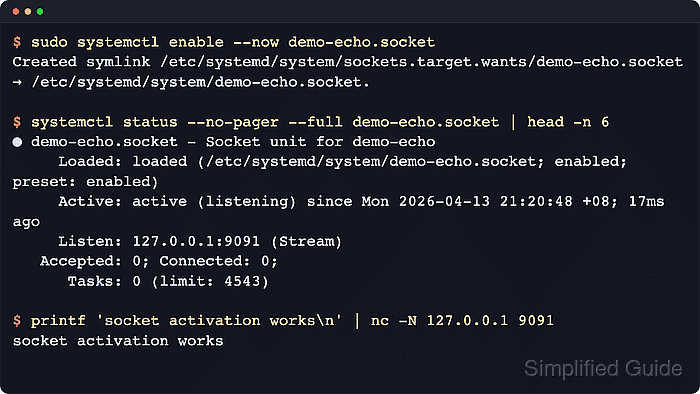
A *.socket unit defines the listening endpoint and starts a matching service when traffic arrives. The example below uses demo-echo.socket on 127.0.0.1:9091 and a demo-echo@.service template, so each client connection starts one short-lived service instance that echoes the received line back.
New daemons are usually better written for Accept=no, where one long-running service receives the listening socket directly. Accept=yes remains a practical way to learn inetd-style activation and per-connection instances with a simple command such as cat. Keep the first test bound to 127.0.0.1 until the service protocol, firewall rules, and authentication requirements are ready.
Steps to create a systemd socket unit:
- Create the service template that handles each accepted connection.
[Unit]
Description=Per-connection echo service for demo-echo.socket

[Service]
ExecStart=/bin/cat
StandardInput=socket
StandardOutput=socket
StandardError=journal
With Accept=yes, the triggered unit must be a template named after the socket basename, here demo-echo@.service. StandardInput=socket and StandardOutput=socket connect the accepted socket to cat so the test client receives its own line back.
- Create the socket unit that listens on the chosen address and port.
[Unit]
Description=Socket unit for demo-echo

[Socket]
ListenStream=127.0.0.1:9091
Accept=yes

[Install]
WantedBy=sockets.target
ListenStream= accepts TCP ports, IPv6 addresses, Unix socket paths, and similar stream endpoints. Use Accept=no and a matching non-template service when the daemon handles the inherited listening socket itself.
- Verify both unit files before reloading the manager.
$ sudo systemd-analyze verify /etc/systemd/system/demo-echo@.service /etc/systemd/system/demo-echo.socket
No output means the unit files parsed cleanly and the name relationship is acceptable to systemd.
- Reload the systemd manager so it notices the new unit files.
$ sudo systemctl daemon-reload
This reloads unit definitions from disk before the new socket can be enabled or started.
- Enable and start the socket unit.
$ sudo systemctl enable --now demo-echo.socket
Created symlink /etc/systemd/system/sockets.target.wants/demo-echo.socket → /etc/systemd/system/demo-echo.socket.
Enable the *.socket unit, not the template service. Socket activation starts the matching service instances only when a client connects.
- Confirm that the socket is bound and listening.
$ systemctl show demo-echo.socket -p Listen -p ActiveState -p SubState
Listen=127.0.0.1:9091 (Stream)
ActiveState=active
SubState=listening
Look for ActiveState=active and SubState=listening before sending the first client connection.
- Connect to the socket and confirm that the templated service handled the request.
$ printf 'socket activation works\n' | nc -N 127.0.0.1 9091
socket activation works
This example uses the OpenBSD nc syntax. Use another TCP client, or the equivalent EOF flag for the installed netcat build, when nc -N is not available.
- Check the socket status after the test connection.
$ systemctl status --no-pager --full demo-echo.socket
● demo-echo.socket - Socket unit for demo-echo
     Loaded: loaded (/etc/systemd/system/demo-echo.socket; enabled; preset: enabled)
     Active: active (listening) since Wed 2026-04-22 02:44:41 UTC; 12s ago
     Listen: 127.0.0.1:9091 (Stream)
   Accepted: 1; Connected: 0;
      Tasks: 0 (limit: 28491)
     Memory: 4.0K (peak: 264.0K)
        CPU: 3ms
##### snipped #####
The socket should stay in active (listening) after the client disconnects, and Accepted: should increase after each completed test connection.
- Inspect the unit journal if the socket never reaches listening or the client connection hangs.
$ sudo journalctl -u demo-echo.socket -n 10 --no-pager
Apr 22 02:44:41 host systemd[1]: Listening on demo-echo.socket - Socket unit for demo-echo.
Manager messages confirm whether the socket bound successfully. Service-side errors normally appear under the triggered unit rather than the socket unit, so inspect the matching service journal when the bind works but the request still fails.

Mohd Shakir Zakaria is a cloud architect with deep roots in software development and open-source advocacy. Certified in AWS, Red Hat, VMware, ITIL, and Linux, he specializes in designing and managing robust cloud and on-premises infrastructures.


