Central syslog collectors become hard to audit when every remote host writes into the same catch-all file. A per-host rsyslog destination keeps each sender's messages under its own directory, so an operator can confirm which host produced an event without filtering one large shared log first.
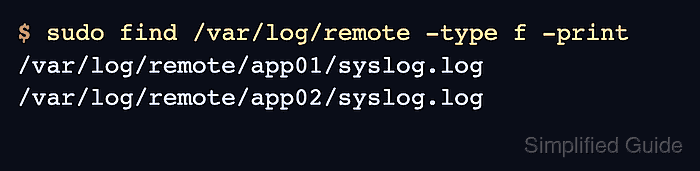
rsyslog handles this with an omfile dynamic file action. The action asks a template to build the destination path for each message, and the message's %HOSTNAME% value can create files such as /var/log/remote/app01/syslog.log and /var/log/remote/app02/syslog.log.
The commands assume a Linux collector using the Debian or Ubuntu rsyslog package layout, where local log files are normally owned by syslog:adm. Use the hostname field only when the senders produce trustworthy syslog hostnames; if devices reuse the same name, send logs through a normalizer first or build the path from %FROMHOST-IP% instead.
Steps to store remote syslog messages by hostname:
- Choose the listener protocol, collector path, and sender identity field.
Listener: TCP/514
Path template: /var/log/remote/<hostname>/syslog.log
Hostname field: %HOSTNAME%
File owner: syslog:adm
File mode: 0640
TCP keeps the test path easier to prove because the client command returns after the message is sent. Use UDP only when the sending devices require it, and keep firewall rules aligned with the chosen protocol. Related: How to receive remote syslog messages with rsyslog
- Create the base remote-log directory with the same owner and group that the file action will use.
$ sudo install -o syslog -g adm -m 0750 -d /var/log/remote
On distributions that do not use the syslog user or adm group, substitute the account that runs rsyslog and the group that should read the collected files.
- Create a dedicated rsyslog drop-in for the remote listener and per-host file action.
$ sudoedit /etc/rsyslog.d/30-remote-by-host.conf
- Add the TCP input, dynamic path template, and omfile action.
module(load="imtcp")
input(type="imtcp" port="514" ruleset="remote-by-host")

template(
    name="RemoteHostPath"
    type="string"
    string="/var/log/remote/%HOSTNAME:::secpath-replace%/syslog.log"
)

ruleset(name="remote-by-host") {
    action(
        type="omfile"
        dynaFile="RemoteHostPath"
        createDirs="on"
        dirOwner="syslog"
        dirGroup="adm"
        dirCreateMode="0750"
        fileOwner="syslog"
        fileGroup="adm"
        fileCreateMode="0640"
    )
}
secpath-replace changes slashes inside the hostname field to underscores before the value becomes part of a filename. Keep that path-safety option on every dynafile template that uses message data.
If imtcp is already loaded and bound in another receiver file, keep one listener and move the template plus action into the existing remote ruleset instead of loading the same input twice.
- Validate the full rsyslog configuration before restarting the collector.
$ sudo rsyslogd -N1
rsyslogd: version 8.2512.0, config validation run (level 1), master config /etc/rsyslog.conf
rsyslogd: End of config validation run. Bye.
Run the check against the master configuration so included files, module loads, and ruleset names are validated together. Related: How to test rsyslog configuration syntax
- Restart rsyslog so the collector opens the listener and loads the dynafile action.
$ sudo systemctl restart rsyslog
Related: How to manage the syslog service
- Confirm that rsyslog is listening on the selected TCP port.
$ sudo ss -ltnp 'sport = :514'
State  Recv-Q Send-Q Local Address:Port Peer Address:Port Process
LISTEN 0      25            0.0.0.0:514      0.0.0.0:*     users:(("rsyslogd",pid=2241,fd=5))
If the listener is present locally but remote senders cannot connect, check the host firewall, cloud security group, and network ACL before changing the rsyslog rule.
- Send a unique test message from the first remote host.
$ logger --tcp --server log-collector.example.com --port 514 --tag auth-test "SG_REMOTE_BY_HOST_20260605 alpha login"
Run this command on a real sender, not on the collector, so %HOSTNAME% reflects the sending host's syslog hostname. Related: How to send a test syslog message
- Send a matching token from a second remote host.
$ logger --tcp --server log-collector.example.com --port 514 --tag auth-test "SG_REMOTE_BY_HOST_20260605 beta login"
- Search the remote log tree on the collector for the unique token.
$ sudo grep SG_REMOTE_BY_HOST_20260605 /var/log/remote/*/syslog.log
/var/log/remote/app01/syslog.log:2026-06-05T10:00:00+00:00 app01 auth-test: SG_REMOTE_BY_HOST_20260605 alpha login
/var/log/remote/app02/syslog.log:2026-06-05T10:01:00+00:00 app02 auth-test: SG_REMOTE_BY_HOST_20260605 beta login
The file names and hostname fields should point to different senders. If both messages land under one directory, inspect the hostname each sender emits before changing the path template.
- List the created files to confirm the per-host paths.
$ sudo find /var/log/remote -type f -print
/var/log/remote/app01/syslog.log
/var/log/remote/app02/syslog.log
- Check the file owner and mode before leaving the route in service.
$ sudo ls -l /var/log/remote/app01/syslog.log /var/log/remote/app02/syslog.log
-rw-r----- 1 syslog adm 82 Jun  5 10:00 /var/log/remote/app01/syslog.log
-rw-r----- 1 syslog adm 81 Jun  5 10:01 /var/log/remote/app02/syslog.log
If files are missing or owned by the wrong account, check the omfile action, parent directory permissions, and service log for suspended file actions. Related: How to fix rsyslog output file permission errors
- Add log rotation for the per-host tree before sending production volume through the collector.
/var/log/remote/*/syslog.log {
    su root root
    rotate 14
    daily
    missingok
    notifempty
    compress
    delaycompress
    create 0640 syslog adm
    sharedscripts
    postrotate
        /usr/lib/rsyslog/rsyslog-rotate >/dev/null 2>&1 || true
    endscript
}
Adjust retention to match the compliance and storage requirements for the collected hosts. Related: How to rotate syslog log files with logrotate

Mohd Shakir Zakaria is a cloud architect with deep roots in software development and open-source advocacy. Certified in AWS, Red Hat, VMware, ITIL, and Linux, he specializes in designing and managing robust cloud and on-premises infrastructures.


