A Linux host that only keeps logs locally can lose investigation evidence when the host is rebuilt, the disk fills, or another team needs the same events in a central collector. Forwarding with rsyslog sends matching syslog messages to a remote listener while the sender continues to use its local log rules.
The forwarding rule uses the built-in omfwd action to connect to a collector over TCP. A linked-list action queue keeps the forwarding action from blocking the main ruleset during short receiver interruptions, and RSYSLOG_SyslogProtocol23Format gives the receiver a normal syslog-framed message instead of an unstructured text line.
The example forwards all facilities and priorities from a sender to loghub.example.net on TCP port 514. Use the TLS forwarding path for untrusted networks, and narrow the selector when only application, facility, or priority-specific messages should leave the host. A successful check shows the same tagged test message in the sender's local log and in the collector's remote log.
Steps to forward syslog messages with rsyslog:
- Confirm that the remote collector is listening on the intended TCP syslog port.
$ sudo ss -ltn '( sport = :514 )'
State  Recv-Q Send-Q Local Address:Port Peer Address:Port
LISTEN 0      4096         0.0.0.0:514       0.0.0.0:*
Run this check on the collector or use the collector's normal listener-status view. If the collector is not ready yet, configure the receiving side before changing the sender.
- Choose the sender-side forwarding values.
Collector: loghub.example.net
Port: 514
Transport: tcp
Forwarded selector: *.*
Sender drop-in: /etc/rsyslog.d/60-forwarding.conf
Use a DNS name that the sender can resolve and that operations staff recognize in later troubleshooting. Replace *.* with a narrower selector when the collector should receive only one facility, priority range, or application stream.
- Open a dedicated sender drop-in for the forwarding action.
$ sudoedit /etc/rsyslog.d/60-forwarding.conf
- Add the omfwd action that sends matching messages to the remote collector.
*.* action(
    type="omfwd"
    target="loghub.example.net"
    port="514"
    protocol="tcp"
    template="RSYSLOG_SyslogProtocol23Format"
    queue.type="linkedList"
)
The selector *.* forwards all facilities and priorities. To forward only a subset, replace it with a selector such as local0.* or a property-based filter that matches the message stream meant for the collector.
Related: How to filter syslog messages by facility and priority in rsyslog
Related: How to filter syslog messages by program name in rsyslogPlain TCP syslog does not encrypt log content or authenticate the collector. Use the TLS forwarding guide when messages cross an untrusted network or when collector identity must be verified.
- Validate the full rsyslog configuration before restarting the service.
$ sudo rsyslogd -N1
rsyslogd: version 8.2512.0, config validation run (level 1), master config /etc/rsyslog.conf
rsyslogd: End of config validation run. Bye.
Run validation against the master config so modules, includes, templates, and drop-ins load in the same order as the service.
- Restart rsyslog and confirm that it is active after loading the forwarding action.
$ sudo systemctl restart rsyslog
$ systemctl is-active rsyslog
active
Restarting rsyslog briefly interrupts local log processing. Use a controlled change window on hosts with high log volume or strict audit requirements.
Related: How to manage the syslog service
- Send a tagged test message from the sender.
$ logger -t remote-forward-demo "remote forward smoke sg-20260605"
Use a unique token so the receiver-side search cannot match an older test message.
Related: How to send a test syslog message
- Confirm that local logging still records the same test message.
$ sudo grep "remote forward smoke" /var/log/syslog
2026-06-05T01:52:02.107328+00:00 log-client remote-forward-demo: remote forward smoke sg-20260605
Use /var/log/messages or a dedicated local destination file on distributions that do not write general messages to /var/log/syslog. This local hit proves that the forwarding action did not replace local storage for the test event.
- Confirm that the sender has an established TCP connection to the collector.
$ sudo ss -tn state established '( dport = :514 )'
Recv-Q Send-Q Local Address:Port  Peer Address:Port
0      0      192.0.2.25:54614   198.51.100.40:514
An established socket proves the sender reached the collector port. The receiver-side log entry still decides whether the collector accepted and stored the forwarded syslog message.
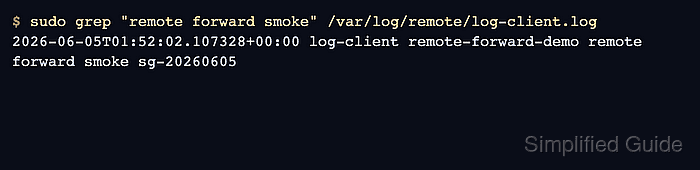
- Confirm that the collector received the tagged message.
$ sudo grep "remote forward smoke" /var/log/remote/log-client.log
2026-06-05T01:52:02.107328+00:00 log-client remote-forward-demo remote forward smoke sg-20260605
Use the collector file, SIEM query, or log-search view that normally proves remote intake. The same tag and message body on both hosts confirm that the sender accepted the local event and forwarded it to the remote syslog path.
- Check the failure boundary when the test message is missing.
If the local file has the message but the collector does not, inspect DNS resolution, firewall policy, the collector listener, TCP connection state, and the sender service journal. If the local file does not contain the message, troubleshoot the sender's local syslog path before changing the remote target.

Mohd Shakir Zakaria is a cloud architect with deep roots in software development and open-source advocacy. Certified in AWS, Red Hat, VMware, ITIL, and Linux, he specializes in designing and managing robust cloud and on-premises infrastructures.


