Rotating a syslog file without reopening the writer can leave new messages in the archived file instead of the active path. A logrotate rule for rsyslog needs to move the old file, create a replacement with the right ownership, and signal rsyslog before the next test message is used as proof.
logrotate reads file-specific rules from /etc/logrotate.d/ and decides whether to rotate by schedule, size, or a forced test run. For local syslog text files, the safer default is a normal rename plus create and a postrotate script, because copytruncate keeps the same file open but can lose messages during the copy-and-truncate window.
Examples use the Debian and Ubuntu rsyslog layout where /usr/lib/rsyslog/rsyslog-rotate signals the daemon after rotation and local syslog files are commonly owned by syslog:adm. Use the same verification pattern with the matching reopen command on another distribution, and keep each active log path in only one logrotate rule so the same file is not rotated twice.
Related: How to find local syslog log files
Related: How to test rsyslog configuration syntax
Related: How to send a test syslog message
Steps to rotate syslog log files with logrotate:
- Confirm the active syslog file path and ownership.
$ sudo ls -l /var/log/local0.log
-rw-r----- 1 syslog adm 1842 Jun  5 01:29 /var/log/local0.log
Use the file that rsyslog is already writing for the target facility or rule. The example uses /var/log/local0.log as a custom local syslog file.
Related: How to find local syslog log files
- Open a dedicated logrotate rule for the syslog file.
$ sudoedit /etc/logrotate.d/local0-syslog
- Add the rotation policy.
/var/log/local0.log {
    su root root
    daily
    rotate 14
    missingok
    notifempty
    compress
    delaycompress
    create 0640 syslog adm
    sharedscripts
    postrotate
        /usr/lib/rsyslog/rsyslog-rotate >/dev/null 2>&1 || true
    endscript
}
create 0640 syslog adm recreates the active file before the postrotate script runs. Adjust the owner and group to match the file confirmed in the first step.
su root root avoids parent-directory permission errors on systems where /var/log is writable by a non-root group.
Do not use a broad pattern such as /var/log/local0.log*. logrotate can match previously rotated files and rotate archives again.
- Run logrotate in debug mode to check the rule without changing files.
$ sudo logrotate --debug /etc/logrotate.d/local0-syslog
warning: logrotate in debug mode does nothing except printing debug messages!  Consider using verbose mode (-v) instead if this is not what you want.

reading config file /etc/logrotate.d/local0-syslog
##### snipped #####
rotating pattern: /var/log/local0.log after 1 days empty log files are not rotated, (14 rotations), old logs are removed
considering log /var/log/local0.log
  log does not need rotating
The debug output should name only the intended active file. It should not show rotated files such as /var/log/local0.log.1 or compressed archives.
- Send a marker message before the test rotation.
$ logger -p local0.info -t sgrotate "SG_ROTATE_BEFORE_20260605"
Choose a unique marker so the verification command cannot match an older log entry.
Related: How to send a test syslog message
- Force one rotation of the rule.
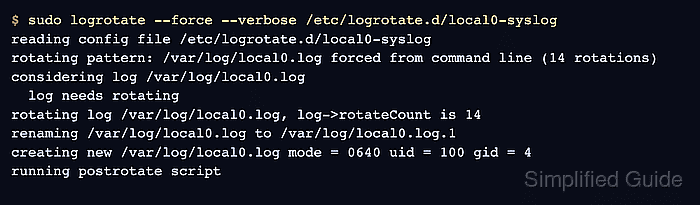
$ sudo logrotate --force --verbose /etc/logrotate.d/local0-syslog
reading config file /etc/logrotate.d/local0-syslog
##### snipped #####
rotating pattern: /var/log/local0.log forced from command line (14 rotations)
considering log /var/log/local0.log
  log needs rotating
rotating log /var/log/local0.log, log->rotateCount is 14
renaming /var/log/local0.log to /var/log/local0.log.1
creating new /var/log/local0.log mode = 0640 uid = 100 gid = 4
running postrotate script
–force rotates the file even if the normal schedule is not due. Use it once for validation, then leave regular rotation to the system timer or cron job.
- Confirm the active and rotated files exist.
$ sudo ls -l /var/log/local0.log /var/log/local0.log.1
-rw-r----- 1 syslog adm   0 Jun  5 01:29 /var/log/local0.log
-rw-r----- 1 syslog adm  86 Jun  5 01:29 /var/log/local0.log.1
- Send a marker message after rotation.
$ logger -p local0.info -t sgrotate "SG_ROTATE_AFTER_20260605"
- Verify the new marker is written to the active file.
$ sudo grep SG_ROTATE_AFTER_20260605 /var/log/local0.log
2026-06-05T01:29:54.854471+00:00 server sgrotate: SG_ROTATE_AFTER_20260605
- Verify the earlier marker stayed in the rotated file.
$ sudo grep SG_ROTATE_BEFORE_20260605 /var/log/local0.log.1
2026-06-05T01:29:53.836966+00:00 server sgrotate: SG_ROTATE_BEFORE_20260605
If the after-rotation marker appears in /var/log/local0.log.1 instead, rsyslog did not reopen the file. Check the postrotate command, service permissions, and whether the host uses a different rsyslog service name.

Mohd Shakir Zakaria is a cloud architect with deep roots in software development and open-source advocacy. Certified in AWS, Red Hat, VMware, ITIL, and Linux, he specializes in designing and managing robust cloud and on-premises infrastructures.


