Doctrine migrations turn reviewed PHP migration classes into schema changes on the database used by a Symfony application. Running them is part of a release because the code and database shape must reach the same version before new entities, repositories, or message-backed tables are used.
Symfony Console exposes Doctrine Migrations through php bin/console, and the command reads the same DATABASE_URL and environment as the application. During deployment, APP_ENV=prod should already point the console at the production connection; in local rehearsal, a SQLite URL can keep the run disposable.
Run only migration files that have been reviewed and committed, and take a database backup or rollback snapshot before schema changes that are hard to reverse. A controlled pass checks pending versions, dry-runs SQL at verbose output, applies the migration without an interactive prompt, and verifies both the version table and the affected schema.
Steps to run Doctrine migrations in Symfony:
- Open a terminal in the Symfony project root that contains bin/console and the reviewed migration file.
If the deployment shell does not already export APP_ENV=prod, select the production environment for each console invocation so Doctrine uses the intended database connection.
- Review the pending migration class for the SQL that will run.
- migrations/Version.php
public function up(Schema $schema): void
{
    $this->addSql(
        'CREATE TABLE product (id INTEGER PRIMARY KEY AUTOINCREMENT NOT NULL, name VARCHAR(80) NOT NULL)'
    );

    // Review every additional SQL statement before running the migration.
}
Pause before running if the migration drops data, rewrites large tables, adds required columns to existing rows, or needs an application rollback plan.
- List available migration versions before applying them.
$ php bin/console doctrine:migrations:list
+------------------------------------------+--------------+-------------+----------------+-------------+
| Migration Versions                                                                     |             |
+------------------------------------------+--------------+-------------+----------------+-------------+
| Migration                                | Status       | Migrated At | Execution Time | Description |
+------------------------------------------+--------------+-------------+----------------+-------------+
| DoctrineMigrations\Version20260625075716 | not migrated |             |                |             |
+------------------------------------------+--------------+-------------+----------------+-------------+
- Dry-run the pending SQL with verbose output.
$ php bin/console doctrine:migrations:migrate --dry-run --no-interaction -vv
[notice] Migrating (dry-run) up to DoctrineMigrations\Version20260625075716
[info] ++ migrating DoctrineMigrations\Version20260625075716
[debug] CREATE TABLE product (id INTEGER PRIMARY KEY AUTOINCREMENT NOT NULL, name VARCHAR(80) NOT NULL)
##### snipped #####
[notice] finished in 3.3ms, used 24M memory, 1 migrations executed, 5 sql queries

 [OK] Successfully migrated to version: DoctrineMigrations\Version20260625075716
-vv prints the SQL emitted during the dry run. Paste the SQL into the migration risk checker before production when the migration touches large or hot tables.
Tool: Database Migration Risk Checker - Run the migration without an interactive confirmation prompt.
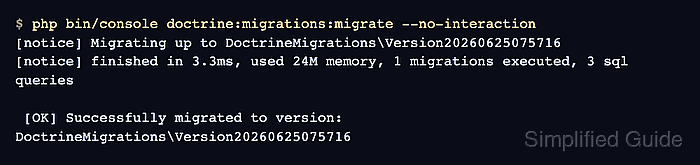
$ php bin/console doctrine:migrations:migrate --no-interaction
[notice] Migrating up to DoctrineMigrations\Version20260625075716
[notice] finished in 3.3ms, used 24M memory, 1 migrations executed, 3 sql queries

 [OK] Successfully migrated to version: DoctrineMigrations\Version20260625075716
Do not use --no-interaction as a shortcut for skipping review. It belongs in deployment automation after the target database, backup, and migration SQL have already been checked.
- Confirm that Doctrine now marks the version as migrated.
$ php bin/console doctrine:migrations:list
+------------------------------------------+----------+---------------------+----------------+-------------+
| Migration Versions                                                                         |             |
+------------------------------------------+----------+---------------------+----------------+-------------+
| Migration                                | Status   | Migrated At         | Execution Time | Description |
+------------------------------------------+----------+---------------------+----------------+-------------+
| DoctrineMigrations\Version20260625075716 | migrated | 2026-06-25 07:57:26 | 0.001s         |             |
+------------------------------------------+----------+---------------------+----------------+-------------+
- Check the migration version table through Doctrine DBAL.
$ php bin/console dbal:run-sql 'SELECT version FROM doctrine_migration_versions'
 ------------------------------------------
  version
 ------------------------------------------
  DoctrineMigrations\Version20260625075716
 ------------------------------------------
- Verify the affected table or column exists.
$ php bin/console dbal:run-sql "SELECT name, type, [notnull] AS required FROM pragma_table_info('product')"
 ------ ------------- ----------
  name   type          required
 ------ ------------- ----------
  id     INTEGER       1
  name   VARCHAR(80)   1
 ------ ------------- ----------
Use the equivalent inspection query for the production database engine when the migration targets MySQL, MariaDB, PostgreSQL, or another server-backed database.

Mohd Shakir Zakaria is a cloud architect with deep roots in software development and open-source advocacy. Certified in AWS, Red Hat, VMware, ITIL, and Linux, he specializes in designing and managing robust cloud and on-premises infrastructures.


