Doctrine migrations turn mapped entity changes into versioned SQL files that can be reviewed before a database schema changes. Creating the migration separately from running it keeps a schema change visible in code review and helps catch unexpected SQL before release.
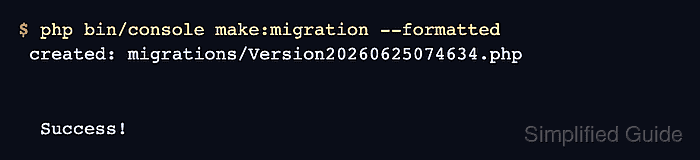
MakerBundle reads Doctrine ORM metadata and asks Doctrine Migrations to compare that metadata with the configured development database. The generated PHP class is saved under the migration path configured for migrations, usually migrations with the DoctrineMigrations namespace in a Symfony Flex application.
Start from a Symfony project where Doctrine is configured and the development database reflects the last migration that was already applied. If the database is missing earlier bundle tables or points at the wrong DATABASE_URL, the generated file can include more SQL than the entity change you meant to capture.
Steps to create a Doctrine migration in Symfony:
- Open a terminal in the Symfony project root that contains bin/console.
- Review the entity mapping change that should become schema SQL.
- src/Entity/CatalogItem.php
#[ORM\Column(length: 120)]
private ?string $name = null;

#[ORM\Column]
private ?int $stock = null;
The migration generator compares mapped fields against the configured database schema. Create or update the entity first, then generate the migration.
Related: How to create a Doctrine entity in Symfony - Generate a formatted migration file.
$ php bin/console \
  make:migration --formatted
created: migration file

Success!

Review the migration before running it.
##### snipped #####
If make:migration reports no database changes, confirm that DATABASE_URL points at the development database you expect and that the entity mapping change is saved.
Related: How to configure a Doctrine database in Symfony - Review the generated migration SQL before applying it.
CREATE TABLE catalog_item (
  id INTEGER PRIMARY KEY
    AUTOINCREMENT NOT NULL,
  name VARCHAR(120) NOT NULL,
  stock INTEGER NOT NULL
)
The SQL follows the configured DBAL platform. The shown migration uses SQLite, so MySQL, MariaDB, and PostgreSQL projects may generate different column types, defaults, and identifier quoting.
Tool: Database Migration Risk Checker - Confirm that Doctrine sees the new migration as pending.
$ php bin/console \
  doctrine:migrations:status
##### snipped #####
Migrations:
  Available: 1
  New: 1
##### snipped #####
New means Doctrine found the generated class but has not recorded it in the migration version table. Run the migration only after the SQL and rollback path have been reviewed.
Related: How to run Doctrine migrations in Symfony

Mohd Shakir Zakaria is a cloud architect with deep roots in software development and open-source advocacy. Certified in AWS, Red Hat, VMware, ITIL, and Linux, he specializes in designing and managing robust cloud and on-premises infrastructures.


